

As organizations increasingly rely on cloud services, protecting access to sensitive resources has become a critical challenge. Token theft attacks, where attackers steal authentication tokens to impersonate legitimate users, present a significant security threat. Microsoft addresses this vulnerability with Token Protection, a Conditional Access session control in Microsoft Entra ID designed to reduce token replay attacks by ensuring only cryptographically bound tokens are accepted.
What is Token Protection and How Does It Work?
Token Protection enhances security by enforcing device-bound sign-in session tokens like Primary Refresh Tokens (PRTs). When a user registers a Windows 10 or later device with Microsoft Entra, a PRT is issued and cryptographically bound to that specific device. This binding ensures that even if a threat actor steals a token, it cannot be used from another device.
When Token Protection is enforced, Microsoft Entra validates that only these bound sign-in session tokens are used by supported applications when accessing protected resources. This mechanism adds an essential layer of security to Conditional Access policies by tying authentication tokens to specific trusted devices.
Key Requirements and Supported Environments
To implement Token Protection, organizations need Microsoft Entra ID P1 licenses. The feature supports specific devices and applications:
Supported Devices:
Windows 10 or newer devices that are Microsoft Entra joined, hybrid joined, or Microsoft Entra registered
Windows Server 2019 or newer that are hybrid Microsoft Entra joined
Supported Applications:
OneDrive sync client (version 22.217 or newer)
Teams native client (version 1.6.00.1331 or newer)
Power BI desktop (version 2.117.841.0 or newer)
Exchange PowerShell module (version 3.7.0 or newer)
Visual Studio 2022 or newer
Supported Resources:
Office 365 Exchange Online
Office 365 SharePoint Online
Microsoft Teams Services
Azure Virtual Desktop
Windows 365
Important Limitations to Consider
While Token Protection offers significant security benefits, it has several limitations that organizations should understand:
Unsupported clients: Office perpetual clients aren't supported
Application limitations: PowerShell modules accessing SharePoint, PowerQuery extension for Excel, and certain Visual Studio Code extensions don't support protected token flows
Device restrictions: Surface Hub and Windows-based Microsoft Teams Rooms systems aren't supported
Registration limitations: Various deployment methods for Microsoft Entra joined devices are unsupported, including:
Azure Virtual Desktop session hosts
Windows devices deployed using bulk enrollment
Windows 365 Cloud PCs that are Microsoft Entra joined
Windows Autopilot devices deployed using self-deploying mode
To identify impacted devices, administrators can inspect the tokenProtectionStatusDetails attribute in sign-in logs. Token requests blocked due to unsupported device registration types can be identified with a signInSessionStatusCode value of 1003.
Implementation Strategy
Microsoft recommends a careful, phased implementation approach to minimize user disruption:
Start with a pilot group of users and expand over time
Create a Conditional Access policy in report-only mode before enforcing token protection
Capture both interactive and non-interactive sign-in logs
Analyze these logs long enough to cover normal application use
Add known, reliable users to an enforcement policy after validation
Creating a Token Protection Conditional Access Policy
The process for creating a Token Protection policy includes these key steps:
Sign in to the Microsoft Entra admin center as a Conditional Access Administrator
Create a new Conditional Access policy with appropriate assignments
Target specific resources (Exchange Online, SharePoint Online, Teams Services) - avoid selecting the Office 365 application group to prevent unintended failures
Configure conditions for device platforms (Windows only) and client apps (Mobile apps and desktop clients only)
Under Access Controls, select "Require token protection for sign-in sessions"
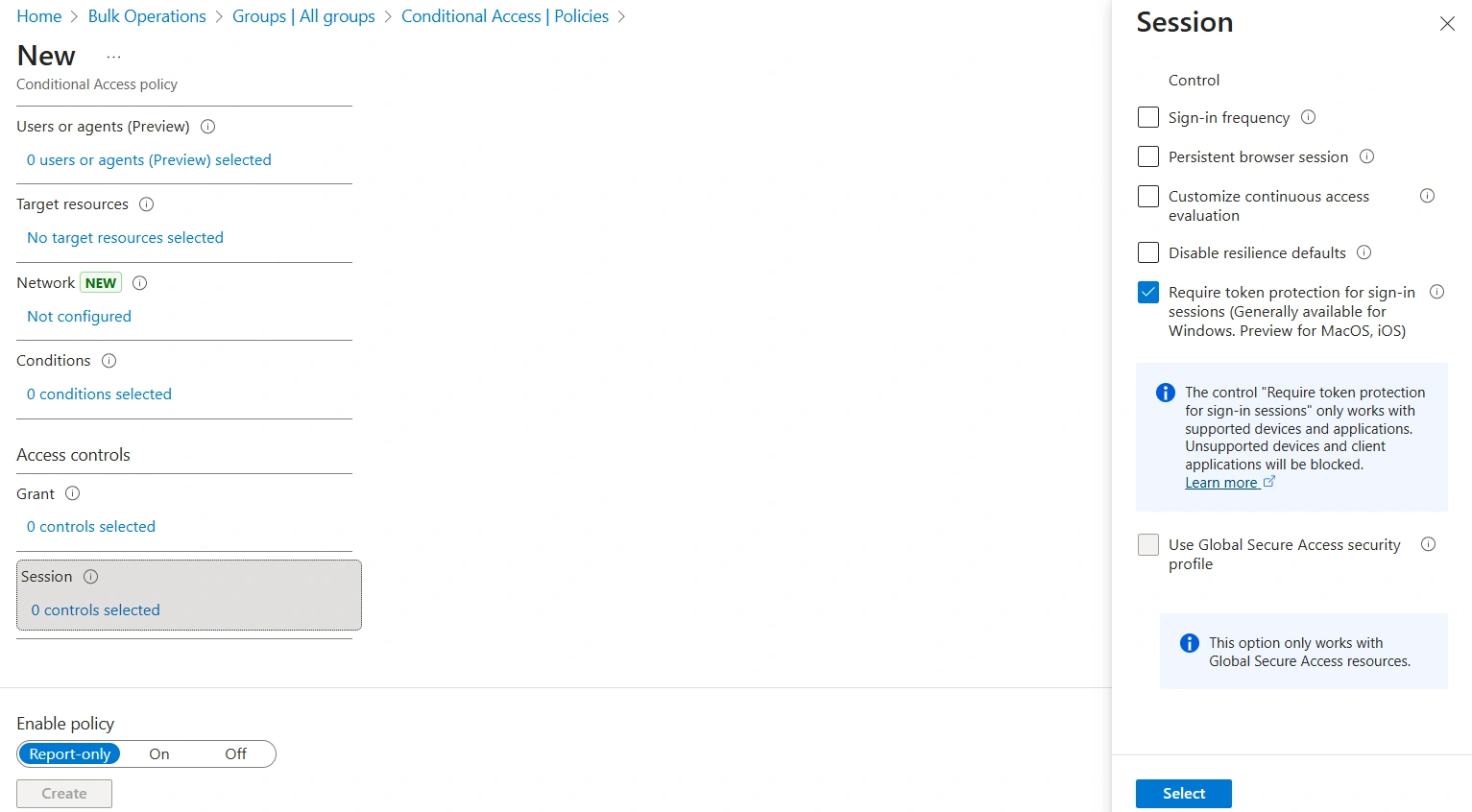
Start in report-only mode, then transition to enforcement after validation
Monitoring and Analysis
Effective monitoring is crucial during Token Protection implementation:
Use sign-in logs to verify policy outcomes in both report-only and enabled modes
Check the Token Protection - Sign In Session field in Basic Info for binding status:
Bound: Request was using bound protocols
Unbound: Request wasn't using bound protocols, with specific status codes indicating reasons
Use Log Analytics to query sign-in logs for blocked requests due to token protection enforcement failure
Microsoft provides sample Kusto queries to analyze enforcement patterns by application and user, helping administrators identify compatibility issues before full deployment.
Strategic Importance in Security Posture
Token Protection should be implemented as part of a broader strategy against token theft. While it significantly reduces the risk of token replay attacks, it's most effective when combined with other security measures. The feature is particularly valuable for protecting users with specialized roles who may be prime targets for credential theft attacks.
Since Conditional Access policies requiring token protection are currently only available for Windows devices, organizations should also configure policies to secure against potential bypass attempts from other platforms.
Conclusion
Microsoft's Token Protection feature represents a significant advancement in securing authentication tokens against theft and misuse. By cryptographically binding tokens to specific devices, organizations can dramatically reduce the risk of token replay attacks while maintaining user productivity on supported platforms and applications.
The key to successful implementation lies in careful planning, thorough testing with pilot groups, comprehensive monitoring, and understanding both the supported scenarios and limitations of the feature. When deployed as part of a layered security strategy, Token Protection enhances an organization's overall security posture in the Microsoft 365 ecosystem.
Join the conversation! Your thoughts help the community grow.