

The sample in this article shows how to use Data Access Application Block 5.0 with a real-world example in ASP.Net.
What is a Data Access Application Block (DAAB)? A Data Access Application Block encapsulates the performance and resource management best practices for accessing Microsoft SQL Server databases. It can easily be used as a building block in your own .NET-based application. If you use it then you will reduce the amount of custom code you need to create, test, and maintain. It comes with a single assembly with a class that has many useful methods. It reduces the amount of custom code.
A Data Access Application Block provides the following benefits:
- It uses the functionality provided by ADO.NET 2.0 and with it, you can use ADO.NET functionality along with the application block's functionality.
- It reduces the need to write boilerplate code to perform standard tasks.
- It helps maintain consistent data access practices, both within an application and across the enterprise.
- It reduces difficulties in changing the database type.
- It relieves developers from learning different programming models for different types of databases.
- It reduces the amount of code that developers must write when they port applications to different types of databases. Read more in http://msdn.microsoft.com/en-us/library/cc309168.aspx.
Install Enterprise Library
Please follow this link to download the Enterprise Library:
http://www.microsoft.com/en-in/download/details.aspx?id=15104
Getting Started
Begin using the following procedure:
- Start Visual Studio
- Create a new website
- Provide the name and location of website
- Click "Next"
Now add a reference for the following two assemblies in the bin folder:
Microsoft.Practices.EnterpriseLibrary.Data.dll
Microsoft.Practices.EnterpriseLibrary.Common.dll
Now open web.config in edit mode and provide database settings.
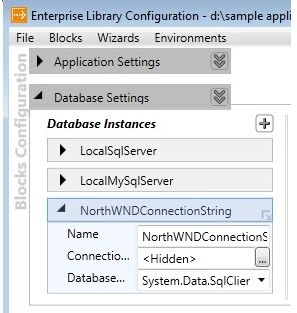
Image 1.
As you can see, two things have been added in web.config.
- <configSections>
- <section name="dataConfiguration" type="Microsoft.Practices.EnterpriseLibrary.Data.Configuration.DatabaseSettings, Microsoft.Practices.EnterpriseLibrary.Data, Version=5.0.414.0, Culture=neutral, PublicKeyToken=31bf3856ad364e35" requirePermission="true" />
- </configSections>
- <dataConfiguration defaultDatabase="NorthWNDConnectionString" />
- <connectionStrings>
- <add name="NorthWNDConnectionString" connectionString="data source=.\SQLEXPRESS;Integrated Security=SSPI;AttachDBFilename=|DataDirectory|NORTHWND.MDF;User Instance=true"
- providerName="System.Data.SqlClient" />
- </connectionStrings>
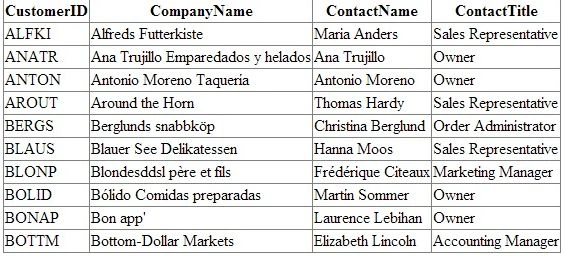
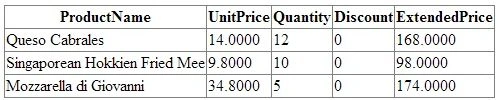
The following are my database Stored Procedures:
Arul RethinamPosted Nov 3, 2013, 11:55 PM
very simply explained. Nice Statement