

Introduction
In enterprise AI architectures, we frequently encounter the Shared Resource Problem. When you deploy a multi-agent system with five specialized agents—each needing to query a vector database, generate embeddings, or access a rate-limited LLM endpoint—how do you ensure they share a single, efficiently managed resource without initializing it five times?
The naive approach (global variables) fails under concurrent load. The traditional Singleton pattern fails when initialization requires asynchronous operations, such as connecting to a cloud vector database or loading a large embedding model.
The solution is an Async-Aware, Thread-Safe Singleton with Lazy Initialization. This pattern guarantees:
Thread-safety: Multiple concurrent requests don't create duplicate instances.
Lazy initialization: The expensive resource is created only when it is first needed.
Async compatibility: Initialization can perform asynchronous operations such as network calls or model loading.
Enterprise resilience: The singleton survives agent crashes and maintains state throughout the application's lifecycle.
In this article, we will implement this pattern and integrate it into an end-to-end Enterprise Knowledge Management Multi-Agent System using LangGraph, where multiple agents share a single vector store and embedding client.
Part 1: The Async-Aware Thread-Safe Singleton
The challenge with async singletons is that __new__ and __init__ are synchronous methods. We cannot use await inside them. The solution is to separate instance creation (synchronous and thread-safe) from resource initialization (asynchronous and lazy).
import asyncio
import threading
from typing import Optional, Any
import time

class AsyncSingletonMeta(type):
    """
    A metaclass that implements thread-safe, lazy-initialized, async-compatible singletons.
    """
    _instances = {}
    _lock = threading.Lock()
    _async_lock = asyncio.Lock()
    _initialized = {}

    def __call__(cls, *args, **kwargs):
        # 1. Thread-safe instance creation (sync)
        if cls not in cls._instances:
            with cls._lock:
                # Double-checked locking pattern
                if cls not in cls._instances:
                    instance = super().__call__(*args, **kwargs)
                    cls._instances[cls] = instance
                    cls._initialized[cls] = False
        return cls._instances[cls]

    async def initialize(cls) -> Any:
        """
        Async initialization method. Call this once at application startup or
        lazily on first use. Thread-safe and async-safe.
        """
        instance = cls()

        # 2. Async-safe initialization (prevents duplicate async init)
        if not cls._initialized.get(cls, False):
            async with cls._async_lock:
                if not cls._initialized.get(cls, False):
                    # Perform async initialization here
                    if hasattr(instance, '_async_init'):
                        await instance._async_init()
                    cls._initialized[cls] = True
                    print(f"  [Singleton] {cls.__name__} async initialization complete.")

        return instance


class VectorStoreClient(metaclass=AsyncSingletonMeta):
    """
    Enterprise Vector Store Client - shared across all agents.
    Demonstrates async initialization (simulating cloud DB connection + model loading).
    """
    def __init__(self):
        self.connection_pool = None
        self.embedding_model = None
        self._is_ready = False

    async def _async_init(self):
        """
        Async initialization - simulates expensive operations:
        - Connecting to Pinecone/Weaviate/Milvus
        - Loading a 2GB embedding model into memory
        """
        print("  [VectorStore] Establishing connection to cloud vector DB...")
        await asyncio.sleep(1)
        self.connection_pool = "PineconeConnectionPool(index='enterprise-kb', dimension=1536)"

        print("  [VectorStore] Loading embedding model (sentence-transformers/all-MiniLM-L6-v2)...")
        await asyncio.sleep(2)
        self.embedding_model = "EmbeddingModel(768MB, loaded)"

        self._is_ready = True
        print("  [VectorStore] Client ready for multi-agent access.")

    async def query(self, query_text: str, top_k: int = 3) -> list:
        """Simulates a vector similarity search."""
        if not self._is_ready:
            raise RuntimeError("VectorStore not initialized. Call initialize() first.")

        await asyncio.sleep(0.1)

        return [
            {"doc_id": "doc_001", "score": 0.95, "text": f"Relevant doc 1 for: {query_text}"},
            {"doc_id": "doc_042", "score": 0.87, "text": f"Relevant doc 2 for: {query_text}"},
            {"doc_id": "doc_108", "score": 0.82, "text": f"Relevant doc 3 for: {query_text}"},
        ][:top_k]

    async def embed(self, text: str) -> list:
        """Simulates embedding generation."""
        if not self._is_ready:
            raise RuntimeError("VectorStore not initialized.")
        await asyncio.sleep(0.05)
        return [0.1] * 1536
Key Design Decisions
Double-Checked Locking
Uses both
threading.Lock(for synchronous instance creation) andasyncio.Lock(for asynchronous initialization) to prevent race conditions.
Separation of Concerns
__call__()creates the singleton instance.initialize()performs asynchronous initialization.
Lazy and Eager Initialization
You can call
await VectorStoreClient.initialize()during application startup or let agents initialize it on first use. Both approaches are safe.
Part 2: The Enterprise Use Case
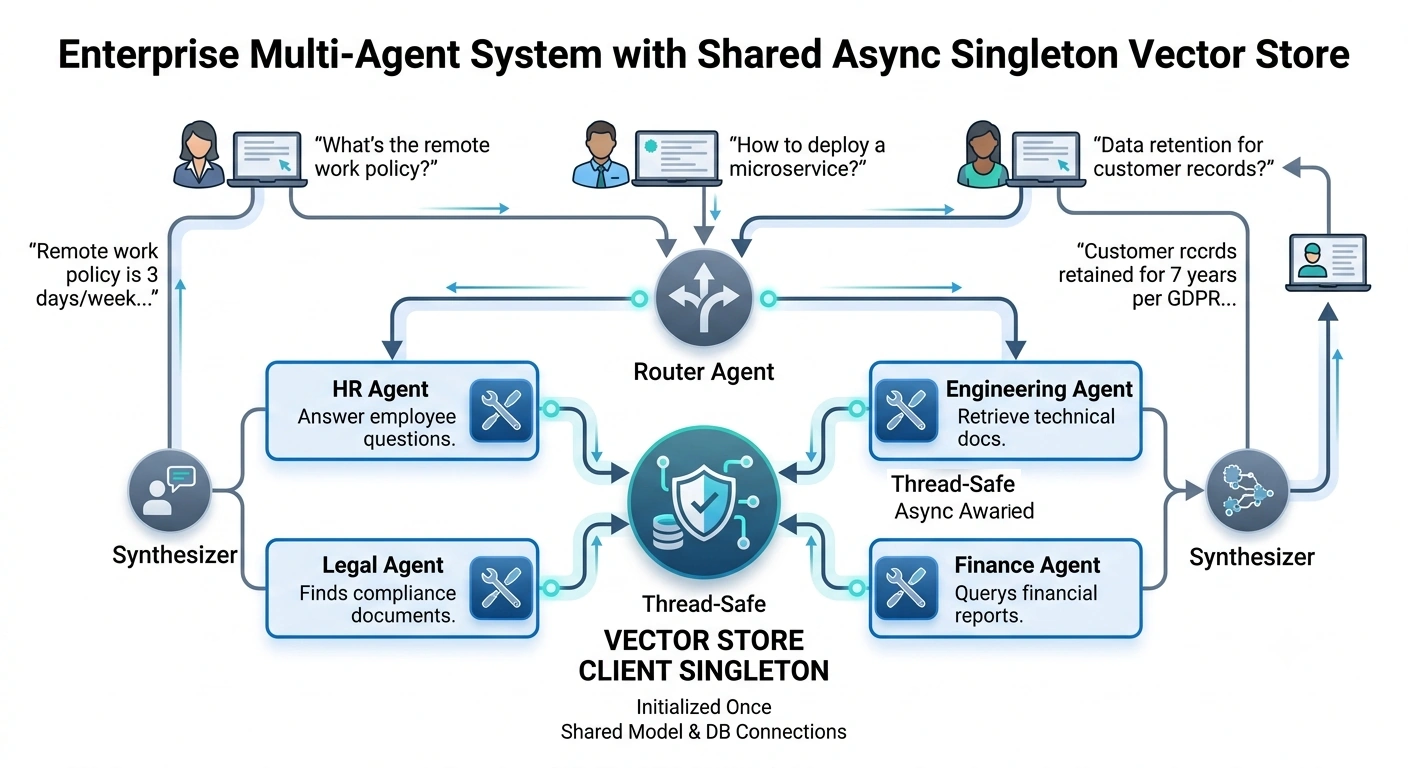
Scenario
A Global Enterprise Knowledge Management System where multiple specialized agents access a shared enterprise knowledge base.
The specialized agents include:
HR Agent
Engineering Agent
Legal Agent
Finance Agent
The Problem
If every agent creates its own vector database connection and embedding model, the system wastes:
Four additional copies of the embedding model (approximately 3 GB of memory).
Four additional vector database connection pools.
Four additional initialization cycles.
The Solution
All agents share one VectorStoreClient singleton that is initialized once and safely accessed concurrently.
Part 3: The Multi-Agent LangGraph Implementation
We will build a LangGraph workflow where a Router Agent directs requests to specialized agents, all sharing the same singleton vector store.
1. Defining the State and Tools
import os
import getpass
from typing import TypedDict, Annotated, Sequence, List, Dict, Any
from pydantic import BaseModel

from langchain_core.messages import BaseMessage, HumanMessage, AIMessage
from langchain_core.tools import tool
from langchain_openai import ChatOpenAI
from langgraph.graph import StateGraph, END
from langgraph.checkpoint.memory import MemorySaver

# --- 1. Strict State Definitions ---
class AgentState(TypedDict):
    messages: Annotated[Sequence[BaseMessage], "add_messages"]
    retrieved_docs: List[Dict[str, Any]]
    agent_route: str

# --- 2. Define the Tools (All using the singleton) ---

@tool
async def search_hr_policies(query: str) -> str:
    """Searches HR policies and employee handbook."""
    vector_store = VectorStoreClient()
    await VectorStoreClient.initialize()

    results = await vector_store.query(f"HR policy: {query}", top_k=2)
    return "\n".join([f"- {r['text']}" for r in results])

@tool
async def search_engineering_docs(query: str) -> str:
    """Searches technical documentation and architecture guides."""
    vector_store = VectorStoreClient()
    await VectorStoreClient.initialize()

    results = await vector_store.query(f"Engineering doc: {query}", top_k=2)
    return "\n".join([f"- {r['text']}" for r in results])

@tool
async def search_legal_compliance(query: str) -> str:
    """Searches legal contracts and compliance documents."""
    vector_store = VectorStoreClient()
    await VectorStoreClient.initialize()

    results = await vector_store.query(f"Legal compliance: {query}", top_k=2)
    return "\n".join([f"- {r['text']}" for r in results])

@tool
async def search_financial_reports(query: str) -> str:
    """Searches financial reports and procedures."""
    vector_store = VectorStoreClient()
    await VectorStoreClient.initialize()

    results = await vector_store.query(f"Financial report: {query}", top_k=2)
    return "\n".join([f"- {r['text']}" for r in results])

tools = [
    search_hr_policies,
    search_engineering_docs,
    search_legal_compliance,
    search_financial_reports
]
Join the conversation! Your thoughts help the community grow.