Table Inheritance in Entity Framework
In OOP, we use inheritance to reduce unnecessary code. We can also archive inheritance in Entity Framework. Entity Framework supports three different types of inheritance.
- THP - Table Per Hierarchy
- TPT - Table Per Type
- TPC - Table Per Concrete Class
Table Per Hierarchy
Table-per-hierarchy inheritance uses one database table to maintain data for more than one entity types in an inheritance hierarchy in Entity Framework. In other words, there are many entity sets in EF for a single database table. In TPH, the base table or entity could be created and it has a number of derived entities (must be more than one) that are inherited from the base table.
Inheritance using TPH
Define entity set in Conceptual Model that will act as a base entity type and others act as derived types. A derived entity type must inherit from a base type and in the conceptual model set Base Type Attribute. The conceptual model defines only non-inherited properties for derived types. The discriminator column (which acts as a separator for base type) is mapped as part of a condition in the Mapping Model, so there can be no corresponding property on any entity types in the hierarchy. The exception to this rule is when the condition uses an Is Null or Is Not Null comparison. In this case, the discriminator column can have a corresponding property on an entity type if the discriminator column contains more than a value like an integer then the column must be nullable or have a default value to ensure that when the new type is created and saved to the database, the column has some values. Conditions must be used to map each derived type and base type in the hierarchy. There is no mapping or conditions allowed if the base type is abstract. The Base Entity type and derived entity are mapped in the "EntitySetMapping" element in Mapping Model.
IsTypeOf keyword is used to set the value of the Type Name attribute on derived types. Use a mapping condition to discriminate between types in the hierarchy.
Here are the steps to follow.
Step 1: Create an Entity Model from the database.
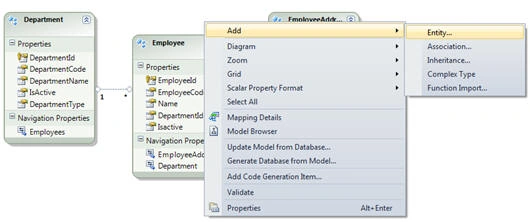
Step 2: Add new Entity (right-click on Entity designer Add -go to Entity).
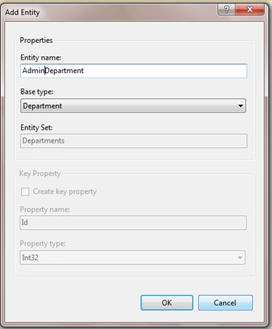
Step 3: Make derived Entity Like "AdminDepartment" and "Sales Department".
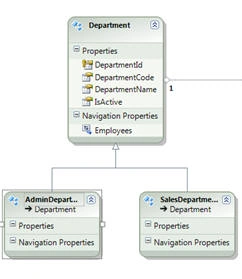
Step 4: Remove discriminator columns from the base type Table "Department".
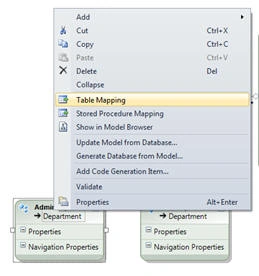
Step 5: Add Table mapping - right-click on Derived type entity and select "Table Mapping".
Step 6: Map Table and add a condition.
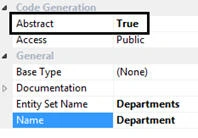
Step 7: Make a Base Entity abstract.
Step 8: Now update EDMX manually.
- Storage Model -In the storage Model, Define the Entity Type, Key, and properties that are the same as the database. There is no definition for derived in the storage model.
Coding
- <EntityType Name="Departments">
- <Key>
- <PropertyRef Name="DepartmentId" />
- </Key>
- <Property Name="DepartmentId" Type="int" Nullable="false" />
- <Property Name="DepartmentCode" Type="varchar" Nullable="false" MaxLength="25" />
- <Property Name="DepartmentName" Type="varchar" Nullable="false" MaxLength="100" />
- <Property Name="IsActive" Type="bit" Nullable="false" />
- <Property Name="DepartmentType" Type="int" Nullable="false" />
- </EntityType>
- Conceptual Model- In the conceptual Model, define the base entity without the discriminator column and also define a derived type.
Coding
- <EntityType Name="Department" Abstract="true">
- <Key>
- <PropertyRef Name="DepartmentId" />
- </Key>
- <Property Type="Int32" Name="DepartmentId" Nullable="false" />
- <Property Type="String" Name="DepartmentCode" Nullable="false" MaxLength="25" FixedLength="false" Unicode="false" />
- <Property Type="String" Name="DepartmentName" Nullable="false" MaxLength="100" FixedLength="false" Unicode="false" />
- <Property Type="Boolean" Name="IsActive" Nullable="false" />
- <NavigationProperty Name="Employees" Relationship="AdventureWorksModel.FK_Employees_Department" FromRole="Department" ToRole="Employee" />
- </EntityType>
- <EntityType Name="SalesDepartment" BaseType="AdventureWorksModel.Department">
- </EntityType>
-
Mapping Model- the Mapping Model contains the entity type mapping i.e. mapping between the conceptual model and storage model.
Example
In this example, the mapping between the Department and Sales Department is defined in the same EntitySetMapping. The IsTypeOf keyword is used to indicate the type of entity set (i.e. base entity or derived entity). The Condition tag is a condition in which a sale Department is identified from the Department.
- <EntitySetMapping Name="Departments" >
- <EntityTypeMapping TypeName="IsTypeOf(AdventureWorksModel.Department)" >
- <MappingFragment StoreEntitySet="Departments" >
- <ScalarProperty Name="DepartmentId" ColumnName="DepartmentId" />
- <ScalarProperty Name="IsActive" ColumnName="IsActive" />
- <ScalarProperty Name="DepartmentName" ColumnName="DepartmentName" />
- <ScalarProperty Name="DepartmentCode" ColumnName="DepartmentCode" />
- </MappingFragment>
- </EntityTypeMapping>
- <EntityTypeMapping TypeName="IsTypeOf(AdventureWorksModel.SalesDepartment)">
- <MappingFragment StoreEntitySet="Departments">
- <ScalarProperty Name="DepartmentId" ColumnName="DepartmentId" />
- <Condition ColumnName="DepartmentType" Value="2" />
- </MappingFragment>
- </EntityTypeMapping>
- <EntityTypeMapping TypeName="IsTypeOf(AdventureWorksModel.AdminDepartment)">
- <MappingFragment StoreEntitySet="Departments">
- <ScalarProperty Name="DepartmentId" ColumnName="DepartmentId" />
- <Condition ColumnName="DepartmentType" Value="1" />
- </MappingFragment>
- </EntityTypeMapping>
- </EntitySetMapping>
In the next article, we will learn about TPT (Table per Type) and how to add it in EDMX.


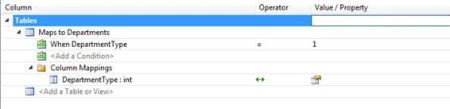 Step 6: Map Table and add a condition.
Santosh YadavPosted Apr 12, 2013, 3:28 PM
Very nice article.
Jignesh TrivediPosted Jul 4, 2012, 8:43 AM
Hi Nishantha, It working fine for me and it ziped in winzip Version -15 Also you can try to testproject.zipx hope this help. Let me know if you find any issue.
Nishantha HettigodaPosted Jul 4, 2012, 6:19 AM
testProject.zip is Damage
Arjun PanwarPosted Jan 21, 2012, 11:17 PM
Thanks for good work