

Introduction
In
Part 2 article of this series, we have discussed how to use Templates with
Repeater Control but now in this part we will discuss how to handle Repeater
Control events.
Repeater Control Events
Repeater control supports the following events mostly:
- DataBinding: It is raised when the
Repeater control is bound to its data source.
- ItemCommand: It is raised when a control contained in the Repeater control raises an event.
- ItemCreated: It is raised when
each Repeater item is created.
- ItemDataBound: It is raised when each Repeater item is bound.
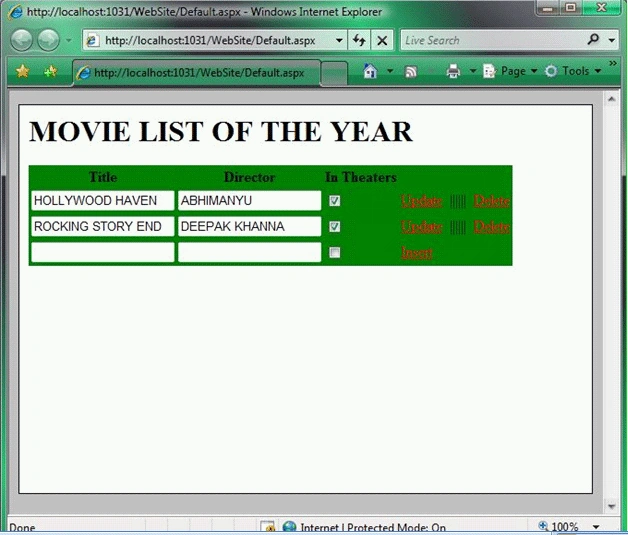
The page given below illustrates how we can
use the DataBinding, ItemCommand, and ItemDataBound events. This page uses a
Repeater control to update, delete, and insert database records.
<%@
Page Language="VB"
%>
<!DOCTYPE html PUBLIC "-//W3C//DTD XHTML 1.0 Transitional//EN" "http://www.w3.org/TR/xhtml1/DTD/xhtml1-transitional.dtd">
<script
runat="server">
' The name of the primary key column
Dim DataKeyName
As String =
"Id"
'''
<summary>
''' Stores the primary keys in ViewState
'''
</summary>
ReadOnly
Property Keys() As
Hashtable
Get
If IsNothing(ViewState("Keys"))
Then
ViewState("Keys")
= New
Hashtable()
End If
Return
CType(ViewState("Keys"),
Hashtable)
End Get
End
Property
'''
<summary>
''' Build the primary key collection
'''
</summary>
Protected
Sub rptMovies_ItemDataBound(ByVal
sender As Object,
ByVal e As
RepeaterItemEventArgs)
If e.Item.ItemType =
ListItemType.Item
Or e.Item.ItemType =
ListItemType.AlternatingItem
Then
Keys.Add(e.Item.ItemIndex,
DataBinder.Eval(e.Item.DataItem,
"Id"))
End If
End Sub
'''
<summary>
''' Clear the primary keys when Repeater
is rebound
''' to its data source
'''
</summary>
Protected
Sub rptMovies_DataBinding(ByVal
sender As Object,
ByVal e As
EventArgs)
Keys.Clear()
End Sub
'''
<summary>
''' When you click the Update,Insert, or
Delete
''' button, this method executes
'''
</summary>
Protected
Sub rptMovies_ItemCommand(ByVal
source As Object,
ByVal e As
RepeaterCommandEventArgs)
Select Case
e.CommandName
Case
"Update"
UpdateMovie(e)
Exit Sub
Case
"Insert"
InsertMovie(e)
Exit Sub
Case
"Delete"
DeleteMovie(e)
Exit Sub
End
Select
End Sub
'''
<summary>
''' Update a movie record
'''
</summary>
Private
Sub UpdateMovie(ByVal e
As
RepeaterCommandEventArgs)
' Get the form fields
Dim txtTitle
As
TextBox = CType(e.Item.FindControl("txtTitle"),
TextBox)
Dim txtDirector
As
TextBox = CType(e.Item.FindControl("txtDirector"),
TextBox)
Dim chkInTheaters
As
CheckBox = CType(e.Item.FindControl("chkInTheaters"),
CheckBox)
' Set
the DataSource parameters
SqlDataSource1.UpdateParameters("Id").DefaultValue
= Keys(e.Item.ItemIndex).ToString()
SqlDataSource1.UpdateParameters("Title").DefaultValue
= txtTitle.Text
SqlDataSource1.UpdateParameters("Director").DefaultValue
= txtDirector.Text
SqlDataSource1.UpdateParameters("InTheaters").DefaultValue
= chkInTheaters.Checked.ToString()
' Fire
the UpdateCommand
SqlDataSource1.Update()
End Sub
'''
<summary>
''' Insert a movie record
'''
</summary>
Private
Sub InsertMovie(ByVal e
As
RepeaterCommandEventArgs)
' Get the form fields
Dim txtTitle
As
TextBox = CType(e.Item.FindControl("txtTitle"),
TextBox)
Dim txtDirector
As
TextBox = CType(e.Item.FindControl("txtDirector"),
TextBox)
Dim chkInTheaters
As
CheckBox = CType(e.Item.FindControl("chkInTheaters"),
CheckBox)
' Set
the DataSource parameters
SqlDataSource1.InsertParameters("Title").DefaultValue
= txtTitle.Text
SqlDataSource1.InsertParameters("Director").DefaultValue
= txtDirector.Text
SqlDataSource1.InsertParameters("InTheaters").DefaultValue
= chkInTheaters.Checked.ToString()
' Fire
the InsertCommand
SqlDataSource1.Insert()
End Sub
'''
<summary>
''' Delete a movie record
'''
</summary>
Private
Sub DeleteMovie(ByVal e
As
RepeaterCommandEventArgs)
' Set the DataSource parameters
SqlDataSource1.DeleteParameters("Id").DefaultValue
= Keys(e.Item.ItemIndex).ToString()
' Fire
the DeleteCommand
SqlDataSource1.Delete()
End Sub
</script>
<html
xmlns="http://www.w3.org/1999/xhtml">
<head
runat="server">
Join the conversation! Your thoughts help the community grow.