

In this article you will see how to resolve the error "The server could not complete your request" when trying to open the site in SharePoint Designer 2013.
Problem
In SharePoint 2013, when I tried to open the site in SharePoint Designer 2013 I was getting the following error.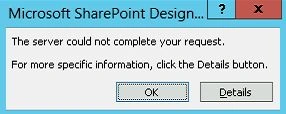
When I clicked on Details button I was unable to see any error message details. 
When I continuously clicked the "OK" button I was getting the following error:
How to resolve
Resolve that using the following procedure:
- Go to "Run" and then type "inetmgr". Then click on "Enter".
- IIS will open.
- Select "SharePoint Web Services" and then click on "Authentication".

- Enable "Anonymous Authentication" for "SharePoint Web Services".
- After that I was able to open the site in SharePoint Designer 2013 successfully.
Note: Please find the cause of the issue in the following link http://support.microsoft.com/kb/2758431
Summary
Thus in this article you have seen how to resolve the error "The server could not complete your request" when trying to open the site in SharePoint Designer 2013.
Join the conversation! Your thoughts help the community grow.