

The basics
One could do some simple guesswork here and understand that the roles required in the application may be called application roles, and this is correct! When we speak of roles, roles are always associated with users and when we say users, then these are the people using the software or the application. Roles could be anything specific to the application; i.e. Administrator, User, Approver, Reviewer etc.
Let us take a moment and go back in the time when ASP.NET forms development was at its peak. People who have worked with it might remember that we used to have something called as ASPNET membership provider database which used to store the user’s credentials and that’s how we used to implement the forms based authentication right? Now extend that database and we had roles of the users sitting at the same table.
The concept remains the same, however with the evolution of distributed and disconnected systems identity and user roles have become the core of the entire ecosystem. In the world of Microsoft Azure, the Azure Active Directory has become one of the most mature identity management solutions and has lots to offer apart from identity management of users; i.e., domain services, but that’s something for later. For this article let’s keep ourselves focused on understanding application roles.
Let’s take out the old buddy -- ASPNET membership provider -- out of the picture for now and focus on the web application which uses Azure Active Directory for user authentication. So essentially, we are speaking of the user credentials store and now try asking yourself a question – hey like we used to have various roles to application users in classic forms authentication, so can I have the same here in this user credentials store too (Azure AD)? The answer is yes and Azure AD caters to this requirement by providing you the application roles.
One of the crucial points to note here in Azure AD application roles is that we are not only restricted to assign these roles to application users from AD but we can also assign these roles to Azure AD groups however for AD group assignments, it needs to have Azure AD premium.
What about Multi-tenancy?Well, nothing needs to be changed when we decide to open our App for multiple Azure AD tenants.
Simple fact is, as the name suggests these roles are associated with the Azure AD app so in multi-tenant scenario, all the roles which are created and enabled inside the home tenant (the root tenant where Azure AD app is provisioned) are available for the users from different Azure AD tenants and hence customer tenant administrators would easily be able to assign their tenant users or groups to the application roles.
Let’s try and visualize it for simplicity
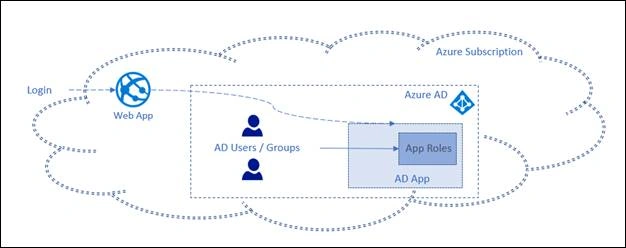
Well, we have tried to keep things too simple and if you are still following, then let us go and see how application role behaves in the real-world scenario and to understand it, let us go ahead and see how can we create these application roles inside Azure AD application. For beginners, this probably would start from the point of locating application settings in Azure AD
This article assumes that you know the procedure to create the Azure AD application inside your Azure AD tenant so we will not go through the detail procedure to do it but in case you are not aware of it, then before proceeding, it is highly recommended that you look at this comprehensive documentation of doing it step by step – Azure AD application registration
Seeing it all in actionConsider that we have already created an Azure AD application. Let’s navigate to it using new Azure portal, once there click on Manifest option as shown in image below
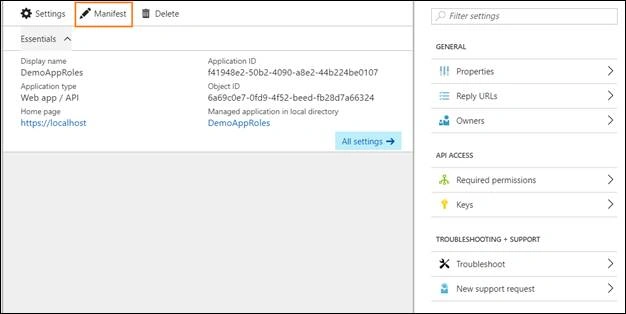
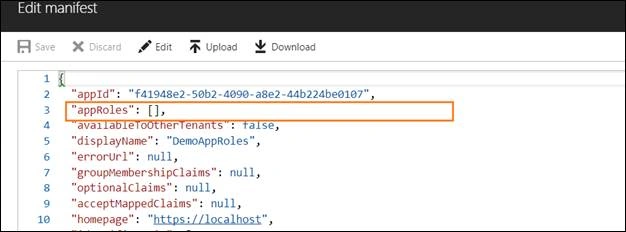
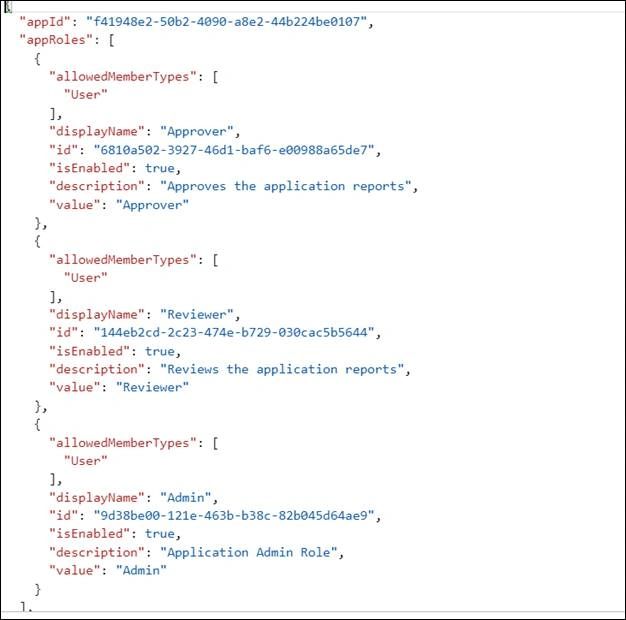
This essentially opens an editor where you will be shown a Json file, this file is called as Manifest of your application and contains almost all the settings which you see on the UI to configure your AD application e.g. reply urls or app permissions.
Vinay VPosted Jun 19, 2018, 7:34 AM
Can you please help how to consume the app roles in Angular based web application?