

This article has been excerpted from book "The Complete Visual C# Programmer's Guide" from the Authors of C# Corner.
The EventLog class allows you to access or customize Windows NT, 2000, and XP event logs, which record information about important software or hardware events. Using the EventLog class, you can read from existing logs, write entries to logs, create or delete event sources, delete logs, and respond to log entries. You can also create new logs when creating an event source. Table 21.7 describes the members of the EventLog class.
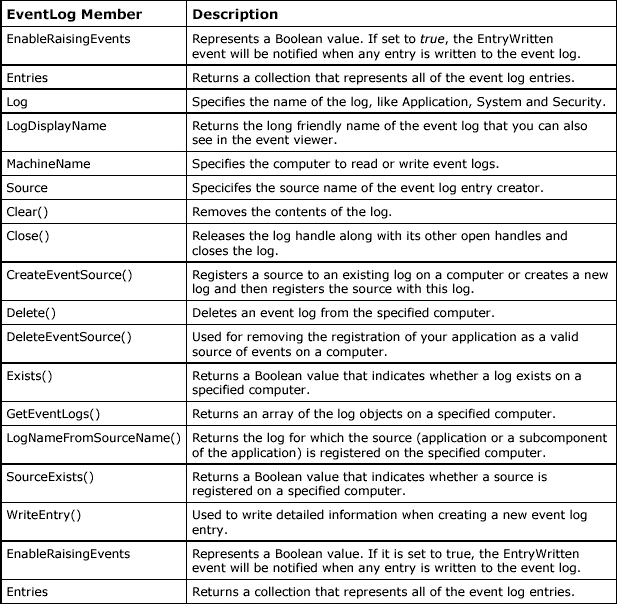
Table 21.7: EventLog Class Members
Event logging provides a standard, centralized way for you to have your applications record important software and hardware events. Windows supplies a standard user interface for viewing the event logs (you can open Event Viewer MMC from Control Panel?Administrative Tools?Computer Management?Event Viewer). Using the Microsoft .NET Framework's EventLog component, you can easily connect to existing event logs on both local and remote computers and read entries from those logs programmatically.
The types of event logs are defined under the HKEY_LOCAL_MACHINE\SYSTEM\ControlSet\ Services\Eventlog registry hive. Windows 2000 includes Application, Security, System, Active Directory, and Domain Name System (DNS) logs by default. In an earlier example, we also added a "Demo" event log source hive in our listener program. Listing 21.16 illustrates how you can create an event source, check the existence of the Application and Demo event sources (which will be created by us) as an event log or in Event Viewer, enumerate and read event log entries, write entries to a log, and monitor the event log source for any new entries written to the log.
Listing 21.16: Using EventLog using System;
using System;
using System.IO;
using System.Diagnostics;
public class Test
{
public static void Main()
{
// check for the event log source on specified machine
// the Application event log source on MCBcomputer
if (!EventLog.Exists("Application", "MCBcomputer"))
{
jayesh sorathiaeditedPosted Aug 28, 2012, 5:23 AMEdited Aug 28, 2012, 5:23 AM
To learn more regarding Read and Write an Event Entry in Windows Event Log with C# Examples and VB.Net Examples. Visit this links.http://jayeshsorathia.blogspot.com/2012/08/beginning-net-read-event-logs.html http://jayeshsorathia.blogspot.com/2012/08/net-tips-write-event-entry-in-windows-event-log.html
sangram desaiPosted Mar 10, 2012, 3:29 AM
Here is code that demonstrate EventLog Creation and Manipulation http://msdotnetbuddy.blogspot.in/2010/01/custom-eventlog-creation-and.html