

Introduction and Background
It has been a very long time, and trust me, I am fed up with the “Cool new features of C# 6!” posts already. I mean, each post has the same things, the same topics, the same content and (usually!) the same code blocks to show the thing too. However, I never wanted to write a blog to describe the new things in C#, but now I think I should explain the things that are done “under the hood” for the C# 6’s code. I have gone through many posts and I already know what these new “cool” features are, so I just wanted to test them out and see when they work, how they work, and when they are not going to work. Well definitely, that is something that people aren’t expecting by C# architect team, however, let’s find them out. :-)
Also, it has already been very late for C# 6 to be discussed because C# 7 has already been discussed by the team; you may want to read more about what C# 7 team has on their list. C# 7 Work List of Features.
Anyway, none of them are the last versions, final statements, or “C# 7 must-haves.” They are just what they are trying to inject to C# as per the demand and ideas provided to them on GitHub and other networks that they have.
Enough of C# 7 already, now you have already seen all the features that were introduced in C# 6 and most of you have used those features in your applications. But, did you try to use them in a way they were not intended to be used? I mean, have you tried to use them in a very “unknown” or “uncertain” manner?
Let me share what I think of those features. I would also love to hear what you think of them! :-)
Counting the features of C# 6
Now let me show you a few things about these services, in a way that you were not expecting or you never cared about! These features are definitely interesting, but, a few are useful in one way, and a few are not at all useful in one way. Depends on your project, your perspective, and ideas. So let me start by the very famous (and my favorite C# 6) feature: String Interpolation.
String interpolation
This feature is a great feature, personally saying, this is the best feature that I find on C# 6 features list. What I find easy while using “string interpolation” is, that I don’t have to use String.Format, I don’t have to concatenate the strings, I don’t have to use the StringBuilder at all. What I can do is that I can just simply write the string and it would include the variable data in the string. Now let me show you an example of multiple methods that can be used.
- // Creating the private field
- private static string Name = "Afzaal Ahmad Zeeshan";
- // Then inside the Main function.
- // 1. Using string concatenation.
- Console.WriteLine("Hello, my name is: " + Name);
- // 2. Using string format
- Console.WriteLine(string.Format("Hello, my name is: {0}", Name));
- // 3. Using string builders
- StringBuilder builder = new StringBuilder();
- builder.Append("Hello, my name is: ");
- builder.Append(Name);
- Console.WriteLine(builder.ToString());
Technically, their result is same. They all say the same message, and how they do it, we can find that out using the Assembly language (or the MSIL code, if you are a fan of MSIL and not Assembly at the debug time), however, we do know that they present the same value on screen.
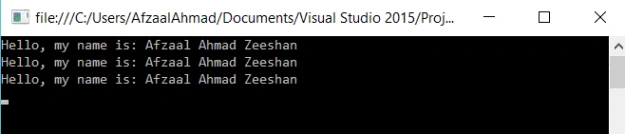
Figure 1: Same string rendered and generated, as a result of many ways.
Their IL benchmark would be different (because internally they are three different ways). That is because, they are different. Their IL generated would be like this:
- IL_0000: nop
- IL_0001: ldstr "Hello, my name is: "
- IL_0006: ldsfld UserQuery.Name
- IL_000B: call System.String.Concat
- IL_0010: call System.Console.WriteLine
- IL_0015: nop
- IL_0016: ldstr "Hello, my name is: {0}"
- IL_001B: ldsfld UserQuery.Name
- IL_0020: call System.String.Format
- IL_0025: call System.Console.WriteLine
- IL_002A: nop
- IL_002B: newobj System.Text.StringBuilder..ctor
- IL_0030: stloc.0 // builder
- IL_0031: ldloc.0 // builder
- IL_0032: ldstr "Hello, my name is: "
- IL_0037: callvirt System.Text.StringBuilder.Append
- IL_003C: pop
- IL_003D: ldloc.0 // builder
- IL_003E: ldsfld UserQuery.Name
- IL_0043: callvirt System.Text.StringBuilder.Append
- IL_0048: pop
- IL_0049: ldloc.0 // builder
- IL_004A: callvirt System.Object.ToString
- IL_004F: call System.Console.WriteLine
- IL_0054: nop
- IL_0055: ret
You can see, that (indirectly) they are all different and execute different functions. What happens, is a "syntactic sugar." They are typically just functions that are executed and compiler allows you to write these simply.
Now coming to the new way of writing the strings with variable content. C# 6 introduces this new way of writing the same message!
- Console.WriteLine($"Hello, my name is: {Name}");
- /* Output:
- * Hello, my name is: Afzaal Ahmad Zeeshan
- */
The output of this is also same… But, how C# 6 does that is a bit of trick now. To find that part out, we will again go back and read the MSIL generated.
- IL_0000: nop
- IL_0001: ldstr "Hello, my name is: {0}"
- IL_0006: ldsfld UserQuery.Name
- IL_000B: call System.String.Format
- IL_0010: call System.Console.WriteLine
- IL_0015: nop
- IL_0016: ret
Um, watching at this MSIL, what do you say? :-) If you pay attention to the highlighted code, this resembles the code that we wrote using the String.Format() method. So what happens is, that this is also a syntactic sugar. There is no addition of anything, it is just what compiler does for you! Compiler simply takes away everything, and generates that previous version of the code. Yet, in a very friendly and simple way. I like it.
Remarks and References:
String interpolation has been adopted by many programming languages by now. Swift by Apple and JavaScript (ECMAScript) is also moving forward to templated strings. I personally feel, since string type data is mostly used, this is a great feature. For more, please read:
Conditional try…catch
Now, I have never used VB.NET, because I was always busy in C# itself but I still hear that VB.NET had this feature way before C# implemented it. The conditional try … catch (or as the team calls them, “Exception filters“) just allows you to handle the exception when a condition is met, I am not going to talk about what they are, instead, I will talk about how you can use them in your code. So basically, if you execute a function that is supposed to have a side-effect, and before handling any further errors, you want to find out if there was a side-effect or did the error occur before the side-effect, you would possibly be left with only one way to check that out!
- try
- {
- // Some code that breaks the execution.
- } catch (MyException me)
- {
- // Just a function to check if value was updated
- if (field.Updated())
- {
- // Log the error and then re throw the exception
- }
- } catch (Exception e)
- {
- // Re-perform the same for other exceptions.
- }
As an example of this case, have a look at the following code:
- private int field = 25;
- public static void Main(string[] args)
- {
- try {
- Console.WriteLine("Do you want to change the field?");
- if (Console.ReadLine() == "yes")
- {
- field = 34;
- }
- // Just throw the exception
- throw new Exception();
- } catch {
- if (fieldModified())
- {
- // Log error, it was thrown after modifying the field.
- }
- // Other code...
- }
- }
- public static bool fieldModified() {
- return (field == 25) ? true : false;
- }
This try catch would allow us to check if our fields were modified, if not, then we can simply ignore as there were no side-effects.
Now what C# 6 allows you to do is to add a condition outside the block, so that you don’t even have to enter the block itself, and the condition would just check if it needs to go to this block, if not, then exception would continue to grow and later catch blocks would try their luck, finally to the end. Something like this.
- try
- {
- Console.WriteLine("Do you want to change the field?");
- if (Console.ReadLine() == "yes")
- {
- field = 34;
- }
- // Just throw the exception
- throw new Exception();
- } catch when(fieldModified())
- {
- // Log the errors, reverse the transaction etc.
- }
So instead of writing that condition inside, we can write that condition in front of that catch block itself. Technically, both were OK, only this way we are leaving most of the work to the compiler and we are designing the code to be more readable, read it like “try ... this code ... catch when field modified ... continue." This provides you with a simple way of reading the code. The IL get some branches around the catch block so that code can jump from one location to another and so on.
Remarks and references:
Technically, I won’t use this in any of my applications because I try to avoid transaction-like programming. But, if you are using transaction-like programming, such as SQL queries or bank management systems, I would recommend that you use these conditions on your catches. They can be of great use when you are logging errors in transactions. The function used would determine if there were changes (or what-ever you want to do in that function!) and if that condition is true, error would be caught, logged (if code is provided) and then re-thrown (if code is provided).
For more:
Nameof operator
Before saying anything at all, I want to confess that I have been one of those responders who said, you cannot have the name of the variable! The compiler doesn’t know the name of the variables, they are just labels. Well, not anymore. C# 6 provides you with another “amazing” feature that lets you get the actual name of the variable, not just the value of that variable.
Before C# 6, nameof operator was not present. With C# 6, this new feature can allow you to know the names of the variables, not just their values. So for example, previously we did:
Console.WriteLine($"Hello, my name is {Name}");
Now we can do this too,
Console.WriteLine($"Value of {nameof(Name)} variable is {Name}");
Figure 2: Use of nameof operator in real world.
However, the actual use cannot be determined here. The actual use of this would be when we want to know the variable names too. We could definitely (before C# 6) hardcode the names, but after modification, refactoring, they would be of no use anymore. However, now C# 6 can allow us to have the names of those variables too.
To understand the working, have a look at the MSIL generated:
- IL_0000: nop
- IL_0001: ldstr "Value of {0} variable is {1}"
- IL_0006: ldstr "Name"
- IL_000B: ldarg.0
- IL_000C: ldfld UserQuery.Name
- IL_0011: call System.String.Format
- IL_0016: call System.Console.WriteLine
- IL_001B: nop
- IL_001C: ret
This shows, that the variable names are passed as string objects to the function and then the strings formatted (as we talked in the string interpolation), and finally the result is printed. So basically, all of this is just sugar-coating.
Null-conditional operator
For this feature too, I have been always very narrow-minded. I never liked it, perhaps because I have written a “good way to handle null exception” as:
- if (obj != null)
- {
- // "Safe" code here
- }
- // OR
- try
- {
- // Code here...
- } catch (NullReferenceException e)
- {
- // Code here...
- }
But, things have changed. Previously, I was writing a library, in which I was supposed to get a list of objects from JSON data. So basically, if the source was empty or like “[]”, the array would be typically null. In other words, to overcome the exception, I would have to write something like this:


Sr KarthigaPosted Feb 14, 2016, 8:03 AM
Good one sir
Sr KarthigaPosted Feb 14, 2016, 8:03 AM
Good one sir
Vivek KumarPosted Feb 13, 2016, 5:28 AM
Nice share...
Sibeesh VenuPosted Feb 1, 2016, 8:00 AM
That was a great read.
Akhil GargPosted Jan 29, 2016, 2:20 AM
Nice
Debasis SahaPosted Jan 25, 2016, 1:22 PM
Nice One..
Mohammed IbrahimPosted Jan 25, 2016, 4:39 AM
nice
Anil Kumar MurmuPosted Jan 25, 2016, 3:34 AM
Nice one...never explored the points earlier.
Vipan SharmaPosted Jan 25, 2016, 12:53 AM
Thanks
Raja TPosted Jan 24, 2016, 11:09 PM
Nice, Thank you for sharing..
Humayun Kabir MamunPosted Jan 24, 2016, 10:48 PM
Nice...
Sridhar SharmaPosted Jan 24, 2016, 2:03 PM
Nice share
Sujeet SumanPosted Jan 24, 2016, 12:40 PM
Nice one......
Jaco ZwartsPosted Jan 24, 2016, 11:04 AM
Nice Article Thank you!
Mahesh ChandPosted Jan 24, 2016, 10:23 AM
Good one Afzaal Ahmad Zeeshan. I agree with Aqib Shehzad, you've a different approach. I remember my younger days. Cheers!
Santhakumar MunuswamyPosted Jan 24, 2016, 10:21 AM
Thanks for nice article. Keep it up
Gowtham KPosted Jan 24, 2016, 6:10 AM
Nicely Explained, Thanks for sharing your experiments
Muhammad Aqib ShehzadPosted Jan 24, 2016, 5:39 AM
nice way to elaborate it, you always use different approach and experiment as well,
Sthitaprajnya Debasis NayakPosted Jan 24, 2016, 4:15 AM
Super Experiment...