

Export data from a database table to Excel is a frequently required feature in web and window applications. There are many ways to upload data from a database to Excel, and here I'm going to show one simple common method to export.
To start this task, you need to create a database that stores data in a data table that exports an Excel file.
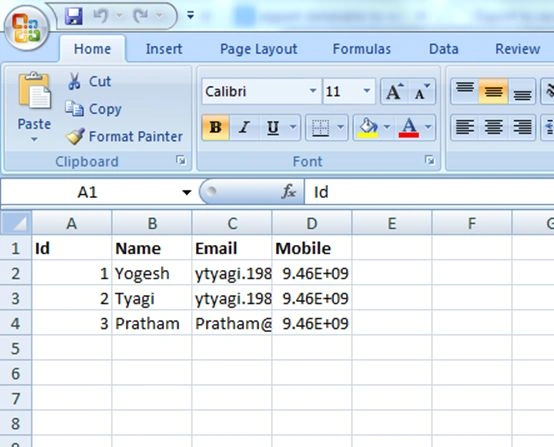
The design of the database table looks like the following.

First of all, open Visual Studio 2012, then select "New project" and click on ASP.NET MVC4 Web Application in Visual C#. Name the project ExportToExcel or whatever you like. Create a controller named ExportToExcelController, and in this controller, create an ActionResult method named Index. Here I select data from the database for display on index view.
public ActionResult Index()
{
    string constring = ConfigurationManager.ConnectionStrings["dbconnection"].ConnectionString;
    SqlConnection con = new SqlConnection(constring);
    string query = "SELECT * FROM Person";
    DataTable dt = new DataTable();
    con.Open();
    SqlDataAdapter da = new SqlDataAdapter(query, con);
    da.Fill(dt);
    con.Close();
    IList<ExportToExcelModel> model = new List<ExportToExcelModel>();
    for (int i = 0; i < dt.Rows.Count; i++)
    {
        model.Add(new ExportToExcelModel()
        {
            Id = Convert.ToInt32(dt.Rows[i]["Id"]),
            Name = dt.Rows[i]["Name"].ToString(),
            Email = dt.Rows[i]["Email"].ToString(),
            Mobile = dt.Rows[i]["Mobile"].ToString(),
        });
    }
    return View(model);
}
Now create a view, right-click on the Indexaction method, select Add View, and then click OK. Write the following code to the view to display the data.
namespace ExportToExcel.Models
{
    public class ExportToExcelModel
    {
        public int Id { get; set; }
        public string Name { get; set; }
        public string Email { get; set; }
        public string Mobile { get; set; }
    }
}
Now, create a view, right-click on the Indexaction method, select Add View, and then click OK. Write the following code for the view to display data.
@model IEnumerable<ExportToExcel.Models.ExportToExcelModel>

@{
    ViewBag.Title = "Index";
}
<h2>Index</h2>
<p>
    <a href="ExportToExcel" class="m-btn red">Export To Excel</a>
</p>
<table>
    <tr>
        <th>@Html.DisplayNameFor(model => model.Name)</th>
        <th>@Html.DisplayNameFor(model => model.Email)</th>
        <th>@Html.DisplayNameFor(model => model.Mobile)</th>
        <th></th>
    </tr>
    @foreach (var item in Model) {
        <tr>
            <td>@Html.DisplayFor(modelItem => item.Name)</td>
            <td>@Html.DisplayFor(modelItem => item.Email)</td>
            <td>@Html.DisplayFor(modelItem => item.Mobile)</td>
        </tr>
    }
</table>

Edison RomoPosted Feb 14, 2024, 3:11 PM
Not working in Azure Web App, Microsoft.Office.Interop.Excel needs Microsoft Excel
Preethi GPPosted Aug 1, 2017, 5:40 AM
But sir i want to store that excel sheet inside the same project folder how it could be?
Bavani MPosted Aug 20, 2015, 12:26 AM
hi sir, i couldn't export data from db to excel file, because i have only openoffice .ods format, how to export data from db to open office excel sheet
Ruben NemesPosted Oct 16, 2014, 10:46 AM
this is very helpfull thanks!!!!