

Hello everyone. Today in this article, I will explain to you about exporting the reports in Excel format using PHP and MySQL. So, I will create one simple PHP page that will display data from the My SQL database in tabular format and then we put one button. By clicking this button, we can export the Excel file which is automatically downloaded to your machine.
- Make Table in My SQL for storing the user. Give it the name “tbl_User”. This table contains UserName, Password etc. For creating a table, run the below script.
By running the above script, it will create a table like below. Here, table contains Id, Username, Password, Status etc… columns- CREATE TABLE IF NOT EXISTS `tbl_user` (
- `ur_Id` int(11) NOT NULL AUTO_INCREMENT,
- `ur_username` varchar(50) NOT NULL,
- `ur_password` varchar(50) NOT NULL,
- `ur_status` int(11) NOT NULL,
- PRIMARY KEY (`ur_Id`)
- ) ENGINE=InnoDB DEFAULT CHARSET=latin1 AUTO_INCREMENT=1 ;
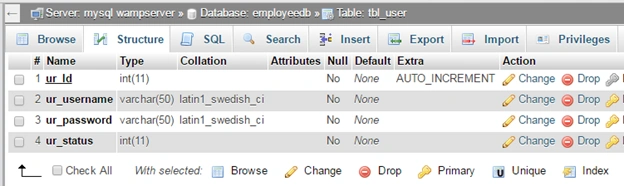
- Now, insert some temporary data to this table. So, for inserting data in the temporary table, I run the below SQL script.
After running the below script you can show a table something like below.- INSERT INTO `tbl_user` (`ur_Id`, `ur_username`, `ur_password`, `ur_status`) VALUES
- (1, '[email protected]', 'nirav', 1),
- (2, '[email protected]', 'kapil', 1),
- (3, '[email protected]', 'arvind', 1);
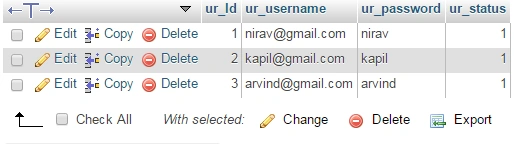
- Now, first we make one simple PHP page that will display the above table data in tabular format with one “Export link”.
Save the above file with “UserReport.php”.- <html>
- <head>
- <title>User Detail Report</title>
- </head>
- <body> </body>
- </html>
2. Now, we will add one table for displaying the data. Our table contains 3 columns, “Sr No”, “User Name” ,” Password”.
Here, we take table border as “1” so user can display, and we create 3 columns for the table header rows.- <table border="1">
- <tr>
- <th>Sr NO.</th>
- <th width="120">User Name</th>
- <th>Password</th>
- </tr>
- </table>
- Now, we have to fetch the SQL table value for displaying table data rows. So, first we make MySQL Server database connection. Now, we make MySQL server connection from the PHP file. So, pass server name, user name, password, database name etc.
Here, we pass server name as ‘localhost’, username as ‘root’, password to be blank(’’), and we pass database name as ‘EmployeeDB’.- <?php
- $conn = new mysqli('localhost', 'root', '');
- mysqli_select_db($conn, 'EmployeeDB');
- ?>
- Now, we make Query which will select the SrNo, Username and password from the database and pass this with MySQL connection object. As show below:
Above, Query fetches the records from the MySQL database and stores it in “$sql” variable.- $sql = mysqli_query($conn,"SELECT `ur_Id`,`ur_username`,`ur_password` FROM `tbl_user`");
- Here, we have record set. So, now we separate it in row-wise data. Repeat the while loop and fetch each row and show in tabular format, as show below:
Above code will display the data row for the table. So, now complete table with header row and data row is displayed.- while($data = mysqli_fetch_row($sql))
- {
- echo '
- <tr>
- <td>'.$data[0].'</td>
- <td>'.$data[1].'</td>
- <td>'.$data[2].'</td>
- </tr>
- ';
- }
- Now, we put one link; that is, export the data to Excel file.
- <a href="UserReport_Export.php"> Export To Excel </a>
- Now, complete code for the “UserReport.php” is shown below:
Run the above PHP page http://localhost:8081/UserReport.php, It displays like this,- <html>
- <head>
- <title>User Detail Report</title>
- </head>
- <body>
- <table border="1">
- <tr>
- <th>Sr NO.</th>
- <th width="120">User Name</th>
- <th>Password</th>
- </tr>
- <?php
- $conn = new mysqli('localhost', 'root', '');
- mysqli_select_db($conn, 'EmployeeDB');
- $sql = mysqli_query($conn,"SELECT `ur_Id`,`ur_username`,`ur_password` FROM `tbl_user`");
- while($data = mysqli_fetch_row($sql)){
- echo '
- <tr>
- <td>'.$data[0].'</td>
- <td>'.$data[1].'</td>
- <td>'.$data[2].'</td>
- </tr>
- ';
- }
- ?>
- </table> <a href="UserReport_Export.php"> Export To Excel </a> </body>
- </html>
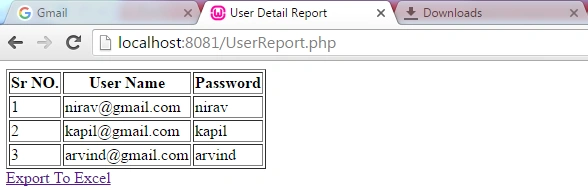
Here, displaying the table data in PHP page is now complete. Now, we have to create file for exporting this table data to excel file in PHP.
- Create another PHP file for exporting data to excel and give its name “UserReport_Export.php”. And, write the below code :
- <?php
- ?>
- First, I create the My SQL connection for fetching the data from the database, as shown in above steps.
Here, in variable $setRec, record set is stored. So, we loop the record set and separate the each row of record by writing while loop to fetch each row.- $conn = new mysqli('localhost', 'root', '');
- mysqli_select_db($conn, 'EmployeeDB');
- $setSql = "SELECT `ur_Id`,`ur_username`,`ur_password` FROM `tbl_user`";
- $setRec = mysqli_query($conn,$setSql);
- while($rec = mysqli_fetch_row($setRec))
- {
- }
- Now, we have to get the column wise data from the row. So, we write “for each” loop in while loop.
- foreach($rec as $value)
- {
- }
- Now, we have to add one tab (“\t”) value between each and every column values and store this full string to any new variable. So, we write some function in between for each loop, as show below,
- $rowData = '';
- foreach($rec as $value)
- {
- $value = '"' . $value . '"' . "\t";
- $rowData .= $value;
- }
- Now, our columns are ready. We have to separate the rows now. So, we have to add new line character (“\n”) between each new row:
- $setData='';
- while($rec = mysqli_fetch_row($setRec))
- {
- $rowData = '';
- foreach($rec as $value)
- {
- $value = '"' . $value . '"' . "\t";
- $rowData .= $value;
- }
- $setData .= trim($rowData)."\n";
- }
- Our table data row and columns are ready now. We have to define a new variable for header row, as shown in below code,
- $columnHeader ='';
- $columnHeader = "Sr NO"."\t"."User Name"."\t"."Password"."\t";
- Here, when user clicks on link, we have to download the excel file directly, without showing the data. Just add the below code.
header("Content-type: application/octet-stream");
- Now, we have to set the filename for downloading excel file.
header("Content-Disposition: attachment; filename=User_Detail_Reoprt.xls");
header("Pragma: no-cache");
header("Expires: 0");
- Now, finally we print all the table row data and header data to the excel file.
echo ucwords($columnHeader)."\n".$setData."\n";
Complete code for “UserReport_Export.php”,
- <?php
- $conn = new mysqli('localhost', 'root', '');
- mysqli_select_db($conn, 'EmployeeDB');
- $setSql = "SELECT `ur_Id`,`ur_username`,`ur_password` FROM `tbl_user`";
- $setRec = mysqli_query($conn, $setSql);
- $columnHeader = '';
- $columnHeader = "Sr NO" . "\t" . "User Name" . "\t" . "Password" . "\t";
- $setData = '';
- while ($rec = mysqli_fetch_row($setRec)) {
- $rowData = '';
- foreach ($rec as $value) {
- $value = '"' . $value . '"' . "\t";
- $rowData .= $value;
- }
- $setData .= trim($rowData) . "\n";
- }
- header("Content-type: application/octet-stream");
- header("Content-Disposition: attachment; filename=User_Detail_Reoprt.xls");
- header("Pragma: no-cache");
- header("Expires: 0");
- echo ucwords($columnHeader) . "\n" . $setData . "\n";
- ?>
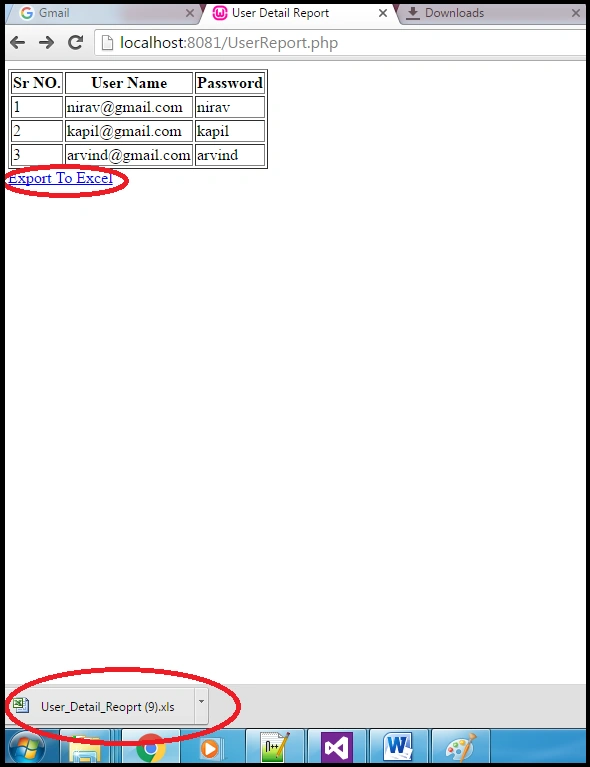
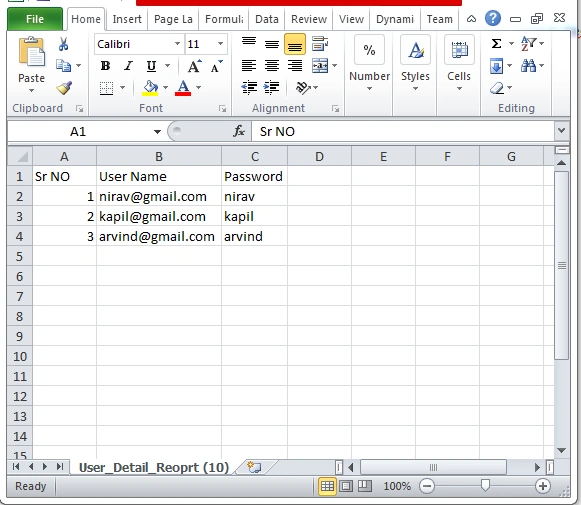
- Now, run the “UserReport.php” in your WAMP or any other related server. It will show like the below image and then, click on “Export to Excel” link . It will download the excel file, as show in below.
- Now, open the Excel file and show the result.
Thank you for reading my article , if you have any problem than fill free to ask in comment box.
mirudu riyaPosted Feb 20, 2019, 4:29 AM
How to export the data from table in php with column and row span to excel
Former memberPosted Oct 27, 2017, 7:31 PM
It showing empty rows above exported records
Amitkumar SinghPosted Oct 5, 2017, 7:49 AM
How to customize header in excel and add images.
Ehtesham MehmoodPosted Sep 30, 2017, 3:40 AM
http://www.phpcodify.com/export-data-to-excel-in-php-mysql/. Export Data to Excel in PHP
Mehuli GhoshPosted Sep 3, 2017, 1:40 PM
How to export dates from sql to excel? I tried your code and everything is fine. The date is showed as ###### unless I change the format of the column.
Selva kPosted Jul 27, 2017, 4:12 AM
How to use logo image in top
Nita KalambePosted Jul 27, 2017, 4:12 AM
This is the really usefull tutorial.....can you help me how can i export multiple tables of a database into csv zip file on front end using php
Main ZedgetvPosted Apr 23, 2017, 5:09 AM
How to get proper value of email column ? if it is encoded.
Sourabh AilPosted Mar 28, 2017, 8:01 AM
Thank you so much!
jishi esPosted Mar 21, 2017, 4:08 AM
Warning propmt on downloaded Excel: File format and extension do not match. The file could be corrupted or unsafe [duplicate]..How can i fix it??plz reply
nana faraPosted Nov 29, 2016, 11:41 PM
Please help me ....i got a problem in “UserReport_Export.php”,..line 14 and 6..the error is mysql_query() expects parameter 1 to be string, resource given in <b>C:\xampp and : mysql_fetch_array() expects parameter 1 to be resource, null given in <b>C:\xampp
nana faraPosted Nov 29, 2016, 11:40 PM
Ive got error ...<b>Warning</b>: mysql_fetch_array() expects parameter 1 to be resource, null given in <b>C:\xampp\htdocs\export.php</b> on line <b>14</b><br />
IT SolutionPosted Nov 9, 2016, 10:39 PM
It work for me, Thank you very much.
Shobana JPosted Jul 19, 2016, 2:34 AM
Nice one
kalu singh raoPosted Jul 19, 2016, 1:25 AM
Nice...
Pankaj Kumar ChoudharyPosted Jul 19, 2016, 1:06 AM
Basic but useful Article...