

The Power of AI in Facial Recognition
Facial recognition technology has transformed multiple industries, from security systems and customer analytics to accessibility and personalized experiences. But beyond detecting faces, AI can now analyze facial expressions to determine emotions—unlocking new possibilities in human-computer interaction.
This is where Azure Face API comes in. With a few API calls, you can:
- ✅ Detect multiple faces in an image.
- ✅ Identify facial landmarks (eyes, nose, mouth).
- ✅ Analyze expressions (happiness, sadness, surprise, anger, etc.).
- ✅ Blur or mask faces for privacy compliance.
Today, let’s dive into how you can integrate the Azure Face API to build a facial recognition and emotion detection system.
🛠️ Step 1. Setting Up Azure Face API
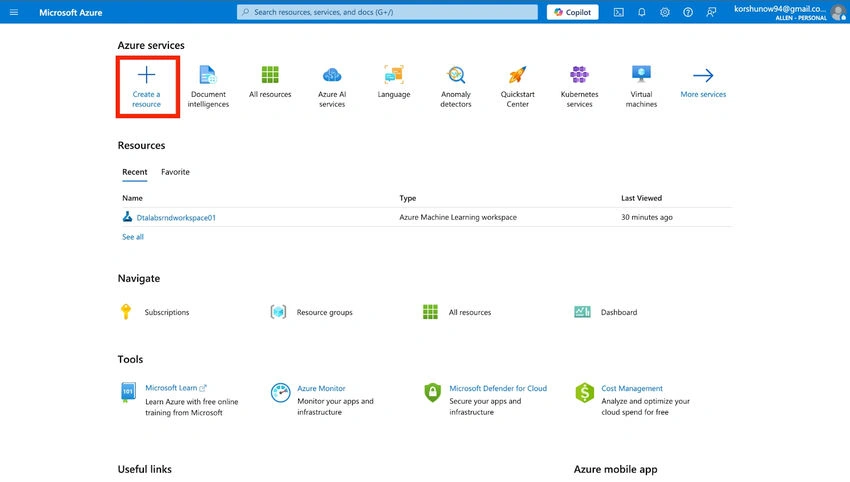
To start, an Azure Face API resource must be created. Here’s how:
1️⃣ Go to Azure Portal.
2️⃣ Click "Create a resource" → Search for "Face API".
3️⃣ Select "Cognitive Services → Face API".
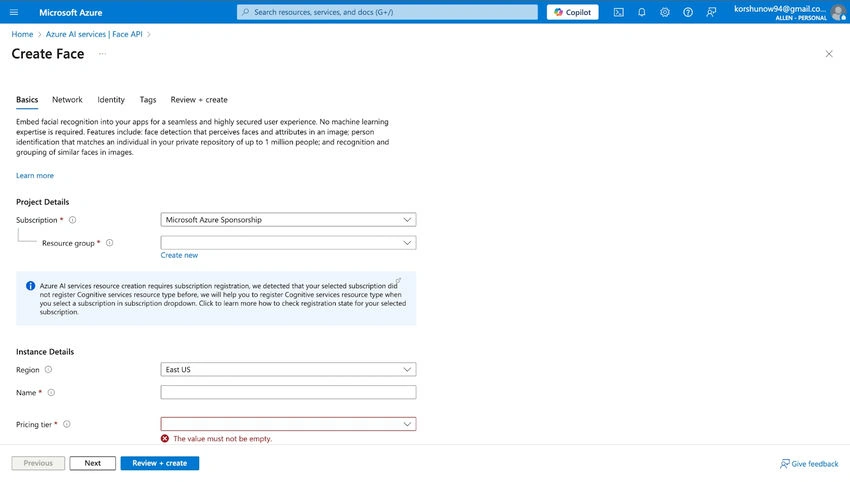
4️⃣ Fill in the details:
- Subscription: Choose an active Azure subscription.
- Resource Group: Create or use an existing one.
- Region: Select the closest region.
- Pricing Tier: Start with free F0 (if available) or Standard S1.
5️⃣ Click "Review + Create" → then "Create".
Once deployed, go to "Keys and Endpoint" and copy:
- ✔ API Key (used for authentication).
- ✔ Endpoint URL (needed for API requests).
📷 Step 2. Uploading an Image for Face Detection
To detect faces, an image must be sent to the Face API. The image should be:
- ✅ JPEG or PNG format.
- ✅ Less than 4MB in size.
- ✅ Contain clear, unobstructed faces.
Here’s how to send an image to Azure Face API using Python:
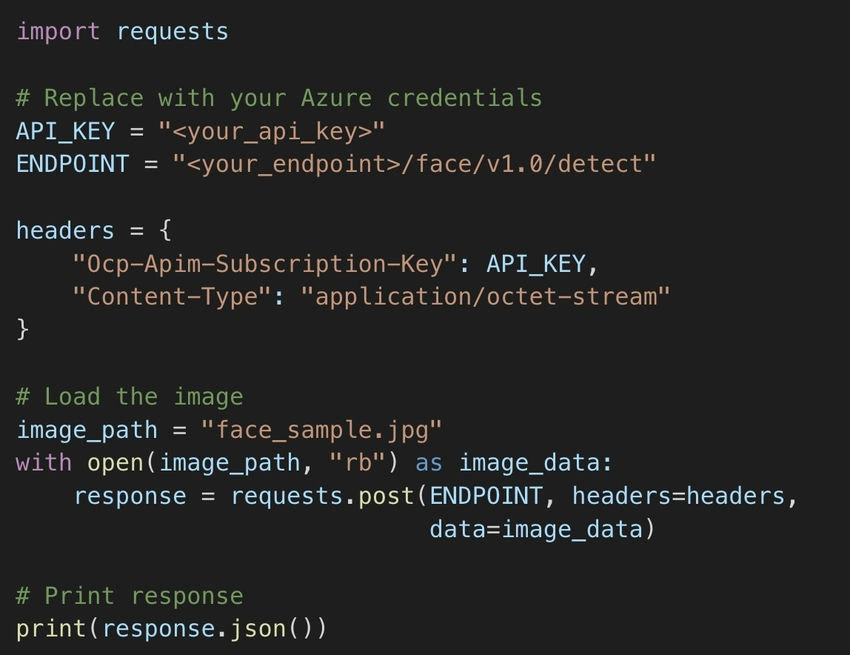
📌 What’s happening here?
- The image is loaded as binary data.
- It is sent via a POST request to Azure Face API.
- The API responds with detected face coordinates, facial landmarks, and attributes.
👁️ Step 3. Detecting Facial Features & Emotions
Beyond detecting faces, the API provides emotion analysis, identifying expressions such as:
- Happiness
- Sadness
- Anger
- Surprise
- Neutral
To request emotion attributes, modify the API call:
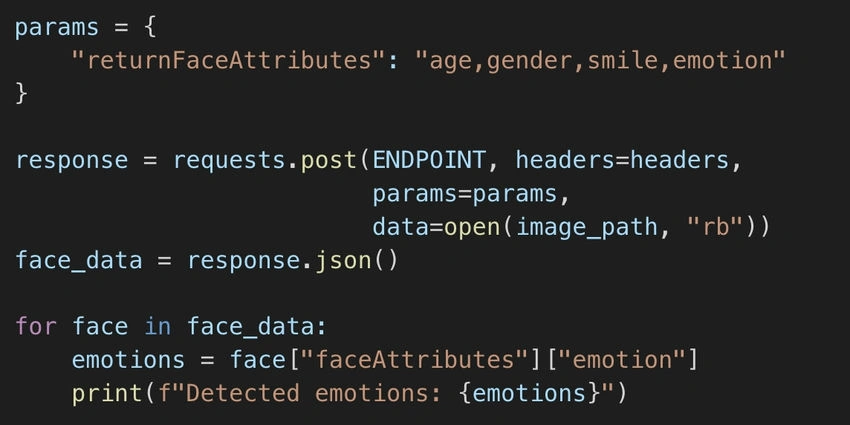
📌 What’s happening here?
- The request now includes parameters for face attributes.
- The response contains emotion scores for each face.
🎨 Step 4. Visualizing Face Detection Results
For better interpretation, detected faces can be highlighted on the image using OpenCV:
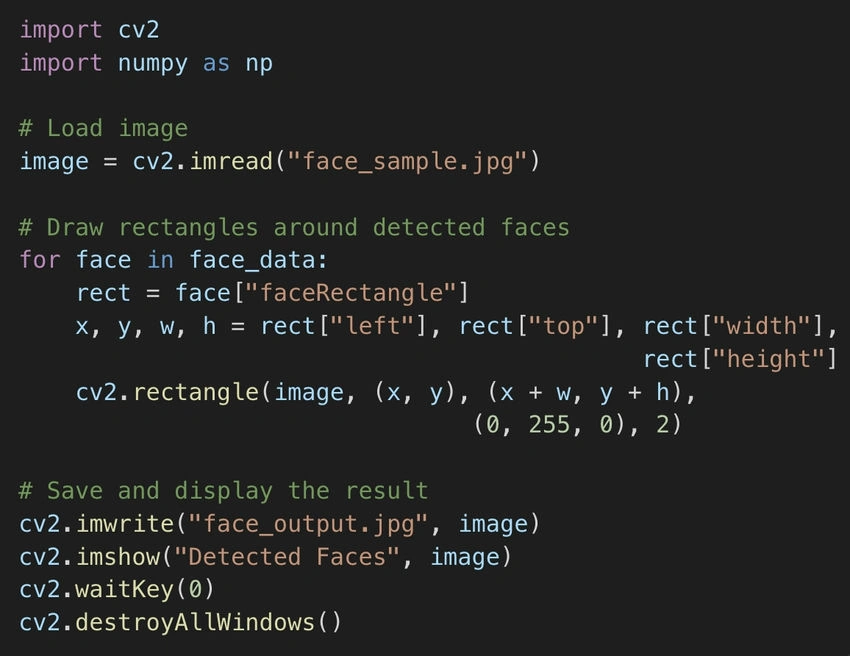
📌 What’s happening here?
- The script draws bounding boxes around detected faces.
- The modified image is saved and displayed.
🛡️ Privacy Considerations
Using facial recognition comes with legal and ethical responsibilities. Consider:
- GDPR compliance: Inform users about face detection.
- Data retention policies: Avoid storing sensitive biometric data.
- Bias mitigation: Ensure fairness in emotion analysis models.
🚀 Conclusion
Azure Face API offers a powerful way to detect faces and analyze emotions in real-time. Whether for security, customer engagement, or accessibility, integrating AI-powered face detection is now more accessible than ever.
🔗 Further Learning
Join the conversation! Your thoughts help the community grow.