Introduction
.NET MAUI, a cross-platform framework, empowers developers to build native mobile and desktop applications using C# and XAML. It enables the creation of apps that seamlessly operate on Android, iOS, macOS, and Windows, all from a unified codebase. This open-source platform is an advancement of Xamarin Forms, expanding its reach to desktop scenarios while enhancing UI controls for improved performance and extensibility.
Using .NET MAUI, you have the capability to develop applications that can run on multiple platforms, such as Android, iOS, MacOS, and Windows, all from a single codebase.
.NET MAUI allows for efficient cross-platform development, reducing the need for separate codebases for each platform and simplifying the maintenance and updates of your application.
.NET MAUI saves time and effort and makes it easier to maintain your apps. Visual Studio 2022 is avail with dotnet 7 with .Net Maui app development
.NET MAUI, a cross-platform framework, empowers developers to build native mobile and desktop applications using C# and XAML. It enables the creation of apps that seamlessly operate on Android, iOS, macOS, and Windows, all from a unified codebase. This open-source platform is an advancement of Xamarin Forms, expanding its reach to desktop scenarios while enhancing UI controls for improved performance and extensibility.
In this article, we will see how we can implement a File Picker in the .NET MAUI project.
Project Setup
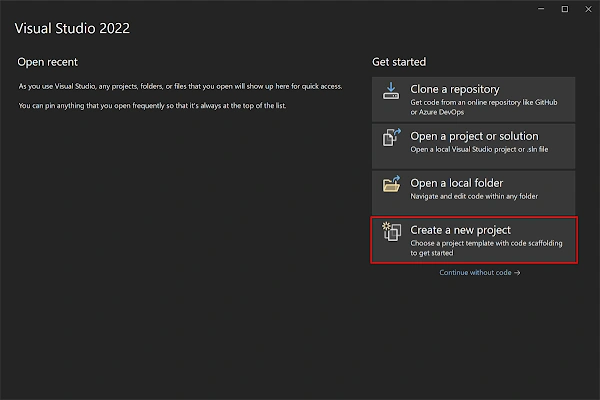
- Launch Visual Studio 2022, and in the start window click Create a new project to create a new project.
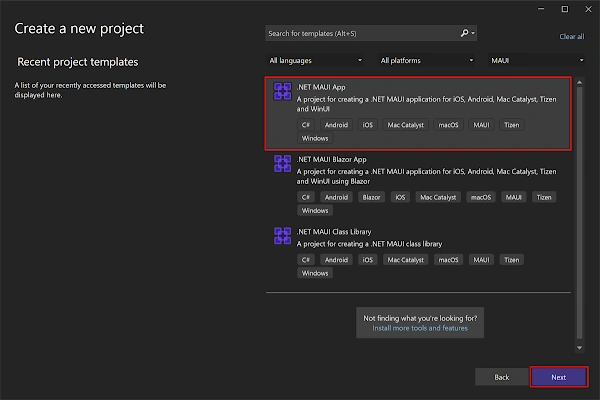
- In the Create a new project window, select MAUI in the All project types drop-down, select the .NET MAUI App template, and click the Next button:
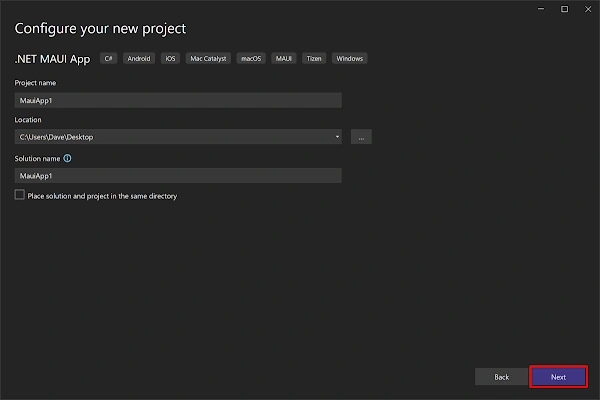
- In the Configure your new project window, name your project, choose a suitable location for it, and click the Next button:
- In the Additional information window, click the Create button:
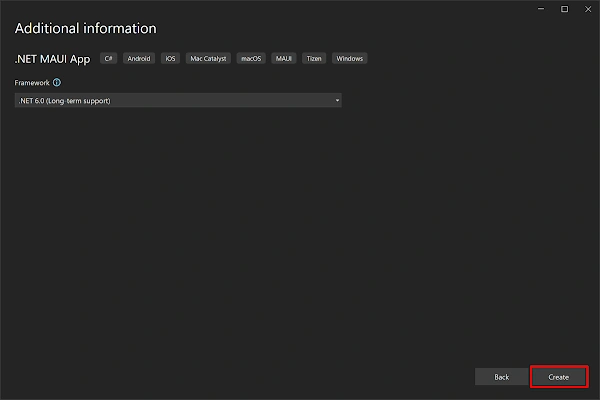
- Once the project is created, we can able to see the Android, iOS, Windows and other running options in the toolbar. Press the emulator or run button to build and run the app

Implementation
As a first point, we need to implement the screen design as per our requirements. In this tutorial, we will use 3 controls - button, image, and label like in the following code block.
<?xml version="1.0" encoding="utf-8" ?>
<ContentPage xmlns="http://schemas.microsoft.com/dotnet/2021/maui"
             xmlns:x="http://schemas.microsoft.com/winfx/2009/xaml"
             x:Class="MauiFilePicker.MainPage">

    <ScrollView>
        <VerticalStackLayout
            Spacing="25"
            Padding="30"
            VerticalOptions="Start">

            <Button
                x:Name="ImageSelect"
                Text="Select Barcode"
                SemanticProperties.Hint="Select Image"
                Clicked="SelectBarcode"
                HorizontalOptions="Center" />
            <Label x:Name="outputText"
                   Padding="10"/>
            <Image
                x:Name="barcodeImage"
                SemanticProperties.Description="Selected Barcode"
                HeightRequest="200"
                HorizontalOptions="Center" />
        </VerticalStackLayout>
    </ScrollView>

</ContentPage>
Here,
- Button - used to select images from the device.
- Image - used to display the selected image.
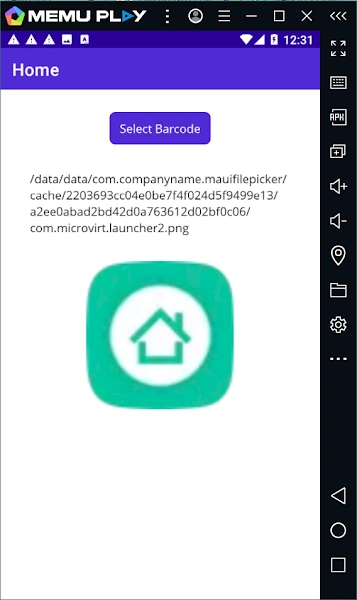
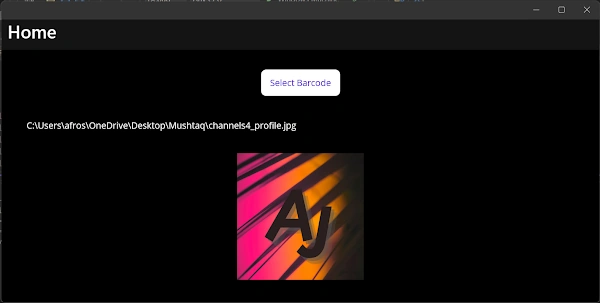
- Label - used to display the file path once the image is selected through the file picker.
Functional part
- Add a click event for the button to select the image like below.
private async void SelectBarcode(object sender, EventArgs e)
{
	var images = await FilePicker.Default.PickAsync(new PickOptions
	{
		PickerTitle = "Pick Barcode/QR Code Image",
		FileTypes = FilePickerFileType.Images
	});
	var imageSource = images.FullPath.ToString();
	barcodeImage.Source = imageSource;
	outputText.Text = imageSource;
}
Here,
- FileTypes: The default file type available for selection in the FilePicker are FilePickerFileType.Images, FilePickerFileType.Png, and FilePickerFileType.Videos. However, if you need to specify custom file types for a specific platform, you can create an instance of the FilePickerFileType class. This allows you to define the desired file types according to your requirements.
- PickerTitle: The PickOptions.PickerTitle is presented to the user and its behavior varies across different platforms.
Full Code
namespace MauiFilePicker;

public partial class MainPage : ContentPage
{
	int count = 0;

	public MainPage()
	{
		InitializeComponent();
	}

    private async void SelectBarcode(object sender, EventArgs e)
    {
        var images = await FilePicker.Default.PickAsync(new PickOptions
        {
            PickerTitle = "Pick Barcode/QR Code Image",
            FileTypes = FilePickerFileType.Images
        });
        var imageSource = images.FullPath.ToString();
        barcodeImage.Source = imageSource;
        outputText.Text = imageSource;
    }
}
<?xml version="1.0" encoding="utf-8" ?>
<ContentPage xmlns="http://schemas.microsoft.com/dotnet/2021/maui"
             xmlns:x="http://schemas.microsoft.com/winfx/2009/xaml"
             x:Class="MauiFilePicker.MainPage">

    <ScrollView>
        <VerticalStackLayout
            Spacing="25"
            Padding="30"
            VerticalOptions="Start">

            <Button
                x:Name="ImageSelect"
                Text="Select Barcode"
                SemanticProperties.Hint="Select Image"
                Clicked="SelectBarcode"
                HorizontalOptions="Center" />
            <Label x:Name="outputText"
                   Padding="10"/>
            <Image
                x:Name="barcodeImage"
                SemanticProperties.Description="Selected Barcode"
                HeightRequest="200"
                HorizontalOptions="Center" />
        </VerticalStackLayout>
    </ScrollView>

</ContentPage>
Demo
Android
Windows
Download Code
You can download the code from GitHub. If you have any doubts, feel free to post a comment. If you liked this article, and it is useful to you, do like, share the article & star the repository on GitHub.
References
https://learn.microsoft.com/en-us/dotnet/maui/platform-integration/storage/file-picker


Join the conversation! Your thoughts help the community grow.