

In WPF we have the CollectionView that is the instance type bound to the Items controls. The CollectionView allows the use of filters, sorting and other features.
To filter the results shown in a items control we can use the collection view and add a Filter method to it.
Consider the following scenario:
- public ObservableCollection<Dragon> Items { get; set; }
- public ICollectionView ItemsView
- {
- get { return CollectionViewSource.GetDefaultView(Items); }
- }
- <DataGrid ItemsSource="{Binding ItemsView}" />
- ItemsView.Filter = new Predicate<object>(o => Filter(o as Dragon));
- private bool Filter(Dragon dragon)
- {
- return Search == null
- || dragon.Name.IndexOf(Search, StringComparison.OrdinalIgnoreCase) != -1
- || dragon.OriginalName.IndexOf(Search, StringComparison.OrdinalIgnoreCase) != -1
- || dragon.RomajiName.IndexOf(Search, StringComparison.OrdinalIgnoreCase) != -1;
- }
- <TextBox Text="{Binding Search, UpdateSourceTrigger=PropertyChanged}" />
- private string search;
- public string Search
- {
- get { return search; }
- set
- {
- search = value;
- NotifyPropertyChanged("Search");
- ItemsView.Refresh(); // required
- }
- }
Now if we change the text to be searched the data grid will automatically filter the results.

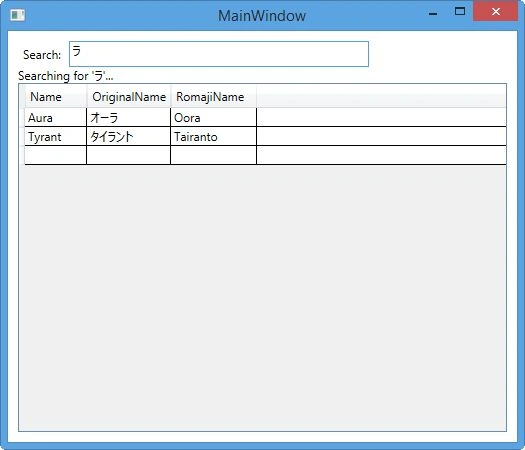
It is possible to have the collection view refresh automatically. To do that you need to inherit from a collection view and change the logic there. In the following example I'm saying that if my model implements the INotifyPropertyChanged and a property named “Search” triggers a change then it will refresh itself.
- public class NotifiableCollectionView : ListCollectionView
- {
- public NotifiableCollectionView(IList sourceCollection, object model)
- : base(sourceCollection)
- {
- if (model is INotifyPropertyChanged)
- (model as INotifyPropertyChanged).PropertyChanged += NotifiableCollectionView_PropertyChanged;
- }
- void NotifiableCollectionView_PropertyChanged(object sender, PropertyChangedEventArgs e)
- {
- if (e.PropertyName == "Search")
- this.Refresh();
- }
- }
- private ICollectionView itemsView;
- public ICollectionView ItemsView
- {
- get
- {
- if (itemsView == null)
- {
- itemsView = new NotifiableCollectionView(Items, this);
- }
- return itemsView;
- }
- }
- private string search;
- public string Search
- {
- get { return search; }
- set
- {
- search = value;
- NotifyPropertyChanged("Search");
- // ItemsView.Refresh(); // no longer required
- }
- }
- public string Search { get; set; }
WebbarrPosted Jun 1, 2022, 2:13 PM
For those who are interested, I've created a demo repository in GitHub (without using Fody) at https://github.com/Webbarrr/Web.Demo.FilterObservableCollection
Maks FilonenkoPosted Feb 24, 2020, 4:54 AM
Could you share the solution, please?
Kris MartelePosted Nov 29, 2019, 5:25 PM
Any idea who to use this in .netcore instead of the classic .net
Vijaykumar ReddyPosted Apr 29, 2019, 7:25 AM
Good Article. Could you please share sample code
Florent GrivoryPosted May 30, 2018, 11:41 AM
This is a great work. I've got a problem though: NotifyPropertyChanged("Search") returns an error. Its says that NotifyPropertyChanged doesn't exist. Is this a method you do not mention in your code? Maybe I did not place Search function in the right class...
Ramesh DoniPosted May 28, 2018, 5:38 AM
Could you please share the complete solution?
Sharath GPosted Jul 10, 2015, 9:00 AM
Could you please share the complete solution?
Sibeesh VenuPosted Jul 6, 2015, 3:18 AM
Good One.Thanks for sharing :)
SharadPosted Jul 6, 2015, 3:06 AM
Nice Article...
Debasis SahaPosted Jul 6, 2015, 12:56 AM
Good One
Santhakumar MunuswamyPosted Jul 6, 2015, 12:14 AM
Thanks for good one