
As there is no support of push notifications in Ionic Pro so far, it’s a big pain for developers to handle push notifications in Ionic Pro.
Prerequisites
You must have your development and distribution p12 files for push notifications. You can follow the tutorial for generating those files.
https://support.clevertap.com/docs/ios/how-to-create-an-ios-apns-certificate.html
Firebase Set Up
Log in to
https://console.firebase.google.com/
Click on "Add Project", give any name to project, and click on "Create Project". The following window will appear. Click on "Add Firebase to your iOS app".
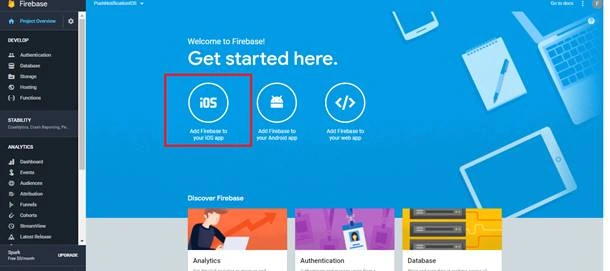
A window will appear. You need to add your bundle id there. Please note that this bundle id should match the app id that you created while generating the development and distribution certificates.
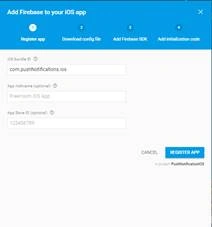
Now, click on "Register App". Next, it will ask you to download the GoogleService-Info.plist . Download this file and click on Continue until the end.
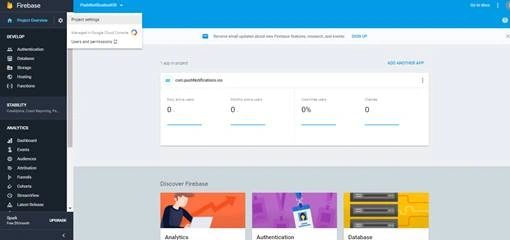
Now, navigate to "Project Settings".
Click on "Cloud Messaging" tab.
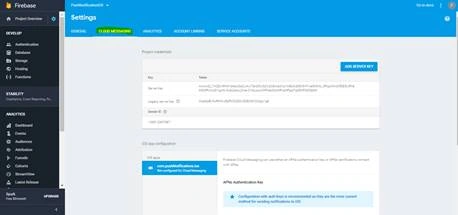
Here, you have to upload your development and production p12 files.
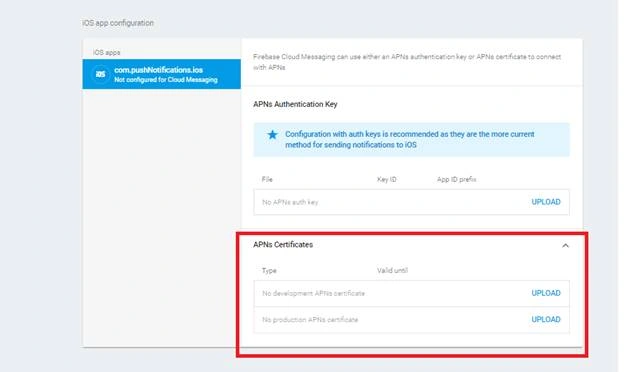
Now, Firebase set up is done.
Ionic Project Setup
Create a new blank Ionic project. Open your config.xml file, add the same bundle id that you entered for App ID and in firebase project.
Next, place the downloaded GoogleService-Info.plist file in the root of your folder. Run the following commands in terminal.
- $ ionic cordova plugin add cordova-plugin-fcm
- $ npm install --save @ionic-native/fcm
Open App module and import the FCM module, then write the imported module in providers as well.
import { FCM } from '@ionic-native/fcm';
Open app component and add the following code.
Ivan ChuPosted Nov 23, 2018, 8:54 PM
Hello Fatima Khan, do you know how to change the icon's badge number in ios, Can you tell me also, Thanks so much
Mohsin AzamPosted Nov 27, 2017, 3:15 AM
Nice Share,Keep it up.