

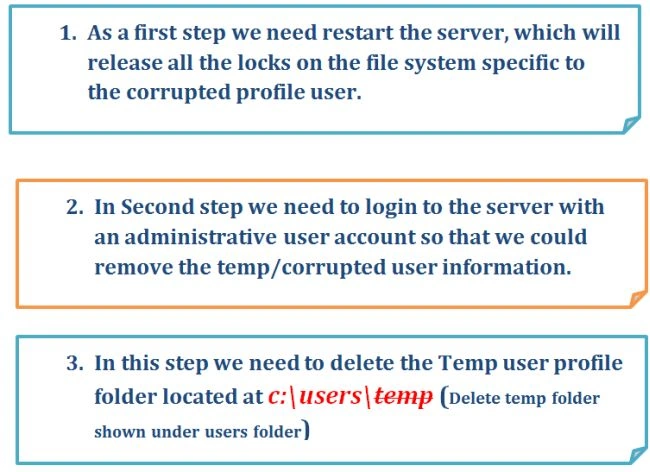
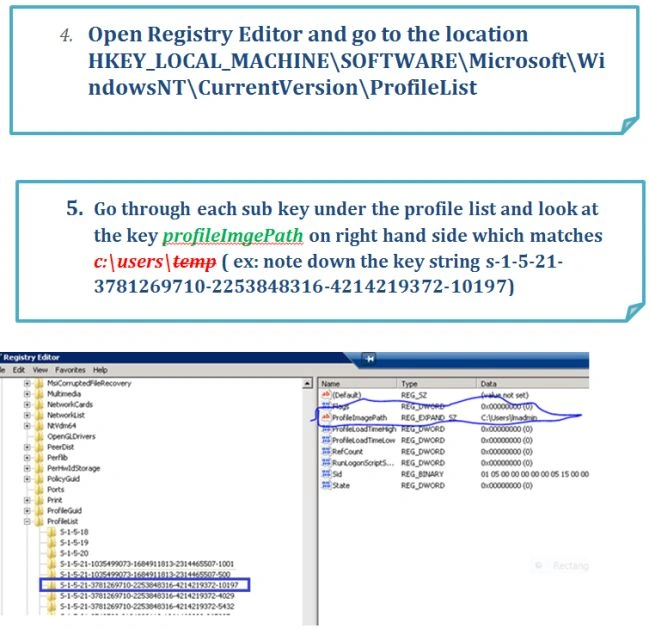
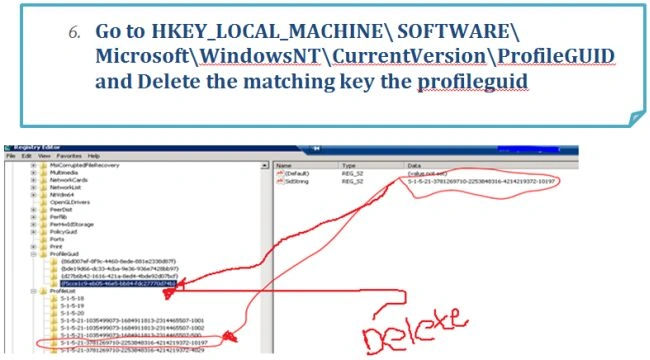
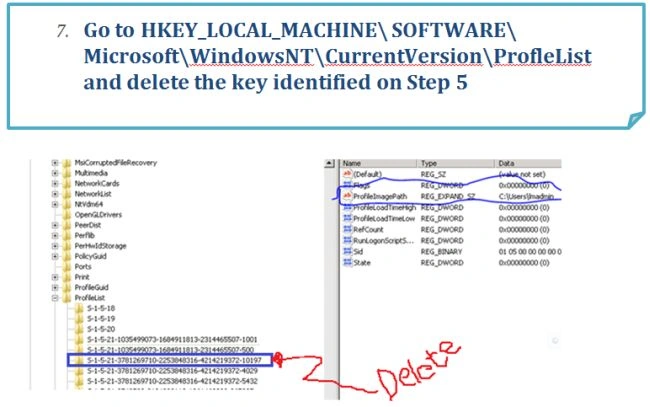
Windows will create a temporary profile when it is unable to read the user profile files. Usually people may not notice unless they run into some issues. This will lead to some weird experience like even though the corrupted profile user is an administrator, the account may not able to perform the administrative operations. Recently I experienced the corrupt user profile or temp user profile in a SharePoint 2013 environment in which the service account used for setting up a web application was behaving strangely. The user account is a local admin in the box, still it is not able to perform the operations and also I see the messages like unable to access resources in the system. I also saw the message "the profile is a temp profile" so I looked at the C:\USER folder, surprisingly there is no folder for the account I logged in with, instead there is a temp folder that only I could see. Normally when a user has logged into the system a folder will be created under C:\user that will have the exact same name as the user.

This is a relatively simple issue to fix using the procedure provided here.
Guest UserPosted May 28, 2020, 5:00 AM
Changing the owner of the corrupted profile's folder in c:\users to the local administrators group. That fixed the problem for me :-)
Big DPosted Jan 3, 2020, 11:07 AM
Nice Snippets
P HPosted Sep 2, 2018, 1:04 PM
Was largely helpful, although shouldn't be taken too literally as often the profile path wasn't actually literally entered. But deleting SIDs that didn't correspond between the two keys solved the problem for me, and my long-suffering wsusadmin now has a profile again!
Jonathan CheryPosted Jun 6, 2018, 2:30 PM
For me the issue was that the UVHD-template was deleted I had to restore from 2 month backup and it fix my issue
Eitay CohenPosted May 15, 2015, 4:04 AM
Thank you, you just saved my Administrator account and allot of work!
Vivek RaghuvansiPosted Mar 19, 2013, 2:28 AM
thanks! I am facing this problem last few weeks.
Sam HobbsPosted Mar 1, 2013, 8:33 PM
If the problem is caused by Windows then Microsoft should fix it for free. I had a similar problem with Windows many years ago. They provided a hotfix and then they later fixed Windows. Regardless of the cause, the procedure described in this article could be automated. The data in the registry key that starts with "S-1-5-21-" I think is the Security ID (SID) for the user. If so then I have a sample script that would make it easier to find the user. I will be surprised if someone has not already automated the procedure described here.