

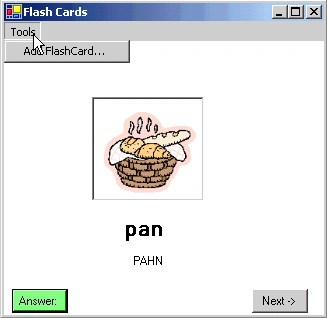
Figure 1 - Flashcards read in from a Sql Database
I thought it would be fun to write a simple program that displayed flashcards from a database and at the same time, show you how to read and write images to the database. This program is a simple flashcard program that talks to a single table in a Sql Server Database. The design of the database table is shown below:
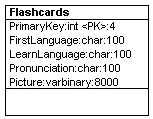
Figure 2 - FlashCard DB Design Reverse Engineered Using WithClass 2000
The Picture field is of type varbinary. As seen from the database design diagram, it holds 8000 bytes of data, enough for a square picture of about 89 x 89 pixels. When I created the table using the Server Explorer wizard, I needed to specifiy the maximum length in order to get the image storage to work correctly. Although the database is not provided with the download, you can easily recreate it using the design diagram above. Below is also a snapshot from server explorer of the data:
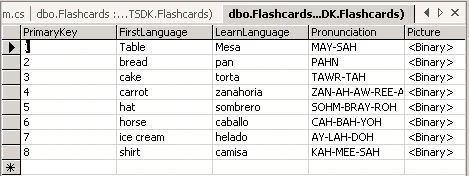
Figure 3 - Snapshot from the Server Explorer of the Data in this sample
Alot of the coding for this example is done visually. I created the sql server adapter and sql connection simply by dragging the table from the server explorer into the Design View of the Form. At this point, you have almost everything you need to read the flashcard information into the Form. The code for reading in the table in Figure 3 is shown in the listing below:
public bool ReadFlashCard(int x){
try
{
// dispose of the old image and set the picture box to null
if (pictureBox1.Image != null)
pictureBox1.Image.Dispose();
pictureBox1.Image = null;
// form a query that will only select the flashcard we are interested in
sqlDataAdapter1.SelectCommand.CommandText = "Select * From Flashcards Where PrimaryKey = "+ Convert.ToString(x);
// Fill the dataset using the query from the adapter
DataSet ds = new DataSet();
sqlDataAdapter1.Fill(ds, "Flashcards");
// Hide the labels that contain the answer to the flashcard
label1.Visible = false;
label2.Visible = false;
// if no row is returned it means we reached the end or something is wrong
if (ds.Tables[0].Rows.Count == 0)
return false;
// populate the hidden answers: the language word and the pronunciation
label1.Text = ds.Tables[0].Rows[0]["LearnLanguage"].ToString();
label2.Text = ds.Tables[0].Rows[0]["Pronunciation"].ToString();
// now we need to get the picture from the DataRow
// and assign it to a byte array
byte[] MyData = null;
MyData = (byte[])ds.Tables[0].Rows[0]["Picture"];
// After retrieving the byte array, we want to get the
// number of elements of the array for use in writing the array
int ArraySize = new int();
ArraySize = MyData.GetUpperBound(0);
// Create a Filestream for writing the byte array to a gif file (the original format in is case)
FileStream fs = new FileStream("tmp.gif", FileMode.OpenOrCreate, FileAccess.Write);
// Write the stream of data that we read in from the database to the filestream and close it.
// This will create the file tmp.gif, which we can use to display in the picturebox
fs.Write(MyData, 0,ArraySize+1); // don't ask me why, but I had to add 1 here for this to work
fs.Close();
// Assign the temporary gif file to the picture box
pictureBox1.Image = new Bitmap("tmp.gif");
return true;
}
catch (Exception ex)
{
MessageBox.Show(ex.Message.ToString());
return false;
}
}
Join the conversation! Your thoughts help the community grow.