Introduction
This article is fully based on how to query a flat file database (in other words text file database). The flat file database querying is quite difficult. I write this article to create a simple application with the ability to manipulate the flat file database (in other words text file).
System Analysis
Flat File Database
This is a basic database system. It makes our work easier compared to writing the data on paper. It saves paper. A flat file database is the simplest form of database system. There is no capability of accessing multiple tables like a RDBMS Because it uses a simple structure, a text file is considered as a table. Every line of the text file is a row of the table and the columns are separated by delimiters like comma (,), tab or some special character. The database does not have a specific data type. It only supports strings.
System Design
The system based on File Input Output processing and Streams. This system is also the same as a flat file database except we can use multiple tables. The similarity is the multiple table querying such as Join queries are not processed currently.
Database
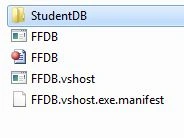
A database is nothing but the folder for the database. The Name the application's startup folder.
Tables
In this system the tables hold all the data. In this System the table structure has the following two parts:
- Header Row
- Data Rows
A Header Row consists of the column names. Data Rows consist of the records related to the columns. Here some special symbols are used as delimiters.

Symbols
├: Header Row Begining
┤: Header Row End
└: Data Row Begining
┘: Data Row End
│: Column Separator

Figure: Overview of System
Querying
The system supports 15 or more SQL Type Queries to query the database. The following queries are used in this system.
1) CREATE DATABASE StudentDB
This is the query for creating the database named "StudendDB".
2) LIST DATABASES
This query shows a list of databases in the system.
3) DROP DATABASE StudentDB
This query deletes the database StudentDB.
4) USE StudentDB
This query holds the StudentDB database name for further database manipulation quries such as INSERT, DELETE, UPDATE, SELECT and so on.
5) LIST TABLES
This query shows the tables in the database that are currenlty held for manipulation.
6) DROP TABLE tblMarkSheet
This query deletes the table from the database.
7) CREATE TABLE tblMarkSheet (RollNo,StudentName,ClassStd,Mark1,Mark2,Mark3,Total,Avg)
This query crates a tblMarkSheet table with the columns RollNo, StudentName, ClassStd, Mark1, Mark2, Mark3, Total and Avg. In the background it creates a file named "tblMarkSheet.fdb" in the "StudentDB" folder.
8) 1. INSERT INTO tblMarkSheet
(RollNo,StudentName,ClassStd,Mark1,Mark2,Mark3,Total,Avg) VALUES (1, ANAND,10TH,85,48,59,192,64)
This query inserts a record into the tblMarkSheet table.
2. INSERT INTO tblMarkSheet VALUES (1, ANAND,10TH,85,48,59,192,64)
This query is the same as the previous insert query. The difference is we don't need to provide the column names.
9) 1. DELETE FROM tblMarkSheet WHERE RollNo=10
This query deletes the records with record column values equal to 10 in the tblMarkSheet table.
2. DELETE FROM tblMarkSheet
This query deletes all the records from the tblMarkSheet Table.
10) 1. UPDATE tblMarkSheet SET (ClassStd) VALUES (11TH) WHERE RollNo=1
This query modifies the ClassStd field of the record that holds RollNo as 1.
1.1. UPDATE tblMarkSheet SET (ClassStd) VALUES (11TH)
2. UPDATE tblMarkSheet SET VALUES (1, XXX,5TH,40) WHERE RollNo=1
This query sequentiay updates the record that holds the RollNo as 1. Here we don't need to specify the columns to update, it automatically updates from the sequence and missed column values remain the same.
2.1. UPDATE tblMarkSheet SET VALUES (1, XXX,5TH,40)
Note: The queries 11 of 1.1 and 2.1 are executed without condition.
11) 1. SELECT * FROM tblMarkSheet
2. SELECT * FROM tblMarkSheet WHERE RollNo=1
3. SELECT RollNo,StudentName,Total FROM tblMarkSheet WHERE RollNo>5
4. SELECT RollNo,StudentName,Avg FROM tblMarkSheet WHERE Avg>=60
This query is for viewing the records of the table. Here we can filter the records using relational operators.
Bugs and Flaws in Queries
- In UPDATE and DELETE queries it supports only an Equal (=) condition. It is not supported for other operators like <, >, <=, and so on.
- In a SELECT query the data filter feature is held using a datatable and dataview. Need to provide native support.
- There is no JOIN queries when compared to RDBMS.
Advantage
- It is our own database system, so we can modify the transactions of the database system.
- Compared to other database systems it is quite small and slower but security things are ours. So we feel free about data security.
- We can ensure the security by using cryptography things in this system.
- We can modify the table structure in encoded text. So that no one knows the inner structure of the database. There is no data theft.
Future Enhancement
In the future it will be portable for more security and a fully enhanced database structure. It could support JOIN queries.
Demo Form Design
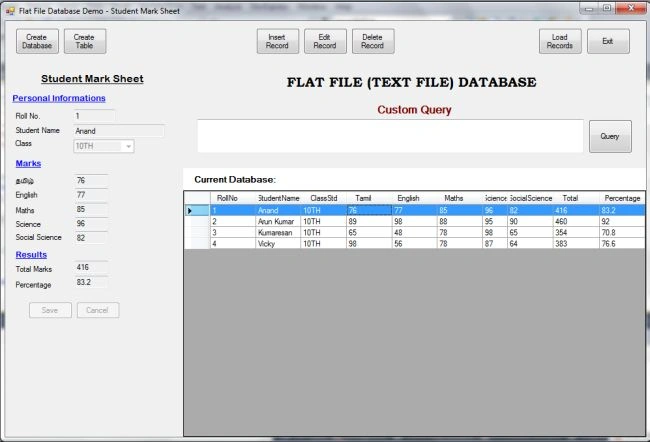
The demo form has been designed to examine the flat file database operation. It has database creation, table creation, record insertion, record deletion, record updation, loading records and custom query execution. In addition it has IntelliSense TextBox for easy query writing. The form layout is fluid and exactly fit for all screens.


murali ksdPosted Feb 13, 2020, 7:20 AM
Is it firebird database
Sam HobbsPosted Apr 8, 2014, 2:49 PM
There is not a clear definition of what a "flat file" is. Your text files might conform to the relational model more than you realize; see: http://en.wikipedia.org/wiki/Relational_model