

Problem
You have FLOW running on your SharePoint list or library. You have added a few conditions in your FLOW so that the actions/logic runs only in specific scenarios. But the flow will get triggered every time when the item is modified, which you don’t want to happen. This will unnecessarily consume FLOW runs, which might become a problem for small organizations with a large number of processes.
So, the problem here is how to trigger a FLOW only when it’s really needed.
Solution
Considering the example of the “When an item is created or modified” trigger, you use this trigger to run the FLOW when a new item is added in your list or when the item is modified by the end user. You want the FLOW to run only when the Status columns have the value “In Progress” or “Done”. FLOW should not run when the Status column value is anything other than these two values. How to achieve this?
Yes, it's achievable now.
With almost all SharePoint triggers the Power Automate team has come up with a new feature in recent months called "Trigger Conditions". It says - Specify one or more expressions which must be true for the trigger to fire. This uses the same expressions or query syntax that gets generated in any FLOW action; e.g. Condition action in FLOW.
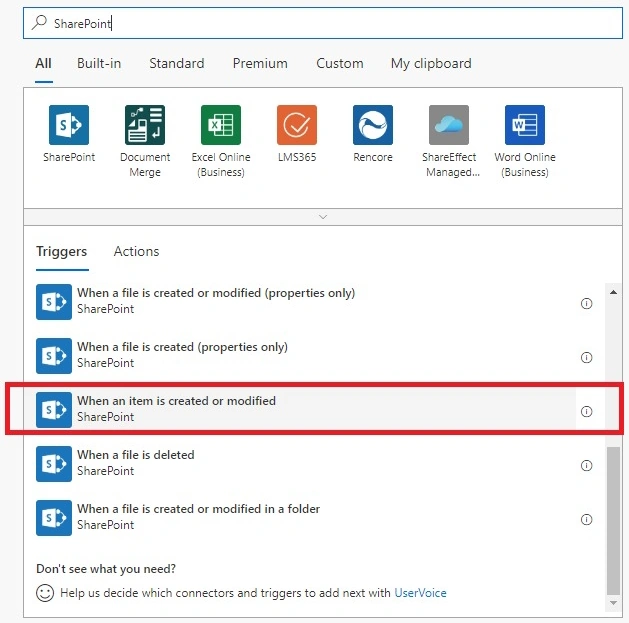
Let’s see how to do it. Login to https://flow.microsoft.com/ >> Create a new FLOW or edit your existing FLOW which has a "When an item is created or modified" trigger. If it's a new FLOW, then add the below trigger:
As shown below, Click on the Menu button >> Settings option.

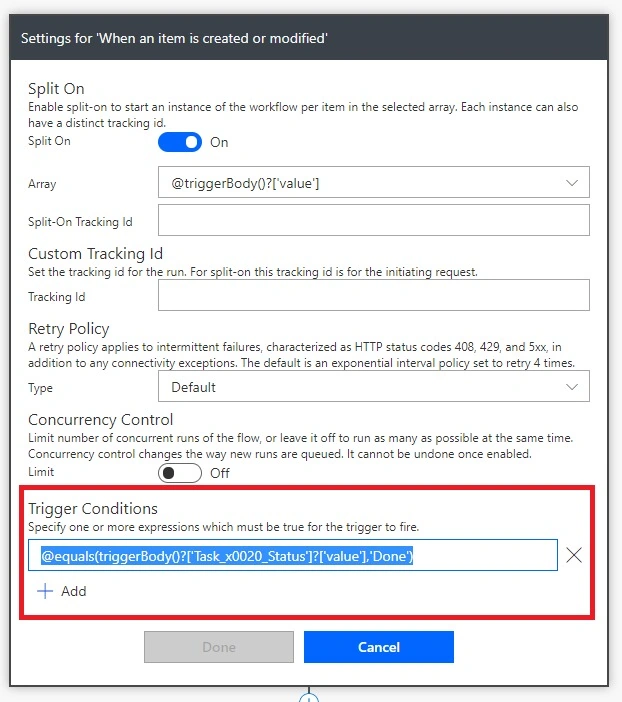
There is a Trigger Conditions section in the settings as shown below >> Click on the +Add button to add your rule or condition. If this condition is satisfied then only FLOW triggers otherwise not.

Let’s see some of the examples.
Single Condition
Run the FLOW only when the Task Status is Done. In my demonstration, Task Status is in the Choice column. So, I need to use the value parameter.
@equals(triggerBody()?['Task_x0020_Status']?['value'], 'Done')
Two OR conditions
When you need to check two conditions with the OR clause then use the expression as shown below, this checks if Notify All is true or Published is true.
@or(
    equals(triggerBody()?['Notify_x0020_All'], true),
    equals(triggerBody()?['Published'], true)
)
Two or more AND conditions
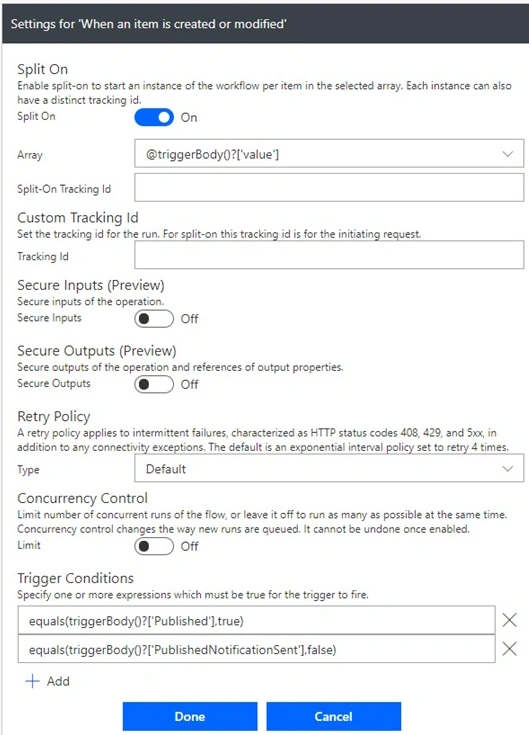
When you need to check multiple conditions with an AND clause then just keep adding more conditions by clicking on the Add button. And add individual condition expressions in each of the text fields as shown below.
OR and AND Conditions together
When you need to check more than 2 conditions with Or and And clauses then you need to combine the above two scenarios, OR you can just create one expression and put it in one box as shown below. Make sure you do not put the @ prefix before and clause when it is a nested condition.
@or(
    equals(triggerBody()?['Notify_x0020_All'], true),
    and(
        equals(triggerBody()?['Published'], true),
        equals(triggerBody()?['PublishedNotificationSent'], false)
    ),
    equals(not(empty(triggerBody()?['Notify_x0020_Specific_x0020_Person'])), true)
)
Some more tips
- How to check if the column is empty or has no value?
- Use the empty() function.
- How to check if the column is not empty or has some value?
- Use not and empty functions together.
- not(empty())
Summary
So, we can have control over the FLOW runs as depending upon your licensing you get a limited number of FLOW runs per user per month. Trigger conditions trim down FLOW runs and help trigger FLOW only when it’s really needed.
Hope this helps. Thanks for reading.
Akshay SolankiPosted Oct 14, 2021, 8:55 PM
Hi Sarvesh, I have a 'status' column in sharepoint list which has three values: requested, completed and rejected. Now what should be the trigger condition if I want to run the flow only when the status is changed to Completed or Rejected?
Scot BickellPosted Aug 12, 2021, 4:14 AM
Hi Sarvesh... I have a list of a lot of data that was exported as JSON from an old mySQL database. The database had a couple of fields that showed the last time a record was changed and who changed it. It did now seem feasible to push those two fields into the built in Modified and Modified By fields since they are not exposed in a Create Item action. So... I set up separate fields for those two fields from the database. I then created a separate flow that uses the "When an item or file is modified" as a trigger and updates the two columns with the Dynamic "Modified by DisplayName" value and the current time stamp. My problem is that since I am updating these two columns, the flow is triggered again when it does the update, which updates, which triggers, and I seem to end up in an almost endless loop. Is there a way to use trigger conditions to prevent this. That is, can I only trigger the flow when any field EXCEPT the two fields the flow updates are changed? Or is there a way to obtain the source of the change and only run the flow when the change to the list is done by a user rather than a flow?
Kannalan KPosted Sep 22, 2020, 12:31 PM
Hi Sarvesh, what will be the trigger condition for SP list attachment. Trigger should start only if the SP list has attachment.
Hari KiranPosted Jul 7, 2020, 3:37 AM
Hi Sarvesh. Thank you for the brief explanation. what should be the condition in my case if i am using Yes&No (check box) and workflow should be triggered only if this option is set to Yes. I have update the condition as @equals(triggerBody()?['Re-Submit']?['value'],'Yes') but i do not see my work flow is firing. what is that i am missing here. Kindly advise.
Hari KiranPosted Jul 7, 2020, 3:37 AM
Hi Sarvesh. Thank you for the brief explanation. what should be the condition in my case if i am using Yes&No (check box) and workflow should be triggered only if this option is set to Yes. I have update the condition as @equals(triggerBody()?['Re-Submit']?['value'],'Yes') but i do not see my work flow is firing. what is that i am missing here. Kindly advise.
Rogério BonomePosted May 27, 2020, 7:19 PM
Hi Sarvesh! Very good explanation, thanks for sharing. I am trying to create a Trigger Condition to start my flow only when a specific sharepoint list column has been modified. In this case it is a due date column. Any suggestion? Thanks in advance!
vinod kumarPosted Jan 28, 2020, 4:19 PM
Hi, Thank you so much.. It's very helpful for me. I have a problem in flow. When user entered values in forms, those values and fields i want to display in email action, other fields i don't want.. Only entered values. Is there any way?
Dhruvin ShahPosted Jan 22, 2020, 9:37 AM
Very Helpful. Thanks for sharing this!