

In this article, I will discuss the for and the foreach loop in C# language, their use cases, and when to use which for performance reasons.
Let's start with C# for loop.
for loop in C#
The for loop iterates through items until a certain condition is true. You give an initial statement, a condition for which the loop is to be iterated until it gets false, and a statement that will be executed after every successful block execution.
A normal c# for loop looks like this.
int length = 100;
for (int index = 1; index < length; index++)
{
 //Your code will be here
 //This is how a programmer makes century.....#ilovecricket
}
A for loop on a list is like this that goes through a collection and reads each item of the collection.
List<JCEmployee> JCEmployees = GetJCEmployeesList();
for (int index = 0; index < JCEmployees.Count; index++)
{
    Console.WriteLine(JCEmployees[index].Age);
}
Note here that you can directly access the list item by its index.
If you're new to collections, here is a tutorial: Collections in C#
foreach loop in C#
C# foreach loop is used to iterate through items in collections (Lists, Arrays etc.). When you have a list of items, instead of using a for loop and iterate over the list using its index, you can directly access each element in the list using a foreach loop.
A normal foreach loop looks like this.
List<JCEmployee> JCEmployees = GetJCEmployeesList();
foreach(JCEmployee Employee in JCEmployees)
{
    Console.WriteLine(item.Age);
}
Note here that a foreach loop creates a copy of the collection on which you are iterating the loop. This means, if you want to perform an assignment operation on the collection item, you cannot directly perform on that item.
To understand that, look at the following example.
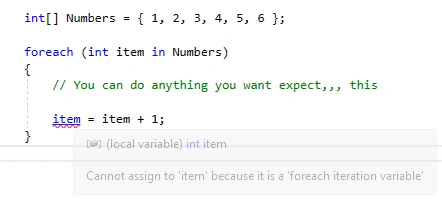
Why did that error occur here?
As I said, a foreach loop creates a copy of a collection, so in this loop, the ‘item’ is not referencing to the array elements; it’s just a temporary variable and you cannot assign a value to it.
Also, when it comes to performance, then ‘foreach’ takes much time as compared to the ‘for’ loop because internally, it uses extra memory space, as well as, it uses GetEnumarator() and Next() methods of IEnumerables.
So, the long story short is that when you want your code to be readable and clean, you can use a Foreach loop but whenever you want the performance, you should use a For loop instead.
More?
Here is a detailed article and code samples on the foreach loop - The foreach in C#.
Pankajkumar PatelPosted Aug 16, 2019, 1:00 AM
Very informative and useful details, nice article.
Cerlancism CerlancismPosted Apr 15, 2019, 5:51 AM
List and Arrays are fine to use for loop, but for other structures implementing IEnumerable, foreach is way to go for iterations, that's how linq works behind the scenes too. On non Ilist enumerable structures, the index can only be accessed by linq's ElementAt method, which has a iteration in it also, so if use for loop for such cases, it will drastically degrade the performance
László JaskóPosted Apr 14, 2019, 8:26 PM
You are wrong. The problem is in your code. As the fading error message shows: you are trying to modify the iterator, not the iterated item. Would be correct like this: foreach (int item in Numbers) { Numbers[item]++;}
Pat BudorPosted Apr 14, 2019, 12:22 PM
You're wrong about performance. In your example, foreach should give better performance. For large lists an enumerable if far better than using array access.
Mahesh ChandPosted Apr 11, 2019, 8:28 AM
Thank you all for your positive critics. Thank you, Sagar for writing it and planning to fix/imporve it. This is what makes a community stronger and make all of us better coders. Salute!
David GlassPosted Apr 10, 2019, 6:24 AM
Can't you fix the errors in this article? It's not great to leave incorrect information online. Firstly, there are no copies of anything created here. Secondly your conclusion is wrong, or at least incomplete - no discussion of for loops is complete without explaining IEnumerable. Also, the performance difference between the two loops is really small, you should include stats to demonstrate that.
Storm MullerPosted Apr 9, 2019, 6:19 AM
This whole article is very inaccurate...
SirNalonPosted Apr 9, 2019, 3:07 AM
Hi, I believe your explanation of foreach being a copy is incorrect. Please see https://docs.microsoft.com/en-us/dotnet/csharp/language-reference/keywords/foreach-in . It is perfectly fine to do use a foreach to assign/operate on objects in the list. Hope this helps
Pandurang PailvanPosted Apr 9, 2019, 2:36 AM
Thanks sagar for explaining a difference between For and ForEach.
Jignesh KumarPosted Apr 8, 2019, 1:33 PM
I think its typo here Console.WriteLine(item.Age). It should be Console.WriteLine(Employee.Age). Please dont think i am pointing out it just observation.