My last article was on the use of basic fragments. It showed how and when to use a fragment. You can find the article at http://www.c-sharpcorner.com/UploadFile/2fd686/fragments-in-android/
This article shows one of the major uses of fragments.
You might have seen many applications with bottom or top tab bars.
In Android we previouslly implemented it using TabActivity and ActivityGroup but now that these two have been deprecated from the Android SDK, we will implement the functionality using fragments.
So let's start. Create a new project and create the main class as MainTabActivity.java and a layout file activity_main_tab.xml will be created for you.
1. Add two .png files to the "res/drawable" folder for the icons of the tabs and name them tab_icon1.png and tab_icon2.png.
2. Create a new file tab_style.xml in "res/drawable" for the background of the tabs. You can check out this article : http://www.c-sharpcorner.com/UploadFile/2fd686/android-buttons-background2/ to create an awesome background but for now you can use this code:
tab_style.xml
- <?xml version="1.0" encoding="utf-8"?>
- <selector xmlns:android="http://schemas.android.com/apk/res/android">
-
- <item android:state_selected="true">
- <shape android:shape="rectangle">
- <gradient
- android:startColor="#555555"
- android:centerColor="#444444"
- android:endColor="#333333"
- android:angle="90"/>
- <padding android:left="7dp"
- android:top="7dp"
- android:right="7dp"
- android:bottom="7dp" />
- <stroke
- android:width="2dip"
- android:color="#555555" />
- </shape>
- </item>
-
- <item>
- <shape android:shape="rectangle">
- <gradient
- android:startColor="#222222"
- android:centerColor="#181818"
- android:endColor="#111111"
- android:angle="90"/>
- <padding android:left="7dp"
- android:top="7dp"
- android:right="7dp"
- android:bottom="7dp" />
- <stroke
- android:width="2dip"
- android:color="#222222" />
- </shape>
- </item>
- </selector>
3. Create "tabs_icon.xml" in "res/layout", this is the view for the tabs. You can use this code:
- <LinearLayout xmlns:android="http://schemas.android.com/apk/res/android"
- android:id="@+id/tabsLayout" android:layout_width="fill_parent"
- android:layout_height="fill_parent" android:background="@drawable/tab_style"
- android:gravity="center" android:orientation="vertical">
- <ImageView android:layout_width="fill_parent" android:layout_height="wrap_content"
- android:layout_weight="1"
- android:id="@+id/tab_icon" />
- <TextView
- android:id="@+id/tab_text"
- android:layout_width="wrap_content"
- android:layout_height="wrap_content"
- android:textColor="#ffffff"
- android:text="asdfads"
- android:paddingTop="5dp"
- android:paddingBottom="2dp"
- android:textSize="14sp"
- />
- </LinearLayout>
4. Create fragment1.xml and fragment2.xml in the "res/layout" folder.
fragment1.xml
- <?xml version="1.0" encoding="utf-8"?>
- <RelativeLayout xmlns:android="http://schemas.android.com/apk/res/android"
- android:layout_width="match_parent"
- android:layout_height="match_parent"
- android:background="#AA1111">
- <TextView
- android:layout_height="wrap_content"
- android:layout_width="wrap_content"
- android:text="This is Tab 1"
- android:textSize="20sp"
- android:textColor="#dddddd"
- android:layout_centerInParent="true"
- />
- </RelativeLayout>
fragment2.xml
- <?xml version="1.0" encoding="utf-8"?>
- <RelativeLayout xmlns:android="http://schemas.android.com/apk/res/android"
- android:layout_width="match_parent"
- android:layout_height="match_parent"
- android:background="#AAAA11">
- <TextView
- android:layout_height="wrap_content"
- android:layout_width="wrap_content"
- android:text="This is Tab 2"
- android:textSize="20sp"
- android:textColor="#333333"
- android:layout_centerInParent="true"
- />
- </RelativeLayout>
5. Open "activity_main_tab.xml" from the "res/layout" folder, the root element is TabHost that contains the FrameLayout for the fragment and TabWidget to hold the tabs and paste this code.
- <?xml version="1.0" encoding="utf-8"?>
- <TabHost
- xmlns:android="http://schemas.android.com/apk/res/android"
- android:id="@android:id/tabhost"
- android:layout_width="fill_parent"
- android:layout_height="fill_parent">
- <LinearLayout
- android:orientation="vertical"
- android:layout_width="fill_parent"
- android:layout_height="fill_parent">
- <FrameLayout
- android:id="@android:id/tabcontent"
- android:layout_width="fill_parent"
- android:layout_height="0dp"
- android:layout_weight="1"/>
- <TabWidget
- android:id="@android:id/tabs"
- android:orientation="horizontal"
- android:layout_width="fill_parent"
- android:layout_height="wrap_content"
- android:layout_weight="0"/>
- </LinearLayout>
- </TabHost>
6. Now create 2 Java files, Fragment1.java and Fragment2.java, they have the minimum code for a Fragment.
Fragment1.java
- import android.os.Bundle;
- import android.support.v4.app.Fragment;
- import android.view.LayoutInflater;
- import android.view.View;
- import android.view.ViewGroup;
- public class Fragment1 extends Fragment
- {
- @Override
- public View onCreateView(LayoutInflater inflater, ViewGroup container, Bundle savedInstanceState)
- {
- View view = inflater.inflate(R.layout.fragment1, container, false);
- return view;
- }
- }
Fragment2.java
- import android.os.Bundle;
- import android.support.v4.app.Fragment;
- import android.view.LayoutInflater;
- import android.view.View;
- import android.view.ViewGroup;
- public class Fragment2 extends Fragment
- {
- @Override
- public View onCreateView(LayoutInflater inflater, ViewGroup container, Bundle savedInstanceState)
- {
- View view = inflater.inflate(R.layout.fragment2, container, false);
- return view;
- }
- }
7. Open MainTabActivity.java. I have added comments to the code for the explanation. Paste this code and run the app.
- import android.os.Bundle;
- import android.support.v4.app.Fragment;
- import android.support.v4.app.FragmentActivity;
- import android.support.v4.app.FragmentManager;
- import android.support.v4.app.FragmentTransaction;
- import android.view.LayoutInflater;
- import android.view.Menu;
- import android.view.View;
- import android.widget.ImageView;
- import android.widget.TabHost;
- import android.widget.TextView;
- public class MainTabActivity extends FragmentActivity
- {
- static String TAB_A = "First Tab";
- static String TAB_B = "Second Tab";
- TabHost mTabHost;
- Fragment1 fragment1;
- Fragment2 fragment2;
- @Override
- protected void onCreate(Bundle savedInstanceState)
- {
- super.onCreate(savedInstanceState);
- setContentView(R.layout.activity_main_tab);
- fragment1 = new Fragment1();
- fragment2 = new Fragment2();
- mTabHost = (TabHost) findViewById(android.R.id.tabhost);
- mTabHost.setOnTabChangedListener(listener);
- mTabHost.setup();
- initializeTab();
- }
- @Override
- public boolean onCreateOptionsMenu(Menu menu)
- {
- getMenuInflater().inflate(R.menu.activity_main_tab, menu);
- return true;
- }
- public void initializeTab()
- {
- TabHost.TabSpec spec = mTabHost.newTabSpec(TAB_A);
- mTabHost.setCurrentTab(-3);
- spec.setContent(new TabHost.TabContentFactory()
- {
- public View createTabContent(String tag) {
- return findViewById(android.R.id.tabcontent);
- }
- });
- spec.setIndicator(createTabView(TAB_A, R.drawable.tab_icon1));
- mTabHost.addTab(spec);
- spec = mTabHost.newTabSpec(TAB_B);
- spec.setContent(new TabHost.TabContentFactory()
- {
- public View createTabContent(String tag) {
- return findViewById(android.R.id.tabcontent);
- }
- });
- spec.setIndicator(createTabView(TAB_B, R.drawable.tab_icon2));
- mTabHost.addTab(spec);
- }
- TabHost.OnTabChangeListener listener = new TabHost.OnTabChangeListener()
- {
- public void onTabChanged(String tabId)
- {
- if (tabId.equals(TAB_A))
- {
- pushFragments(tabId, fragment1);
- }
- else if (tabId.equals(TAB_B))
- {
- pushFragments(tabId, fragment2);
- }
- }
- };
- public void pushFragments(String tag, Fragment fragment)
- {
- FragmentManager manager = getSupportFragmentManager();
- FragmentTransaction ft = manager.beginTransaction();
- ft.replace(android.R.id.tabcontent, fragment);
- ft.commit();
- }
- private View createTabView(final String text, final int id)
- {
- View view = LayoutInflater.from(this).inflate(R.layout.tabs_icon, null);
- ImageView imageView = (ImageView) view.findViewById(R.id.tab_icon);
- imageView.setImageDrawable(getResources().getDrawable(id));
- ((TextView) view.findViewById(R.id.tab_text)).setText(text);
- return view;
- }
- }
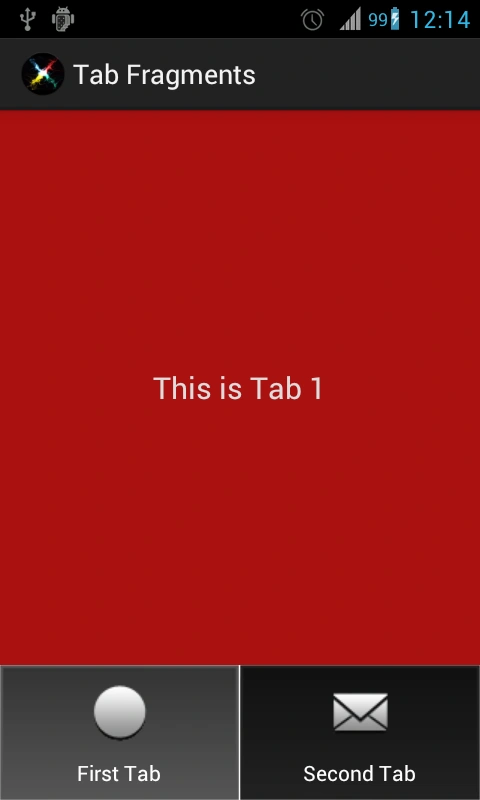
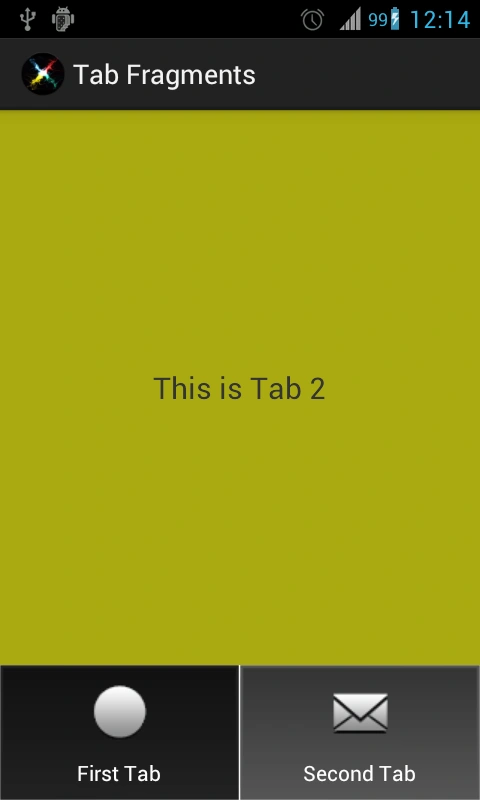
This is the result:
Happy Coding.


arigatooPosted Sep 11, 2013, 12:48 PM
Great!! thanks a lot :D
koutuk itPosted Jun 18, 2013, 12:38 PM
thanks Bro U save my day
santhosh kumarPosted May 4, 2013, 2:24 PM
Good work. Thanks. Could you please tell me How can i start a new fragment under same tab? Pressing back button should take me to previous fragment. Thanks in advance.
elbert yagayaeditedPosted Mar 14, 2013, 3:51 AMEdited Mar 14, 2013, 5:35 AM
Awesome! Cheers!