
Chain, parallelize, and route between specialized agents over the same knowledge graph
Introduction
In Part 1, we built a knowledge graph. In Part 2, we exposed it as an MCP server. In Part 3, we built the Knowledge Captain, a single agent that connects to that MCP server, reads a system prompt, and decides which search tool to call. It works well for simple questions, but it has limits.
Ask it "What are the leadership structure, technology choices, and strategic goals of Project Alpha?" and it will call one search tool, return one block of text, and hope that a single search covers all three aspects. There is no decomposition, no structured output, and no traceability into how the answer was built. For complex questions, a single agent doing everything in one pass produces shallow answers.
This part introduces three workflow patterns that solve this by composing multiple specialized agents. Each pattern uses the same MCP server and the same GraphRAG tools from Parts 1 and 2. The difference is in how agents are organized:
Sequential: a three-step pipeline where each agent's output feeds the next
Concurrent: two agents searching in parallel, then a third merging their results
Handoff: a router agent that classifies the query and delegates to a specialist
All three return a WorkflowResult with step-by-step tracing, timing data, and the final answer. You can inspect exactly which agent ran, what it received, and how long it took.
What You'll Learn
How to chain agents so each step's output becomes the next step's input
How to run parallel searches with
asyncio.gatherand separate MCP connectionsHow to build an explicit router that classifies queries and delegates to specialists
When to use each pattern and what trade-offs they involve
Practical lessons about prompt engineering,
global_searchperformance, and MCP concurrency
What Changed Since Part 3
| Change | Part 3 | Part 4 |
|---|---|---|
| Agents | 1 (Knowledge Captain) | 3 per workflow (specialized roles) |
| Routing | Implicit (system prompt) | Explicit (Router agent, logged step) |
| Output | Conversational text | WorkflowResult with step trace |
| Traceability | Black box | Full intermediate outputs with timing |
| Search strategy | GPT-4o decides each time | Controlled via prompt engineering and agent design |
Prerequisites
Completed Part 3 (or have the MCP server and agent layer working)
Python 3.11+
Poetry installed
Azure OpenAI with a GPT-4o deployment
MCP server running on port 8011
The Problem with a Single Agent
The Knowledge Captain from Part 3 handles one question at a time with one tool call. For a simple question like "Who leads Project Alpha?", that is enough: GPT-4o picks local_search, gets the answer, and formats it. The round trip takes about 5 to 15 seconds.
But for complex questions, the single-agent approach breaks down in three ways:
No decomposition. A multi-faceted question like "What are the key projects, who leads them, and how do they connect to the company strategy?" gets sent as-is to one search call. The agent cannot split it into parts, search for each one, and combine the results.
No traceability. You get a final answer but no visibility into what happened. Which tool was called? What did the raw search return? How did the agent transform it? In Part 3, you have to trust the black box.
No specialization. A single system prompt tries to handle entity lookup, thematic analysis, and report writing. The more responsibilities you add, the more the prompt grows, and the less focused the agent becomes.
Workflows solve these problems by splitting the work across multiple agents, each with a narrow responsibility and its own system prompt.
Architecture
All three workflow patterns share the same infrastructure. The workflows layer sits between the CLI and the agent layer:
Each workflow creates its own Agent instances using the same create_azure_client() and create_mcp_tool() factories from Part 3. The MCP server, the GraphRAG core module, and the knowledge graph itself are completely unchanged. Workflows are a layer of orchestration on top of what already exists.
Project Structure
maf-graphrag-series/
├── core/                      # Part 1 — unchanged
├── mcp_server/                # Part 2 — unchanged
├── agents/                    # Part 3 — unchanged
│   └── supervisor.py          # create_azure_client(), create_mcp_tool() reused by workflows
├── workflows/                 # NEW — Part 4
│   ├── __init__.py            # Public API re-exports
│   ├── base.py                # WorkflowResult, WorkflowStep, WorkflowType
│   ├── sequential.py          # ResearchPipelineWorkflow
│   ├── concurrent.py          # ParallelSearchWorkflow
│   └── handoff.py             # ExpertHandoffWorkflow
├── run_workflow.py            # NEW — Interactive CLI
└── run_mcp_server.py          # Part 2 — unchanged
No new dependencies were added. All three workflows use the same agent-framework-core and agent-framework-orchestrations packages from Part 3.
WorkflowResult: The Common Return Type
Every workflow returns a WorkflowResult, which is the key difference from Part 3's plain text responses:
@dataclassclass WorkflowResult:
    answer: str                     # Final synthesized answer
    workflow_type: WorkflowType     # sequential | concurrent | handoff
    steps: list[WorkflowStep]       # All intermediate agent outputs
    total_elapsed_seconds: float    # Wall-clock time for entire workflow
    query: str                      # Original user query
Each WorkflowStep records one agent's execution:
@dataclassclass WorkflowStep:
    agent_name: str          # e.g. "QueryAnalyzer", "Router"
    input_summary: str       # Short description of the input
    output: str              # Agent's full output text
    elapsed_seconds: float   # Time for this step
    metadata: dict           # Optional (search_type, parallel flag, etc.)
This makes every workflow auditable. You can call result.step_summary() and see exactly which agents ran, what each one produced, and how long each step took.
Pattern 1: Sequential Pipeline
The sequential workflow is a three-step chain. Each agent receives the output of the previous agent as part of its input, building context as the pipeline progresses.
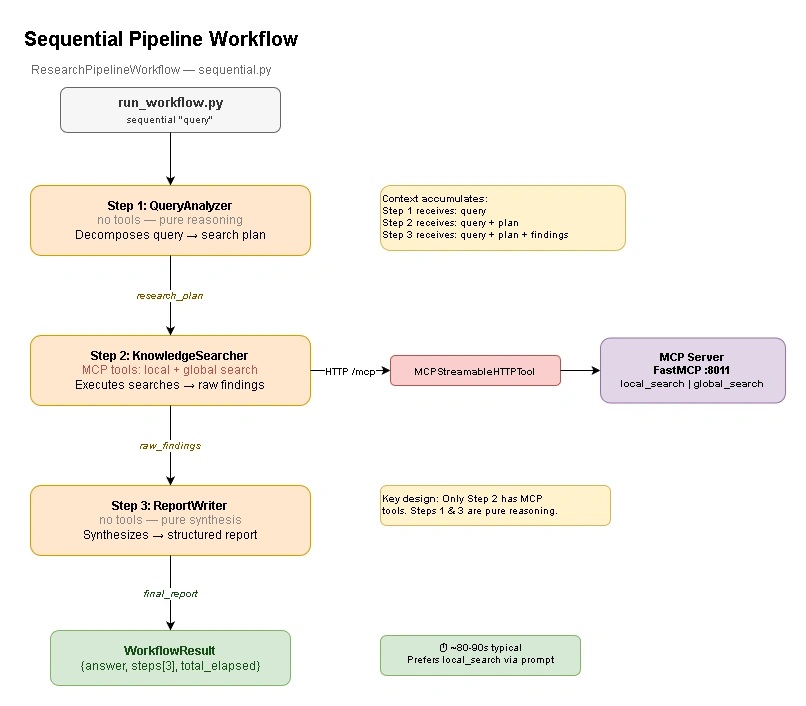
Three-step chain where context accumulates through each step. Only the middle agent has MCP tools; the other two reason over text.
The Three Agents
| Step | Agent | Tools | Role |
|---|---|---|---|
| 1 | QueryAnalyzer | None | Decomposes the query into a structured research plan |
| 2 | KnowledgeSearcher | MCP (local_search, global_search) | Executes searches based on the plan |
| 3 | ReportWriter | None | Synthesizes raw findings into a structured report |
Only the KnowledgeSearcher has MCP tools. Giving all three agents access to MCP would be wasteful — the QueryAnalyzer only needs to reason about the question, and the ReportWriter only needs to organize text. Restricting tool access to the agent that actually searches keeps each role focused.
Agent Creation
All three agents are created in a factory function that takes a single MCP tool:
def _create_sequential_agents(
    mcp_tool: "MCPStreamableHTTPTool",
) -> tuple["Agent", "Agent", "Agent"]:
    from agent_framework import Agent

    client = create_azure_client()

    # Step 1: Pure reasoning — no MCP tools
    query_analyzer = Agent(
        client=client,
        name="query_analyzer",
        instructions=_QUERY_ANALYZER_PROMPT,
        tools=[],
    )

    # Step 2: MCP search — the only agent with search tools
    knowledge_searcher = Agent(
        client=client,
        name="knowledge_searcher",
        instructions=_KNOWLEDGE_SEARCHER_PROMPT,
        tools=[mcp_tool],
    )

    # Step 3: Pure synthesis — no MCP tools
    report_writer = Agent(
        client=client,
        name="report_writer",
        instructions=_REPORT_WRITER_PROMPT,
        tools=[],
    )

    return query_analyzer, knowledge_searcher, report_writer
The Data Flow
The pipeline passes context forward through intermediate string variables. Each agent receives the original query plus everything produced so far:
# Step 1: Analyze → research plan
analysis_result = await self._query_analyzer.run(
    f"Analyze this research question and produce a search plan:\n\n{query}"
)
research_plan = analysis_result.text

# Step 2: Search with plan as context
search_result = await self._knowledge_searcher.run(
    f"Original question: {query}\n\n"
    f"Research plan:\n{research_plan}\n\n"
    "Execute all relevant searches and return the raw findings."
)
raw_findings = search_result.text

# Step 3: Synthesize into structured report
report_result = await self._report_writer.run(
    f"Original question: {query}\n\n"
    f"Research plan:\n{research_plan}\n\n"
    f"Raw search findings:\n{raw_findings}\n\n"
    "Write a well-structured report that answers the original question."
)
final_report = report_result.text
Notice that Step 3 receives both research_plan and raw_findings. This means the ReportWriter can cross-reference the original plan against the actual findings, producing output that directly addresses each part of the question.
The Context Manager
The workflow class manages the MCP connection lifecycle with async with:
class ResearchPipelineWorkflow:
    def __init__(self, mcp_url: str | None = None):
        self._mcp_url = mcp_url
        self._mcp_tool = None

    async def __aenter__(self) -> "ResearchPipelineWorkflow":
        self._mcp_tool = create_mcp_tool(self._mcp_url)
        await self._mcp_tool.__aenter__()
        self._query_analyzer, self._knowledge_searcher, self._report_writer = (
            _create_sequential_agents(self._mcp_tool)
        )
        return self

    async def __aexit__(self, exc_type, exc_val, exc_tb):
        if self._mcp_tool:
            await self._mcp_tool.__aexit__(exc_type, exc_val, exc_tb)
One MCP connection is opened when the workflow starts and shared across all three agents. Since they run sequentially, there is no concurrency issue.
System Prompt: QueryAnalyzer
The first agent's prompt is designed to produce a structured plan rather than an answer:
_QUERY_ANALYZER_PROMPT = """You are a Research Planner. Your job is to analyze
a user's question and produce a structured search plan for querying a knowledge
graph about TechVenture Inc.

## Your Output Format
- **primary_question**: The core question to answer
- **search_type**: "local" (specific entities) or "global" (themes/patterns)
- **entities_of_interest**: List of specific entity names to focus on
- **sub_questions**: 1-3 specific sub-questions that together answer the main query

## Rules
- Prefer "local" whenever the question mentions specific entities, projects,
  people, or technologies
- Only recommend "global" for very broad organizational/strategic overview questions
"""
The rule "Prefer local" is deliberate. local_search completes in 5 to 15 seconds with a single LLM call. global_search uses map-reduce across all 32 community reports, which means roughly 32 LLM calls and 60 to 140 seconds of execution time. By biasing the planner toward local_search, the entire pipeline stays fast for entity-focused questions.
System Prompt: KnowledgeSearcher
The search agent has explicit constraints to prevent excessive tool calls:
_KNOWLEDGE_SEARCHER_PROMPT = """You are a Knowledge Graph Searcher.

## Available Tools
- **local_search**: Fast, entity-focused. Preferred for most queries.
- **global_search**: Slow (map-reduce across all communities).
  Use ONLY for broad organizational overview questions.

## Instructions
1. Read the research plan carefully
2. **Strongly prefer local_search**
3. Only use global_search if the question explicitly asks for
   organizational-wide themes
4. **Never call global_search more than once**
5. Combine sub-questions into a single well-crafted search query
   when possible, rather than making separate calls
"""
Without the "Never call more than once" constraint, GPT-4o was calling search tools two to five times per step. Each extra global_search call adds another 60+ seconds. Prompt engineering was the most effective performance optimization in the entire project.
When to Use Sequential
The sequential pipeline is best for complex, multi-part questions that benefit from structured decomposition before searching. It produces the most detailed output of the three patterns and provides full traceability through all three steps.
Real-world timing: ~80 to 90 seconds for a typical query (with local_search). Most of the time is in Step 2, where the KnowledgeSearcher executes the actual MCP searches.
Pattern 2: Concurrent Search
The concurrent workflow takes a different approach. Instead of decomposing a query into steps, it searches from two perspectives at the same time and merges the results.
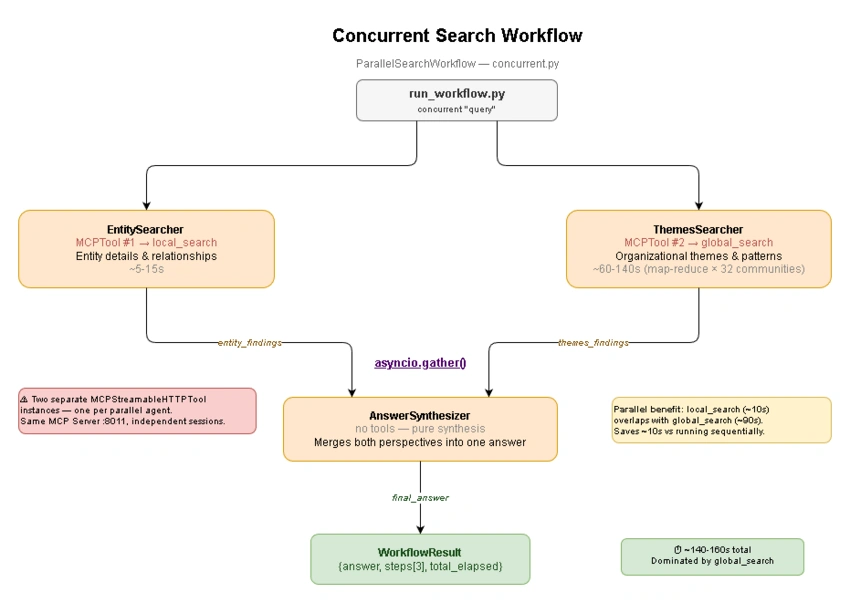
Fork-join pattern. Two agents search independently in parallel, then a third synthesizer merges both perspectives into one answer.
The Three Agents
| Step | Agent | Tools | Runs |
|---|---|---|---|
| 1 | EntitySearcher | MCP #1 (local_search) | Parallel |
| 2 | ThemesSearcher | MCP #2 (global_search) | Parallel |
| 3 | AnswerSynthesizer | None | After both finish |
The EntitySearcher calls local_search for entity-level detail (people, projects, relationships). The ThemesSearcher calls global_search for cross-cutting patterns (strategic themes, technology trends). The AnswerSynthesizer has no tools; it merges both text outputs into a unified answer.
The Concurrency Problem: Separate MCP Connections
This is the most important implementation detail in the concurrent workflow. When two agents run in parallel with asyncio.gather, they cannot share a single MCPStreamableHTTPTool instance. The tool manages an HTTP session internally, and concurrent writes to the same session can interleave or fail.
The solution is straightforward: create two independent MCP tool instances.
class ParallelSearchWorkflow:
    async def __aenter__(self) -> "ParallelSearchWorkflow":
        # Two separate connections — one per concurrent agent
        self._entity_mcp_tool = create_mcp_tool(self._mcp_url)
        self._themes_mcp_tool = create_mcp_tool(self._mcp_url)

        await self._entity_mcp_tool.__aenter__()
        await self._themes_mcp_tool.__aenter__()

        self._entity_searcher, self._themes_searcher, self._answer_synthesizer = (
            _create_parallel_agents(self._entity_mcp_tool, self._themes_mcp_tool)
        )
        return self
Both connections point to the same MCP server at http://127.0.0.1:8011/mcp, but they are independent HTTP sessions. This is functionally identical to opening two browser tabs pointing to the same website.
Cleanup in Concurrent Workflows
With two MCP connections, the cleanup logic needs to handle failures independently. If one connection throws an error during __aexit__, the other still needs to close:
async def __aexit__(self, exc_type, exc_val, exc_tb):
    for tool in (self._entity_mcp_tool, self._themes_mcp_tool):
        if tool:
            try:
                await tool.__aexit__(None, None, None)
            except Exception:
                pass  # Cleanup errors are non-fatal
Passing None instead of the original exception context is intentional. If the workflow raised an error during execution, we do not want to propagate that into the cleanup of an unrelated connection. Each connection should close cleanly on its own terms.
The Parallel Execution
The actual parallel execution uses asyncio.gather:
async def run(self, query: str) -> WorkflowResult:
    # Build prompts for each searcher
    entity_prompt = (
        f"Find specific entity details that answer this question:\n\n{query}\n\n"
        "Focus on people, projects, teams, and their direct relationships."
    )
    themes_prompt = (
        f"Find organizational themes and patterns related to:\n\n{query}\n\n"
        "Focus on strategic goals, cross-cutting initiatives, and structural patterns."
    )

    # Run both searches at the same time
    entity_task = self._entity_searcher.run(entity_prompt)
    themes_task = self._themes_searcher.run(themes_prompt)
    entity_result, themes_result = await asyncio.gather(entity_task, themes_task)

    # Step 3: Synthesize both perspectives
    synthesis_prompt = (
        f"Original question: {query}\n\n"
        f"## Entity Details (from local search)\n{entity_result.text}\n\n"
        f"## Organizational Themes (from global search)\n{themes_result.text}\n\n"
        "Synthesize both perspectives into a single comprehensive answer."
    )
    synthesis_result = await self._answer_synthesizer.run(synthesis_prompt)
Both search tasks are created as coroutines and handed to asyncio.gather, which runs them concurrently. When both finish, the synthesizer receives the combined output.
Speed Reality
The parallel benefit is real but limited. local_search takes about 5 to 15 seconds; global_search takes 60 to 140 seconds. Running them in parallel saves the duration of local_search (the shorter one), but the total is still dominated by global_search:
Sequential (no parallelism):   │── local (10s) ──│── global (90s) ──│ = 100s
Concurrent (asyncio.gather):   │── local (10s)  ──│                  = 90s
                               │── global (90s) ──│
This means the concurrent workflow is, counterintuitively, the slowest of the three patterns in absolute terms. Sequential and handoff can avoid global_search entirely for entity-focused queries, finishing in ~80s and ~15s respectively. Concurrent always triggers both search types.
When to Use Concurrent
Use the concurrent workflow when the question genuinely requires both entity details and organizational themes. Questions like "What are the main projects and who leads them?" or "Describe the team structure and strategic initiatives" benefit from the dual perspective. For questions that only need one perspective, the handoff pattern is faster.
Real-world timing: ~140 to 160 seconds (dominated by global_search).
Pattern 3: Expert Handoff
The handoff workflow introduces an explicit routing step. A lightweight Router agent reads the question, classifies it into a category, and delegates to the appropriate specialist. The routing decision is logged as a discrete step in WorkflowResult, making it auditable.
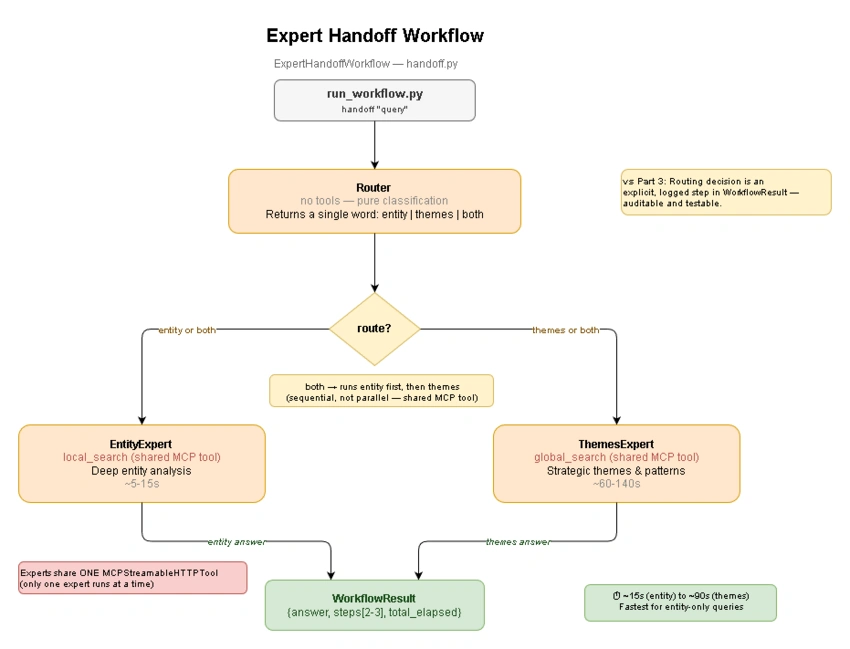
Router agent classifies the query, then delegates to a specialist. The routing decision is a logged step, unlike Part 3's implicit tool selection.
The Agents
| Step | Agent | Tools | Role |
|---|---|---|---|
| 1 | Router | None | Classifies query as "entity", "themes", or "both" |
| 2a | EntityExpert | MCP (local_search) | Deep entity analysis |
| 2b | ThemesExpert | MCP (global_search) | Broad thematic analysis |
The Router has no MCP tools. It only reads the query and returns a single word. The specialists share the same MCP tool instance because they never run concurrently — if the Router decides "both", they execute one after the other.
The Router Prompt
The Router's system prompt is designed for a single-word output:
_ROUTER_PROMPT = """You are a Query Router for a knowledge graph system
about TechVenture Inc.

Your ONLY job is to classify an incoming query into one of three categories:
- **entity**: Questions about specific people, projects, teams, technologies.
  Examples: "Who leads Project Alpha?", "What team works on Project Beta?"
- **themes**: Questions about organizational patterns, strategic direction.
  Examples: "What are the main initiatives?", "Summarize the technology strategy"
- **both**: Questions requiring both entity details AND organizational context.
  Examples: "What are the projects and who leads them?"

## Output Format
Return ONLY a single word: entity, themes, or both.
No explanation. No punctuation. Just the category word."""
The prompt asks for a single word with no punctuation. In practice GPT-4o occasionally adds a period or extra text, so the parsing function handles that:
def _parse_route(router_output: str) -> RouteDecision:
    cleaned = router_output.strip().lower().rstrip(".,;")
    if "entity" in cleaned and "themes" not in cleaned:
        return "entity"
    if "themes" in cleaned and "entity" not in cleaned:
        return "themes"
    return "both"  # Default to "both" for safety
The fallback to "both" ensures the question always gets answered, even if the Router's output is ambiguous.
Routing and Delegation
After the Router classifies the query, the workflow delegates to the appropriate specialist:
# Step 1: Router classifies the query
route_result = await self._router.run(f"Classify this query: {query}")
route_decision = _parse_route(route_result.text)

# Step 2: Hand off to specialist(s)
final_answer_parts: list[str] = []

if route_decision in ("entity", "both"):
    entity_result = await self._entity_expert.run(query)
    final_answer_parts.append(entity_result.text)

if route_decision in ("themes", "both"):
    themes_result = await self._themes_expert.run(query)
    final_answer_parts.append(themes_result.text)

# Combine when both specialists ranif route_decision == "both" and len(final_answer_parts) == 2:
    final_answer = (
        "## Entity Details\n\n" + final_answer_parts[0]
        + "\n\n## Organizational Themes\n\n" + final_answer_parts[1]
    )
else:
    final_answer = final_answer_parts[0]
When the route is "both", both specialists run sequentially (not in parallel) because they share a single MCP tool instance. Running them in parallel would require two MCP connections, like the concurrent workflow. For the handoff pattern, the simplicity of a shared connection is worth the extra seconds.
Versus Part 3's Implicit Routing
In Part 3, GPT-4o decides which tool to call based on the system prompt. It works, but the decision is invisible. You see the final answer but do not know which tool was selected or why.
In the handoff pattern, the Router's decision is stored in WorkflowResult.steps[0]:
result = await workflow.run("Who leads Project Alpha?")

print(result.steps[0].output)
# "Decision: entity (raw: 'entity')"

print(result.steps[1].agent_name)
# "EntityExpert"
This is the primary advantage of the handoff pattern: auditability. In production systems where routing decisions need to be logged, reviewed, or used for analytics, having an explicit Router step is valuable.
When to Use Handoff
The handoff pattern is best when you need auditable routing, when you have multiple specialist agents with different capabilities, or when adding new specialists should not require changing existing ones. For simple entity questions, it is also the fastest pattern because the Router adds minimal overhead (under 1 second) and the EntityExpert avoids global_search entirely.
Real-world timing: ~15 seconds for entity queries (Router + EntityExpert with local_search), ~90 seconds for theme queries (Router + ThemesExpert with global_search).
Choosing the Right Pattern
After building all three, the natural question is: when should you use which one?
| Scenario | Recommended Pattern | Typical Time | Why |
|---|---|---|---|
| "Who leads Project Alpha?" | Handoff (or Part 3) | ~15s | Simple entity query, local_search only |
| "What are the main strategic themes?" | Handoff | ~90s | Single specialist with global_search |
| "Describe projects and who leads them" | Concurrent | ~140–160s | Needs both perspectives simultaneously |
| "Comprehensive report on technology strategy" | Sequential | ~80–90s | Benefits from decomposition and structured output |
| Real-time chat | Part 3 single agent | ~5–15s | Lowest latency, single search call |
| Research or report generation | Sequential | ~80–90s | Full step trace, structured report format |
The performance difference between patterns comes down to one thing: whether global_search is triggered. Any workflow that calls global_search will take 60 to 140 seconds because of its map-reduce architecture (roughly 32 LLM calls over all community reports). local_search uses vector similarity with a single LLM call and finishes in 5 to 15 seconds.
Sequential and handoff are both optimized via prompt engineering to prefer local_search, which makes them faster for most queries. Concurrent always runs both search types, so it is consistently the slowest.
Running the Workflows
Start the MCP server in one terminal and the workflow CLI in another:
# Terminal 1: Start MCP server
poetry run python run_mcp_server.py

# Terminal 2: Interactive workflow selector
poetry run python run_workflow.py
The interactive mode shows a menu with all three workflows:
╭───── Part 4: Workflow Patterns ─────╮
│ Command     Pattern           Steps   │
│ sequential  Research Pipeline  ...  │
│ concurrent  Parallel Search    ...   │
│ handoff     Expert Routing     ...  │
╰─────────────────────────────────────╯

Type a workflow name (sequential / concurrent / handoff):
You can also run workflows directly from the command line:
# Sequential: complex multi-part research
poetry run python run_workflow.py sequential "What are the key projects and their tech stack?"

# Concurrent: dual-perspective questions
poetry run python run_workflow.py concurrent "Who are the technical leads and what technologies does TechVenture focus on?"

# Handoff: specialist routing
poetry run python run_workflow.py handoff "What are the main strategic initiatives at TechVenture Inc?"
Output
Every workflow displays a step trace table and the final answer. Here is what a sequential run looks like:
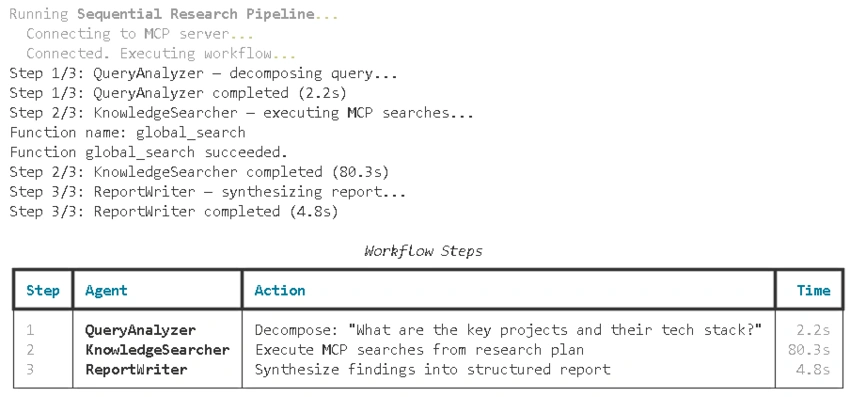
╭─── Sequential Workflow Result ───╮
│                                  │
│  ## Executive Summary                                                │
│  TechVenture Inc. is  ..          │
│  Project Alpha ...               │
│                                  │
╰──────── 87.3s total · 3 steps ────╯
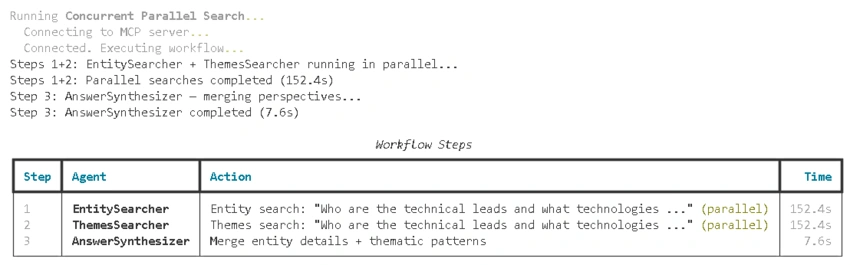
Concurrent run looks like:
And a handoff run for an entity question:
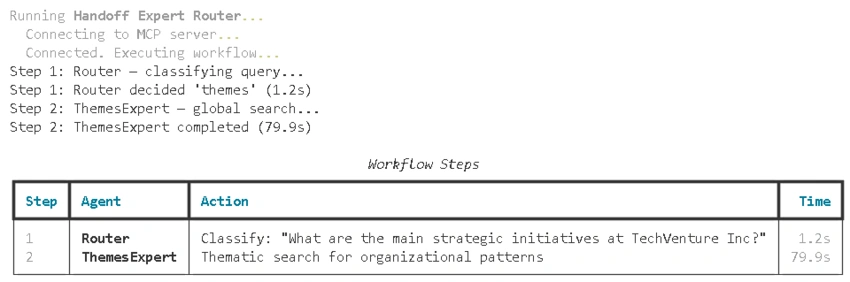
╭───── Handoff Workflow Result ────╮
│                                 │
│  TechVenture Inc.'s main                                │
│  strategic initiatives are centered are ..             │
╰──────── 81.1s total · 2 steps ────────╯
Programmatic Usage
Workflows are designed to be embedded in larger applications:
import asyncio
from workflows import ResearchPipelineWorkflow, ParallelSearchWorkflow, ExpertHandoffWorkflow

async def main():
    # Sequential: structured research pipeline
    async with ResearchPipelineWorkflow() as wf:
        result = await wf.run("What is the technology strategy for Project Alpha?")
        print(result.answer)
        print(result.step_summary())

    # Concurrent: parallel local + global search
    async with ParallelSearchWorkflow() as wf:
        result = await wf.run("Who leads the main projects and what are the key themes?")
        print(result.answer)

    # Handoff: explicit router → specialist
    async with ExpertHandoffWorkflow() as wf:
        result = await wf.run("Who leads Project Alpha?")
        print(result.answer)

asyncio.run(main())
The async with block handles MCP connection lifecycle. If the MCP server is down, you get a ConnectionError at entry time, not a cryptic timeout during execution.
Key Lessons from Implementation
global_search costs 32 LLM calls, not one
This was the most impactful discovery during development. The GraphRAG documentation describes global_search as a "thematic search", which sounds like a single operation. In reality, it runs a map-reduce pipeline: one LLM call per community report (32 in our graph), plus a reduce call to merge all responses. Each call goes through Azure OpenAI, so the total execution time is 60 to 140 seconds depending on rate limits and throttling.
This is not a bug; it is how map-reduce community summarization works. But if you are building agents on top of GraphRAG, you need to know this upfront because it determines your entire performance profile. Every architectural decision in Part 4 — preferring local_search, constraining agents to one tool call, optimizing prompts — traces back to this reality.
LLM agents call tools more than once unless you constrain them
Without explicit constraints in the system prompt, GPT-4o would call search tools two to five times per agent step. The model's reasoning was usually sensible (it wanted more detail, or it split the question into parts), but each additional call multiplied latency.
The fix was adding "CRITICAL RULES" sections to each search agent's prompt:
## CRITICAL RULES
- Call **local_search exactly once** — a single call with one comprehensive query.
- **Never call local_search more than once.** Combine all aspects into one query.
This is aggressive prompt engineering, but it works. The agents still produce good answers with a single search call because GraphRAG's search functions already return comprehensive context.
MCPStreamableHTTPTool cannot be shared across concurrent agents
When building the concurrent workflow, the first attempt used a single MCPStreamableHTTPTool instance shared between the EntitySearcher and ThemesSearcher. Both ran via asyncio.gather. The result was intermittent failures: sometimes the tools worked, sometimes responses were garbled or incomplete.
The problem is that MCPStreamableHTTPTool manages an HTTP session internally. Two concurrent coroutines writing to the same session can interleave requests and responses. The fix is creating a separate tool instance per parallel agent, which means a separate HTTP connection to the MCP server. The MCP server handles multiple connections with no issues; it is the client-side session that requires isolation.
Logging suppression is necessary for usable output
Agent Framework, GraphRAG, LiteLLM, and httpx all log at INFO or WARNING level by default. During a global_search, LiteLLM logs each of the ~32 API calls. GraphRAG logs token-limit warnings. Agent Framework logs cancel-scope cleanup. The result is 60+ lines of noise before you see any useful output.
The CLI suppresses these by setting specific loggers to ERROR or CRITICAL level:
for _logger_name in (
    "litellm", "httpx", "httpcore", "openai", "azure", "mcp",
    "agent_framework._mcp",
    "agent_framework",
    "graphrag.query",
):
    logging.getLogger(_logger_name).setLevel(logging.ERROR)
This must happen before importing the libraries, which is why run_workflow.py has a few intentional E402 lint warnings (imports after non-import statements).
Each response_type parameter matters
GraphRAG's search functions accept a response_type parameter that controls the output format. The default produces detailed, multi-paragraph responses suitable for final answers. For intermediate workflow steps where the output will be processed by another agent, passing response_type="Single Paragraph" keeps the context window manageable and reduces token consumption.
What's Next
In Part 5, we will evaluate these workflows. How do you measure whether a sequential pipeline produces better answers than a single agent? How do you compare the handoff pattern's routing accuracy across different query types? Agent evaluation introduces metrics, reference answers, and automated judging to answer these questions systematically.
The workflow patterns from Part 4 are designed with evaluation in mind. Every WorkflowResult records the original query, the final answer, and all intermediate steps. This structure is exactly what an evaluation pipeline needs to compare output quality across patterns.
Join the conversation! Your thoughts help the community grow.