
Before I launch into the how-to portion of this document I would like to take
time to say thanks to a few influences.
Thank God for inventing aspirin, otherwise I would have certainly died from a
headache trying to figure this out.
Thanks to my wife for not killing me for being a neglectful husband.
Thanks to Eric Haden for his very helpful web page on
Track at Once
CD Burning.
I wrote this because I needed it. Being a card carrying member of Old Timers
Associated, I have a lot of beautiful music on vinyl. Being a card carrying
member of Poor Folks Associated, I can't afford to re-buy all of them on CD.
Most CD recording packages do a wonderful job for 99% of them. For the 1% that
are live concerts (many tracks and no gaps), they don't seem so good.
IMAPI2 is Microsoft's updated Image Mastering API. This is the API to use for
burning data and audio to optical discs. For languages like VB and C Sharp, you
can access most of the features directly but for event handling you will need an
"IMAPI2 Interop". There are several available but the only ones I have found are
in C Sharp so VB users are stuck using a wrapper (minor problems). Hence the
slightly over complicated examples brought here.
I started with a
document from MS that gave 8 simple steps for burning Disc at Once CDs. A
ton of aspirin later I hope this helps in your quest.
- Detect proper drive (IDiscMaster2 => IDiscRecorder2)
- Create Image
IRawCDImageCreator
- Configure the image
- Add tracks IRawCDImageCreator::AddTrack
- Configure burner
IDiscFormat2RawCD & burn your image
- Set up the drive IDiscFormat2RawCD::put_Recorder
- Set up required properties
- Prepare & write stream: IDiscFormat2RawCD::WriteMedia
A ton of aspirin later I hope that what I have
done helps in your quest.
Thanks MS!
There are many separate classes inside IMAPI but the two main components needed
for gapless audio recording are MsftRawCDImageCreator (which inherits
IRawCDImageCreator) and MsftDiscFormat2RawCD (which inherits IDiscFormat2RawCD
and DiscFormat2RawCD_Event). Instances of these two classes can not be created
with the standard new function. Instead you must call the CoCreateInstance
function. Use __uuidof(MsftDisc ...) for the class identifier and __uuidof(IDisc ...) for the interface identifier.
Dll Code:
// imapi2 class that is resposible for creating the image that
MsftRawCDImageCreator
DiscAtOnceImage = default(
MsftRawCDImageCreator);
// imapi2 class that writes the image to the disc
MsftDiscFormat2RawCD
DiscFormat2RawCD = default(
MsftDiscFormat2RawCD);
// these two classes can not be created with
the 'new' call
// they need to be created with calls
from CoCreateInstance
// CoCreateInstance Disc... requires
guiids for the IDisc... and MsftDisc... (which incorporates the interface and
the associated events)
Guid IRawCDImageCreatorGUID =
new Guid("25983550-9D65-49CE-B335-40630D901227");
Guid MsftRawCDImageCreatorGUID =
new System.Guid("25983561-9D65-49CE-B335-40630D901227");
Guid IDiscFormat2RawCDGUID =
new Guid("27354155-8F64-5B0F-8F00-5D77AFBE261E");
Guid MsftDiscFormat2RawCDGUID =
new Guid("27354128-7F64-5B0F-8F00-5D77AFBE261E");
IntPtr ip =
new IntPtr(0);
CoInitialize(ip);
DiscAtOnceImage = (
MsftRawCDImageCreator)CoCreateInstance(MsftRawCDImageCreatorGUID,
null, CLSCTX.CLSCTX_ALL,
IRawCDImageCreatorGUID);
DiscFormat2RawCD = (
MsftDiscFormat2RawCD)CoCreateInstance(MsftDiscFormat2RawCDGUID,
null, CLSCTX.CLSCTX_ALL,
IDiscFormat2RawCDGUID);
There are other classes used in the example and I will try to explain them as we
encounter them.
OK, first things first, later things later.
The list of available recorders must be retrieved and shown to the user. In this
example, the recorders are found in the constructor for AudioRecorder. Use
MsftDiscMaster2 to cycle through all available recorders. MsftDiscMaster2 lists
all available recorder and their "UniqueId" strings.
After that you must create an instance of IDiscRecorder2 and then you must
initialize the desired recorder using it's ID.
GUI Code:
MsftDiscMaster2
discMaster = new
MsftDiscMaster2();
private
IDiscRecorder2[] discRecorders;//
an array of all available recorders
...................................................
IDs[i] =
(uniqueRecorderID);
MsftDiscRecorder2
discRecorder = new
MsftDiscRecorder2();
discRecorders[i] = discRecorder;
discRecorder.InitializeDiscRecorder(IDs[i]);
Before anything else happens you must delare an instance of the
OpticalBurner.AudioRecorder.
Public
WithEvents adr As
New OpticalBurner.AudioRecorder
' instanciate the OpticalBurner.Audio Recorder
It is also important to make all projects COM-Visible to ensure that all events
from IMAPI travel all the way up the ladder to the user.
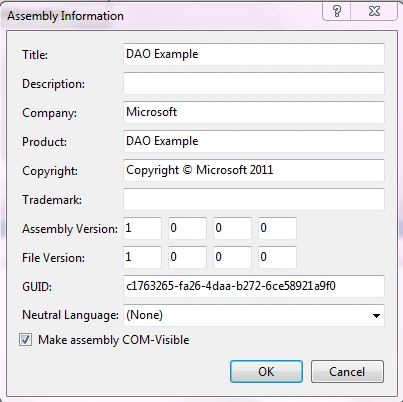
In the GUI's Form.Load event, I display each available recorder in a combo box:
GUI Code:
Do ' find as
many recorders as you can
s = ""
If adr.GetDriveName(i, s)
Then
devicesComboBox.Items.Add(s)
Else
If i > 0
Then ' by default
choose the first one
devicesComboBox.SelectedIndex = 0
End If
Exit
Do
End
If
i += 1
Loop While
True
You must be careful to pick the proper recorder when the selected index of the
combo box is changed.
GUI Code:
adr.CurrentIdIndex = devicesComboBox.SelectedIndex
adr.InitAudiorecorder()
Now that we have found all available recorders and
picked the one we want we need to add some music. IMAPI is very particular about
the music it will accept. Don't worry, it has selective bit taste, not music
taste. There is a proper format to the music. It must be in stereo .wav format.
It must be uncompressed PCM with a sampling rate of 44.1 KHz (44100 samples per
second). Fortunately, this is the most common wav format available. For more
info about wav format check out "The
Sonic Spot's" web page on the subject.
If the file is in the proper format you must strip off the header and put the
music into an IStream object. The stream must contain all the music and must
also be an even whole number of sectors. A CD's sector size is 2,352 bytes.
This is handled in the PrepareStream routine in the AudioRecorder class. The is
called when the user calls AddTracks.
DLL Code:
//
// The stream to be burned is
just to music portion of the wav file
//
private
IStream PrepareStream(int
i)
{
IStream wavStream =
null;
// define a new stream object
waveData = new
byte[Files[i].SizeOnDisc - 1 + 1];
// set aside an array of bytes big enough to hold all
the data
IntPtr fileData =
Marshal.AllocHGlobal((IntPtr)(Files[i].SizeOnDisc));//
create a pointer for use when we load the stream
FileStream fileStream =
File.OpenRead(Files[i].Filepath);//
Create a FileStream to read the file
int sizeOfHeader = (int)(Files[i].MusicStart);
// the length of the header has already been
determined therefore we know where the music starts
int MusicSize = (int)(Files[i].SizeOnDisc
- Files[i].MusicStart); // the
length of the music portion can be easily calculated
fileStream.Read(waveData, 0, System.Convert.ToInt32(Files[i].SizeOnDisc
- 1));// read the whole file
Marshal.Copy(waveData,
sizeOfHeader, fileData, MusicSize);//
copy just the music data into the pointer location
Nick MarinoPosted Nov 9, 2011, 12:31 PM
When trying to burn wave files that are 13-15 minutes in length an execption is throw from AllocHGlobal. "Insufficient memory to continue the execution of the program." is there a way to get around this issue? Smaller files seem to work fine. What is the limit on HGlobal?
Mahesh ChandPosted Oct 3, 2011, 9:45 AM
Lol :) "Thank God for inventing aspirin,"