

Introduction
This article shows how to use a RadioButtonList control in MVC using a HTML helper and binding with LINQ to SQL.
Database structure
Create a table in a database with the name department.
The following is the create table code for the department table:
- CREATE TABLE [dbo].[department]
- (
- [id] [int] NULL,
- [name] [varchar](50) NULL,
- [isselectd] [int] NULL
- )
Step 1
Right-click on the project and select "Add new item", then select Data from the templates.
Step 2
Choose "LINQ to SQL classes" from the list and provide a name. Now after clicking on Add, you can see the .dbml file in the project.
Step 3
Drag the department tables from the database in the Server Explorer.
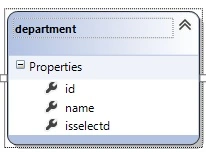
Create model class with name college
- using System;
- using System.Collections.Generic;
- using System.Linq;
- using System.Web;
- namespace mvcmodelfuncation.Models
- {
- public class college
- {
- public string selectdepartment { set; get; }
- public List<department> depatrmts
- {
- get {
- DataClasses1DataContext db = new DataClasses1DataContext();
- return db.departments.ToList();
- }
- }
- }
- }
Create home controller
- using System;
- using System.Collections.Generic;
- using System.Linq;
- using System.Web;
- using System.Web.Mvc;
- using mvcmodelfuncation.Models;
- namespace mvcmodelfuncation.Controllers
- {
- public class homeController : Controller
- {
- //
- // GET: /home/
- DataClasses1DataContext db = new DataClasses1DataContext();
- [HttpGet]
- public ActionResult deprt()
- {
- college cc = new college();
- return View(cc);
- }
- [HttpPost]
- public string deprt(college cs)
- {
- if (string.IsNullOrEmpty(cs.selectdepartment))
- {
- return "you did not select and department";
- }
- else
- {
- return "you selected department with id =" + cs.selectdepartment;
- }
- }
- }
- }
Create a view for showing the radiobuttonlist
Right-click on the Index ActionResult method and select Add View. After selecting Add View, a dialog box will open. The view name is deprt by default. Now select your model class and click on the OK button.
- @model mvcmodelfuncation.Models.college
- @{
- ViewBag.Title = "deprt";
- }
- <h2>deprt</h2>
- @using (Html.BeginForm())
- {
- foreach (var depart in Model.depatrmts)
- {
- @Html.RadioButtonFor(m=>m.selectdepartment,depart.id)
- @depart.name
- <br />
- }
- <br/>
- <br/>
- <input type="submit" value="submit"/>
- }
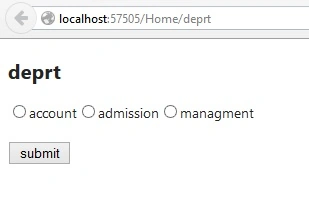
If we will click submit button without select any radiobutton let's see the output.
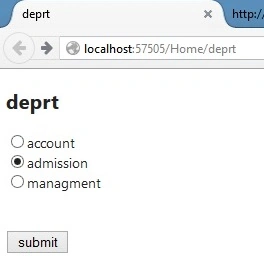
If we will click the submit button with select any radiobutton let's see the output.


Arrange the RadioButton vertically
- @model mvcmodelfuncation.Models.college
- @{
- ViewBag.Title = "deprt";
- }
- <h2>deprt</h2>
- @using (Html.BeginForm())
- {
- foreach (var depart in Model.depatrmts)
- {
- @Html.RadioButtonFor(m=>m.selectdepartment,depart.id)
- @depart.name
- <br/>
- }
- <br/>
- <br/>
- <input type="submit" value="submit"/>
- }
The following is the output of the preceding code.
Summary
In this article we learned how to use a RadioButtonList control in MVC using a HTML helper and binding with LINQ to SQL and arrange the RadioButtonList vertically and horizontally.
developerPosted Feb 12, 2017, 2:01 AM
Could you please explain me why do we require this property public string selectdepartment { set; get; } and also please explain me what does this line means @Html.RadioButtonFor(m=>m.selectdepartment,depart.id) @depart.name ....
Sanjay KumarPosted Jun 18, 2015, 1:23 AM
Nice Atul Rawat
Vipin TyagiPosted Jun 18, 2015, 12:14 AM
Awesome one Atul Rawat
Santhakumar MunuswamyPosted Jun 17, 2015, 3:17 PM
Thanks for nice article:)
Gopi ChandPosted Jun 17, 2015, 2:15 PM
Useful content
Debasis SahaPosted Jun 17, 2015, 1:36 PM
good one
Khan Abrar AhmedPosted Jun 17, 2015, 9:18 AM
Nice information
Rajeev RanjanPosted Jun 17, 2015, 8:26 AM
great @atul Rawat . such a nice article
Atul GuptaPosted Jun 17, 2015, 8:00 AM
Informative, thanks for sharing knowledge!
Ayush JaiswalPosted Jun 17, 2015, 7:55 AM
Nice