

PDF stands for Portable document format. PDFs comprise several things: fonts, graphics, text formatting, images, and OCR text recognition software. To generate a PDF from scratch, we must know how all these components work together and how they interact on the page.
Here, In this article we are going to see how to generate PDFs using C#. We will be cover the following contents in this tutorial. We will create a project in a visual studio. After that, we will install the C# PDF creator library for PDF generation. We can install the library through the NuGet website or from the Visual Studio NuGet Package manager. After that, we will see how we can generate PDF using HTML and CSS with customization like footers e.t.c.
How to create PDF File in C#
- Creating C# Project in Visual Studio for PDF Generation
- Installing PDF creation C# PDF Library using NuGet Package Manager
- Writing code to create PDF documents programmatically.
- Create a PDF file from HTML code
- Create PDF file from Code
- Output of the C# PDF creation library
Let's start creating PDF file programmatically:
Creating C# Project
We will use the Visual Studio 2022 version for creating the C# project. The latest version of Visual Studio is recommended. Open Visual Studio 2022. Follow the following steps for creating a C# project:
- Open Visual Studio 2022 and click on the "Create Project" button.
- Now select any C# application templates according to our project requirements. We will use the console application template.
- Give a name to the C# project.
- Now, We have to select the .NET framework. We will use the .NET 6.0 for this project. We can choose any framework according to our requirements, but the latest version is recommended.
After that, the project will be created. We can use an already existing project. Now it's time to install the IronPDF .net library, which will be helpful for us to create PDF files.
Installing IronPDF Library
IronPDF is a .NET pdf library that helps us to create and edit PDF files programmatically. It supports .NET 6, .Net 5, .Net Core, .Net Standard and .Net Framework. This can be installed in multiple ways. Here we will install IronPDF using the Package manager console. It is a straightforward way of installing IronPDF. Open the Package manager console and write the following command, and hit enter:
install-package ironpdf
It will install the IronPDF library in our project and will be available.

Writing code to create PDF documents programmatically
Now see the below code. The following code demosnstrate that how we can create PDF files progrmmatically. We can copy code and paste it in our project file.
using IronPdf;
var html = @"
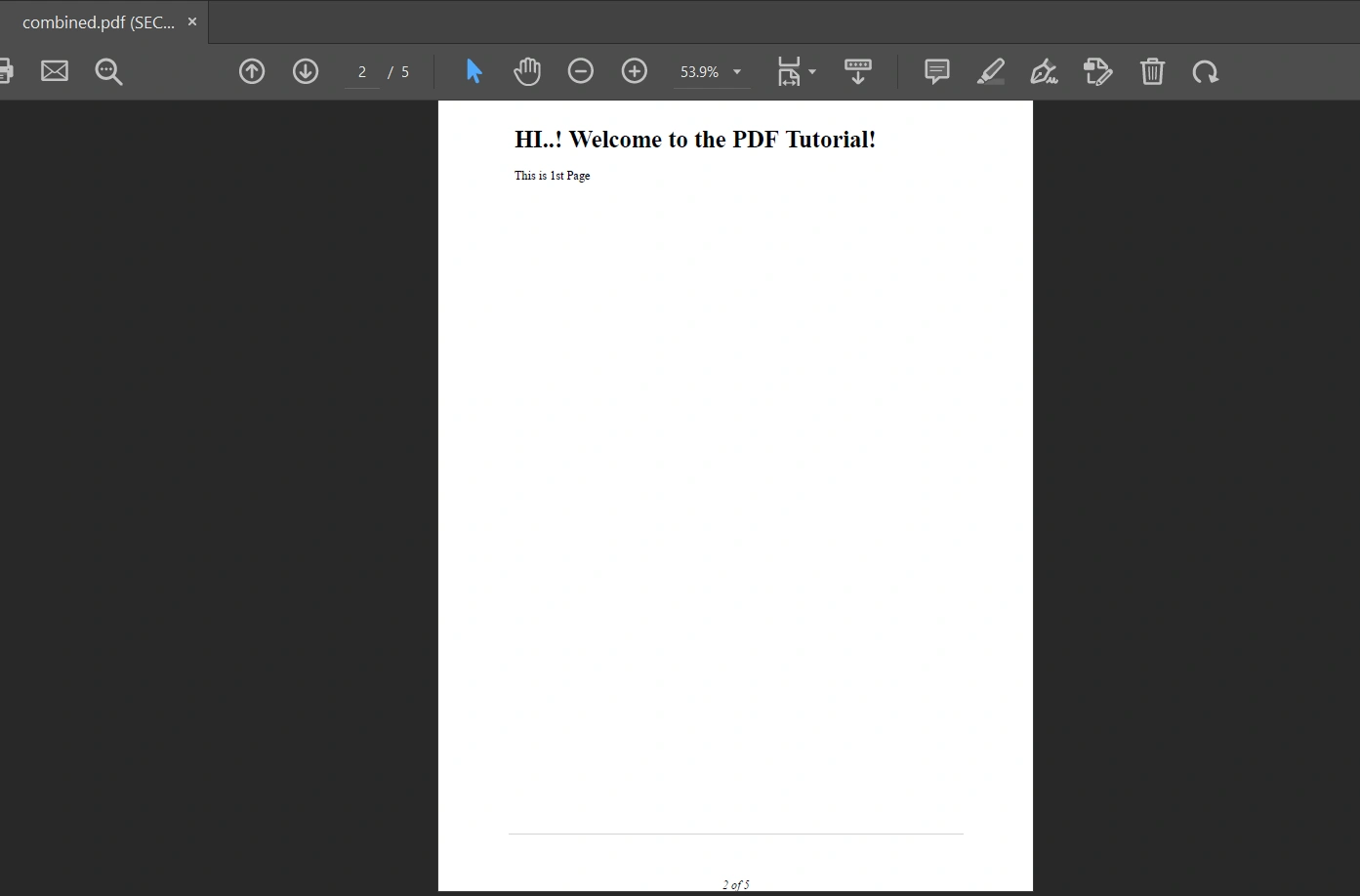
            <h1>HI..! Welcome to the PDF Tutorial!</h1>
            <p> This is 1st Page </p>
            <div style = 'page-break-after: always;' ></div>
            <h2> This is 2nd Page after page break!</h2>
            <div style = 'page-break-after: always;' ></div>
            <p> This is 3rd Page</p>
            <div style = 'page-break-after: always;' ></div>
            <link href=""https://fonts.googleapis.com/css?family=Libre%20Barcode%20128""rel = ""stylesheet"" ><p style = ""font-family: 'Libre Barcode 128', serif; font-size:30px;""> Hello Google Fonts</p>";

// Instantiate Renderer
var Renderer = new IronPdf.ChromePdfRenderer();
using var cover = Renderer.RenderHtmlAsPdf("<h1> This is Cover Page</h1>");

/* Main Document */
//As we have a Cover Page, we're going to start the page numbers at 2.
Renderer.RenderingOptions.FirstPageNumber = 2;

Renderer.RenderingOptions.HtmlFooter = new IronPdf.HtmlHeaderFooter()
{

    MaxHeight = 15, //millimeters
    HtmlFragment = "<center><i>{page} of {total-pages}<i></center>",
    DrawDividerLine = true
};

using PdfDocument Pdf = Renderer.RenderHtmlAsPdf(html);

//Merging PDF document with Cover page
using PdfDocument merge = IronPdf.PdfDocument.Merge(cover, Pdf);

//PDF Settings
merge.SecuritySettings.AllowUserCopyPasteContent = false;
merge.SecuritySettings.UserPassword = "sharable";

merge.SaveAs("combined.pdf");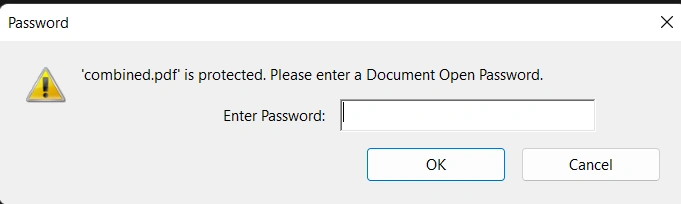


Win PetePosted Feb 19, 2025, 7:37 AM
I use IronPDF too—it works great for me as well! With just a few lines of code, I can quickly convert HTML to PDFs, add cover pages, merge documents, and set security options.
Jack HowlettPosted Sep 26, 2024, 5:32 PM
Hi i think this would be helpful! Try ZETPDF https://zetpdf.com/
Rodrigo LealPosted Jun 24, 2021, 7:18 PM
If I need to use iText 7 Core instead of iTextSharp.text;and iTextSharp.text.pdf; do you have any solution? Because the project is in .NetCore
Manju MPosted Jun 23, 2020, 7:36 AM
Hello Vivek, I want to generate a pdf with dynamic data fetching from SQL. example an application form with applicant data pdf should be likewise a physical application form with tables and images etc. how can I achieve the same. please help me out :)
Manju MPosted Jun 23, 2020, 7:31 AM
Hello Vivek,
Zahary DraykPosted Jan 6, 2020, 10:33 AM
Very helpful article, thank you for this one
Harish Reddy'sPosted Nov 7, 2019, 12:02 AM
- $exception {"Response is not available in this context."} System.Web.HttpException
Kaies OUKHAYPosted Jul 2, 2019, 9:08 AM
OK, unless I am missing it, what is Response?
Masoom MirPosted Sep 28, 2018, 1:18 AM
Hi Vevek, Thanks for article. How to create image into that ?
Josh GlasscockPosted May 15, 2018, 1:02 PM
OK, unless I am missing it, what is Response?
Vikas AgarwalPosted Jan 15, 2018, 6:09 AM
Thanks, Vivek it is a great article.
Bhavesh JadavPosted Nov 16, 2017, 11:23 PM
Helpful article, thanks vivek
puthiyavan krishnaPosted Jul 14, 2016, 7:48 AM
Every one can reply this
puthiyavan krishnaPosted Jul 14, 2016, 7:47 AM
Using System;using System.Collections.Generic; using System.Linq; using System.Web; using System.Web.UI; using System.Web.UI.WebControls; using System.Data; using System.Data.SqlClient; using System.Configuration; using System.Net; using System.Net.Mail; using System.Web.UI.HtmlControls; using System.IO; using System.Text; using iTextSharp.text; using iTextSharp.text.pdf; using iTextSharp.text.html.simpleparser; public partial class Report : System.Web.UI.Page { SqlConnection con = new SqlConnection(ConfigurationManager.ConnectionStrings["con"].ConnectionString); protected void Page_Load(object sender, EventArgs e) { if (!Page.IsPostBack) { BindPatienthistoryDropDown(); } } public override void VerifyRenderingInServerForm(Control control) { //It solves the error "Control 'GridView1' of type 'GridView' must be placed inside a form tag with runat=server." } protected void BindPatienthistoryDropDown() { SqlCommand cmd = new SqlCommand("select * from Patienthistory", con); DataTable dt = new DataTable(); SqlDataAdapter adp = new SqlDataAdapter(cmd); adp.Fill(dt); grEmp.DataSource = dt; grEmp.DataBind(); ddlPatienthistory.DataSource=Getdata(select* from Patienthistory,(name+''+Consultant)name from sampleid"); ddlPatienthistory.DataTextField="name"; ddlPatienthistory.DataValueField = "sampleid"; ddlPatienthistory.DataBind(); } private DataTable Patienthistory(string query) { string conString = ConfigurationManager.ConnectionStrings["con"].ConnectionString; SqlCommand cmd = new SqlCommand(query); using (SqlConnection con = new SqlConnection(conString)) { using (SqlDataAdapter sda = new SqlDataAdapter()) { cmd.Connection = con; sda.SelectCommand = cmd; using (DataTable dt = new DataTable()) { sda.Fill(dt); return dt; } } } } protected void btnExportToPdf_Click(object sender, EventArgs e) { DataRow dr = GetData("SELECT * FROM Patienthistory where sampleid = " + sampleid.SelectedItem.Value).Rows[0]; ; Document document = new Document(PageSize.A4, 88f, 88f, 10f, 10f); Font NormalFont = FontFactory.GetFont("Arial", 12, Font.NORMAL, Color.BLACK); using (System.IO.MemoryStream memoryStream = new System.IO.MemoryStream()) { PdfWriter writer = PdfWriter.GetInstance(document, memoryStream); Phrase phrase = null; PdfPCell cell = null; PdfPTable table = null; Color color = null; document.Open(); //Header Table table = new PdfPTable(2); table.TotalWidth = 500f; table.LockedWidth = true; table.SetWidths(new float[] { 0.3f, 0.7f }); //Company Logo cell = ImageCell("~/img/PK-logo-8.png", 30f, PdfPCell.ALIGN_LEFT); table.AddCell(cell); //Company Name and Address phrase = new Phrase(); phrase.Add(new Chunk("PK research Laborotories Pvt Ltd \n\n", FontFactory.GetFont("Arial", 16, Font.BOLD, Color.RED))); phrase.Add(new Chunk("Mumbai 400104", FontFactory.GetFont("Arial", 8, Font.NORMAL, Color.BLACK))); cell = PhraseCell(phrase, PdfPCell.ALIGN_RIGHT); cell.VerticalAlignment = PdfCell.ALIGN_TOP; table.AddCell(cell); // Separater Line color = new Color(System.Drawing.ColorTranslator.FromHtml("#A9A9A9")); DrawLine(writer, 25f, document.Top - 79f, document.PageSize.Width - 25f, document.Top - 79f, color); DrawLine(writer, 25f, document.Top - 80f, document.PageSize.Width - 25f, document.Top - 80f, color); document.Add(table); table = new PdfPTable(2); table.HorizontalAlignment = Element.ALIGN_LEFT; table.SetWidths(new float[] { 0.3f, 1f }); table.SpacingBefore = 20f; //Employee Details cell = PhraseCell(new Phrase("REPORT", FontFactory.GetFont("Arial", 12, Font.UNDERLINE, Color.BLACK)), PdfPCell.ALIGN_CENTER); cell.Colspan = 2; table.AddCell(cell); cell = PhraseCell(new Phrase(), PdfPCell.ALIGN_CENTER); cell.Colspan = 2; cell.PaddingBottom = 30f; table.AddCell(cell); //Name table.AddCell(PhraseCell(new Phrase("Name:", FontFactory.GetFont("Arial", 8, Font.BOLD, Color.BLACK)), PdfPCell.ALIGN_LEFT)); phrase = new Phrase(new Chunk(dr["name"] + "\n", FontFactory.GetFont("Arial", 8, Font.NORMAL, Color.BLACK))); table.AddCell(PhraseCell(phrase, PdfPCell.ALIGN_LEFT)); cell = PhraseCell(new Phrase(), PdfPCell.ALIGN_CENTER); cell.Colspan = 2; cell.PaddingBottom = 10f; table.AddCell(cell); table.AddCell(PhraseCell(new Phrase("Age:", FontFactory.GetFont("Arial", 8, Font.BOLD, Color.BLACK)), PdfPCell.ALIGN_LEFT)); phrase = new Phrase(new Chunk(dr["age"] + "\n", FontFactory.GetFont("Arial", 8, Font.NORMAL, Color.BLACK))); cell = PhraseCell(new Phrase(), PdfPCell.ALIGN_CENTER); cell.Colspan = 2; cell.PaddingBottom = 10f; table.AddCell(cell); table.AddCell(PhraseCell(new Phrase("Gender:", FontFactory.GetFont("Arial", 8, Font.BOLD, Color.BLACK)), PdfPCell.ALIGN_LEFT)); phrase = new Phrase(new Chunk(dr["gender"] + "\n", FontFactory.GetFont("Arial", 8, Font.NORMAL, Color.BLACK))); cell = PhraseCell(new Phrase(), PdfPCell.ALIGN_CENTER); cell.Colspan = 2; cell.PaddingBottom = 10f; table.AddCell(cell); table.AddCell(PhraseCell(new Phrase("Ethncity:", FontFactory.GetFont("Arial", 8, Font.BOLD, Color.BLACK)), PdfPCell.ALIGN_LEFT)); phrase = new Phrase(new Chunk(dr["ethncity"] + "\n", FontFactory.GetFont("Arial", 8, Font.NORMAL, Color.BLACK))); cell = PhraseCell(new Phrase(), PdfPCell.ALIGN_CENTER); cell.Colspan = 2; cell.PaddingBottom = 10f; table.AddCell(cell); table.AddCell(PhraseCell(new Phrase("Location:", FontFactory.GetFont("Arial", 8, Font.BOLD, Color.BLACK)), PdfPCell.ALIGN_LEFT)); phrase = new Phrase(new Chunk(dr["location"] + "\n", FontFactory.GetFont("Arial", 8, Font.NORMAL, Color.BLACK))); cell = PhraseCell(new Phrase(), PdfPCell.ALIGN_CENTER); cell.Colspan = 2; cell.PaddingBottom = 10f; table.AddCell(cell); table.AddCell(PhraseCell(new Phrase("SampleRtime:", FontFactory.GetFont("Arial", 8, Font.BOLD, Color.BLACK)), PdfPCell.ALIGN_LEFT)); phrase = new Phrase(new Chunk(dr["samplertime"] + "\n", FontFactory.GetFont("Arial", 8, Font.NORMAL, Color.BLACK))); cell = PhraseCell(new Phrase(), PdfPCell.ALIGN_CENTER); cell.Colspan = 2; cell.PaddingBottom = 10f; table.AddCell(cell); table.AddCell(PhraseCell(new Phrase("SampleAtime:", FontFactory.GetFont("Arial", 8, Font.BOLD, Color.BLACK)), PdfPCell.ALIGN_LEFT)); phrase = new Phrase(new Chunk(dr["sampleatime"] + "\n", FontFactory.GetFont("Arial", 8, Font.NORMAL, Color.BLACK))); cell = PhraseCell(new Phrase(), PdfPCell.ALIGN_CENTER); cell.Colspan = 2; cell.PaddingBottom = 10f; table.AddCell(cell); table.AddCell(PhraseCell(new Phrase("ddltest:", FontFactory.GetFont("Arial", 8, Font.BOLD, Color.BLACK)), PdfPCell.ALIGN_LEFT)); phrase = new Phrase(new Chunk(dr["ddltest"] + "\n", FontFactory.GetFont("Arial", 8, Font.NORMAL, Color.BLACK))); cell = PhraseCell(new Phrase(), PdfPCell.ALIGN_CENTER); cell.Colspan = 2; cell.PaddingBottom = 10f; table.AddCell(cell); table.AddCell(PhraseCell(new Phrase("Sampletype:", FontFactory.GetFont("Arial", 8, Font.BOLD, Color.BLACK)), PdfPCell.ALIGN_LEFT)); phrase = new Phrase(new Chunk(dr["sampletype"] + "\n", FontFactory.GetFont("Arial", 8, Font.NORMAL, Color.BLACK))); cell = PhraseCell(new Phrase(), PdfPCell.ALIGN_CENTER); cell.Colspan = 2; cell.PaddingBottom = 10f; table.AddCell(cell); table.AddCell(PhraseCell(new Phrase("Category:", FontFactory.GetFont("Arial", 8, Font.BOLD, Color.BLACK)), PdfPCell.ALIGN_LEFT)); phrase = new Phrase(new Chunk(dr["category"] + "\n", FontFactory.GetFont("Arial", 8, Font.NORMAL, Color.BLACK))); cell = PhraseCell(new Phrase(), PdfPCell.ALIGN_CENTER); cell.Colspan = 2; cell.PaddingBottom = 10f; table.AddCell(cell); table.AddCell(PhraseCell(new Phrase("Sampletest:", FontFactory.GetFont("Arial", 8, Font.BOLD, Color.BLACK)), PdfPCell.ALIGN_LEFT)); phrase = new Phrase(new Chunk(dr["sampletest"] + "\n", FontFactory.GetFont("Arial", 8, Font.NORMAL, Color.BLACK))); cell = PhraseCell(new Phrase(), PdfPCell.ALIGN_CENTER); cell.Colspan = 2; cell.PaddingBottom = 10f; table.AddCell(cell); table.AddCell(PhraseCell(new Phrase("Clientname:", FontFactory.GetFont("Arial", 8, Font.BOLD, Color.BLACK)), PdfPCell.ALIGN_LEFT)); phrase = new Phrase(new Chunk(dr["clientname"] + "\n", FontFactory.GetFont("Arial", 8, Font.NORMAL, Color.BLACK))); cell = PhraseCell(new Phrase(), PdfPCell.ALIGN_CENTER); cell.Colspan = 2; cell.PaddingBottom = 10f; table.AddCell(cell); table.AddCell(PhraseCell(new Phrase("Phone:", FontFactory.GetFont("Arial", 8, Font.BOLD, Color.BLACK)), PdfPCell.ALIGN_LEFT)); phrase = new Phrase(new Chunk(dr["phone"] + "\n", FontFactory.GetFont("Arial", 8, Font.NORMAL, Color.BLACK))); cell = PhraseCell(new Phrase(), PdfPCell.ALIGN_CENTER); cell.Colspan = 2; cell.PaddingBottom = 10f; table.AddCell(cell); table.AddCell(PhraseCell(new Phrase("Email:", FontFactory.GetFont("Arial", 8, Font.BOLD, Color.BLACK)), PdfPCell.ALIGN_LEFT)); phrase = new Phrase(new Chunk(dr["email"] + "\n", FontFactory.GetFont("Arial", 8, Font.NORMAL, Color.BLACK))); cell = PhraseCell(new Phrase(), PdfPCell.ALIGN_CENTER); cell.Colspan = 2; cell.PaddingBottom = 10f; table.AddCell(cell); table.AddCell(PhraseCell(new Phrase("Addtest:", FontFactory.GetFont("Arial", 8, Font.BOLD, Color.BLACK)), PdfPCell.ALIGN_LEFT)); phrase = new Phrase(new Chunk(dr["addtest"] + "\n", FontFactory.GetFont("Arial", 8, Font.NORMAL, Color.BLACK))); cell = PhraseCell(new Phrase(), PdfPCell.ALIGN_CENTER); cell.Colspan = 2; cell.PaddingBottom = 10f; table.AddCell(cell); table.AddCell(PhraseCell(new Phrase("Consultent:", FontFactory.GetFont("Arial", 8, Font.BOLD, Color.BLACK)), PdfPCell.ALIGN_LEFT)); phrase = new Phrase(new Chunk(dr["consultant"] + "\n", FontFactory.GetFont("Arial", 8, Font.NORMAL, Color.BLACK))); cell = PhraseCell(new Phrase(), PdfPCell.ALIGN_CENTER); cell.Colspan = 2; cell.PaddingBottom = 10f; table.AddCell(cell); table.AddCell(PhraseCell(new Phrase("Patienthistory:", FontFactory.GetFont("Arial", 8, Font.BOLD, Color.BLACK)), PdfPCell.ALIGN_LEFT)); phrase = new Phrase(new Chunk(dr["patienthistory"] + "\n", FontFactory.GetFont("Arial", 8, Font.NORMAL, Color.BLACK))); cell = PhraseCell(new Phrase(), PdfPCell.ALIGN_CENTER); cell.Colspan = 2; cell.PaddingBottom = 10f; table.AddCell(cell); document.Close(); byte[] bytes = memoryStream.ToArray(); memoryStream.Close(); Response.Clear(); Response.ContentType = "application/pdf"; Response.AddHeader("Content-Disposition", "attachment; filename=Employee.pdf"); Response.ContentType = "application/pdf"; Response.Buffer = true; Response.Cache.SetCacheability(HttpCacheability.NoCache); Response.BinaryWrite(bytes); Response.End(); Response.Close(); } } private static void DrawLine(PdfWriter writer, float x1, float y1, float x2, float y2, Color color) { PdfContentByte contentByte = writer.DirectContent; contentByte.SetColorStroke(color); contentByte.MoveTo(x1, y1); contentByte.LineTo(x2, y2); contentByte.Stroke(); } private static PdfPCell PhraseCell(Phrase phrase, int align) { PdfPCell cell = new PdfPCell(phrase); cell.BorderColor = Color.WHITE; cell.VerticalAlignment = PdfCell.ALIGN_TOP; cell.HorizontalAlignment = align; cell.PaddingBottom = 2f; cell.PaddingTop = 0f; return cell; } private static PdfPCell ImageCell(string path, float scale, int align) { iTextSharp.text.Image image = iTextSharp.text.Image.GetInstance(HttpContext.Current.Server.MapPath(path)); image.ScalePercent(scale); PdfPCell cell = new PdfPCell(image); cell.BorderColor = Color.WHITE; cell.VerticalAlignment = PdfCell.ALIGN_TOP; cell.HorizontalAlignment = align; cell.PaddingBottom = 0f; cell.PaddingTop = 0f; return cell; } }
Vivek KumarPosted Apr 18, 2016, 1:10 PM
Thank you Gajanan Shinde
Gajanan ShindePosted Apr 16, 2016, 3:44 AM
Nice Article..
H MyriePosted Mar 3, 2016, 12:44 AM
Thanks for sharing. Great job. How can I get a scanned document to pdf using your method?
Humayun Kabir MamunPosted Mar 2, 2016, 11:01 PM
Nice...
Pramod ThakurPosted Feb 25, 2016, 3:06 AM
nice share..
Anu VPosted Feb 22, 2016, 12:22 AM
good one..
Humayun Kabir MamunPosted Feb 16, 2016, 11:07 PM
Nice...
Naman JoshiPosted Feb 13, 2016, 2:45 AM
what if we want to pass a html string, how will it work ?
Sr KarthigaPosted Feb 10, 2016, 8:39 AM
nice share
Dorababu MekaPosted Feb 4, 2016, 1:04 AM
Good on vivek
Santhakumar MunuswamyPosted Feb 3, 2016, 3:06 PM
Welcome
Santhakumar MunuswamyPosted Feb 3, 2016, 3:06 PM
Good Start
Ankit SaxenaPosted Feb 3, 2016, 12:15 PM
Thanks for sharing.
sonu kumar AmarjeetPosted Feb 3, 2016, 8:15 AM
good job
Nanddeep NachanPosted Feb 3, 2016, 1:15 AM
Nice share
Amit Kumar SinghPosted Feb 3, 2016, 1:12 AM
Nice Share
Ranjeet PatraPosted Feb 3, 2016, 12:46 AM
Nice article
Shubham KumarPosted Feb 3, 2016, 12:29 AM
nice one
Sibeesh VenuPosted Feb 3, 2016, 12:29 AM
Nice Share
Raja TPosted Feb 2, 2016, 11:45 PM
Nice, thanks for sharing
Debasis SahaPosted Feb 2, 2016, 11:44 PM
Nice one..
Pankaj Kumar ChoudharyPosted Feb 2, 2016, 8:30 PM
Good Information Vivek.........
Mohammed IbrahimPosted Feb 2, 2016, 2:09 PM
nice
Muhammad Aqib ShehzadPosted Feb 2, 2016, 1:13 PM
nice