

We'll be using SQL SMO(SQL Management Objects).
First of All, you need to add a reference to the Microsoft.SqlServer.smo.dll file which is located in.
- For 64-bit Windows 7:[Your drive]:\Program Files (x86)\Microsoft SQL Server\100\SDK\Assemblies\Microsoft.SqlServer.Smo.dll.
- For 32-bit Windows 7:[Your drive]:\Program Files\Microsoft SQL Server\100\SDK\Assemblies\Microsoft.SqlServer.Smo.dll.
Now that we've added it to our project, we can start coding!
Add a ListBox control to your project.
DataTable dataTable = SmoApplication.EnumAvailableSqlServers(true);
listBox1.ValueMember = "Name";
listBox1.DataSource = dataTable;
By running this code alone,you'll get all the available sql servers inside your listbox control.
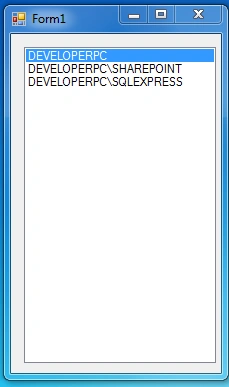
Ok, let's develop it further. Let's see what databases our instances have.
So to do this, you need to add another ListBox.Then in your listbox1's selectedindexchanged event, you need to check which server selected. So you need to create a server object first.
After this, you'll iterate through this server to populate all the databases in the newly created Listbox.
Here is the code to do that.
listBox2.Items.Clear();
if (listBox1.SelectedIndex != -1) {
    string serverName = listBox1.SelectedValue.ToString();
    Server server = new Server(serverName);
    try {
        foreach (Database database in server.Databases) {
            listBox2.Items.Add(database.Name);
        }
    } catch (Exception ex) {
        string exception = ex.Message;
    }
}
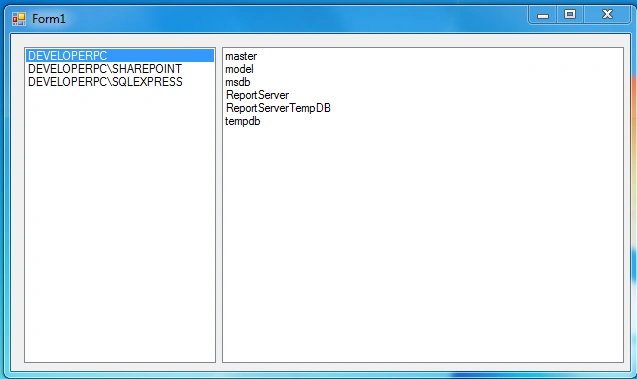
After we run the project we'll be getting our Databases.
Hope it helps!
Mayzar HlaingPosted May 15, 2019, 5:31 AM
Thank you so much
Dharmendra Kumar PanditPosted Jun 18, 2018, 1:47 AM
Thank you. Its a needful help. Its working fine. Thank u again.
yaqoop moneerPosted Aug 2, 2017, 8:18 AM
When run blank form no thing what's the problem
Humayun Kabir MamunPosted Mar 23, 2016, 2:58 AM
Nice...
Mark YorkovichPosted Dec 4, 2014, 8:13 AM
Thank you for this! I've been struggling with getting the right computer, server and database names for the different computers my application will be run on- this works like a charm!
sat cPosted Mar 22, 2014, 4:30 AM
I have added .dll file but got error - ----->Type or namespace name 'Server' could not be found
Co. AdenPosted Jan 8, 2014, 6:15 AM
To find Smo.dll go to this C:\Program Files\Microsoft SQL Server\100\SDK\AssembliesMicrosoft.SqlServer.Smo.dll; Microsoft.SqlServer.ConnectionInfo.dll
Devendra SarangPosted May 23, 2013, 2:54 AM
not working for me. i have used your code in my application but both listbox are empty.
Ibrahim ErsoyPosted Dec 8, 2012, 4:34 AM
Ok.im sharing my SMO dll with you: http://www.iersoy.com/download/smodll.rar reference to it.
babita poolaPosted Dec 7, 2012, 10:39 AM
SmoApplication.EnumAvailableSqlServers(true) how to get dis!!dnt find it in intellisense