

In this article, I will explain the steps to check all the SharePoint site collection usage details and the process of getting the same using Graph API. In the previous article, we have already seen how to get all organization users using Graph API.
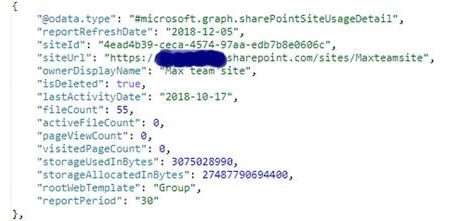
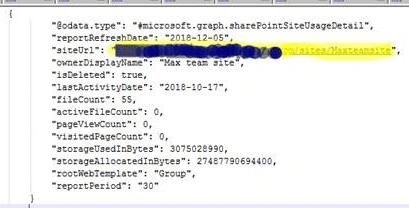
I need to get the file counts from the site collection and the storage information used against the storage allocated for that particular site collection. So, I have used the Graph API to get those details.
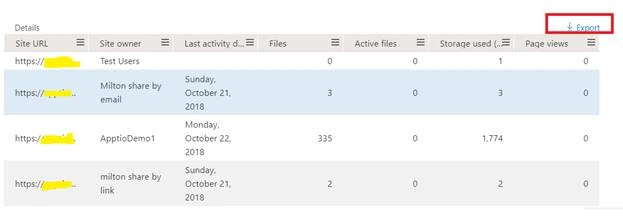
Let's see this sample output from Graph API site usage in the beta version.
What is Microsoft Graph API?
- It is Microsoft's developer platform used to connect multiple services.
- It provides the Rest API and client library access to the data from Azure, SharePoint, OneDrive, Outlook/Exchange, Microsoft Teams, OneNote, Planner, and Excel.
- Using the oAuth 2.0 token, we can authenticate Microsoft Graph API.
From Microsoft documentation
“Microsoft Graph is the gateway to data and intelligence in Microsoft 365. Microsoft Graph provides a unified programmability model that you can use to take advantage of the tremendous amount of data in Office 365, Enterprise Mobility + Security, and Windows 10.
You can use the Microsoft Graph API to build apps for organizations and consumers that interact with the data of millions of users. With Microsoft Graph, you can connect to a wealth of resources, relationships, and intelligence, all through a single endpoint: https://graph.microsoft.com”
Reference URL: https://developer.microsoft.com/en-us/graph/docs/concepts/overview
Here is the Microsoft Documentation URL,
https://developer.microsoft.com/en-us/graph/docs/concepts/overview
Steps to retrieve the SharePoint site usage details using node.js
Follow the below-listed steps and code.
- End Point URL: https://graph.microsoft.com/v1.0/reports/getSharePointSiteUsageDetail(period='D30')
- Graph Token URL: https://login.microsoftonline.com/{tenantID}/oauth2/v2.0/token
- Graph Token body: client_id=" + configValues.clientId + "&scope=" + configValues.scope + "&client_secret=" + configValues.clientSecretId + "&grant_type=client_credentials
Step 1. Register the app in Azure AD using that client ID, Tenant ID, and secret key.
Go through the below URL to register the app in Azure.
How to Register An App In Azure Active Directory
Make sure to check that your registered Azure app has permission to read the directory data.
Step 2. In your node.js solution, just create the config file and provide the below values. We have created the config file to avoid the hard-coded things. Provide your tenantId, clientId, and secret key (don't use the below-mentioned one, it is just a sample and won't work).
{
    "scope": "https%3A%2F%2Fgraph.microsoft.com%2F.default",
    "tenantId": "7aa111ae-1ab6-4256-af4c-a0c1cdb4575d",
    "clientId": "bff7fae8-c253-37e5-9b6a-e096bed54f11",
    "clientSecretId": "XgfrmWfX0K/N7SRouCdAskTKrz0cnKN2rS12IkJ9SJk="
}
Step 3. Refer to that config file in your JS file, as shown below.
var request = require('sync-request');
var fs = require('fs');
var configValues = JSON.parse(fs.readFileSync('sharepointusage.json'));
Step 4. Then, frame the Graph Token URL and Graph Token body to get the auth token.
var graphAccessUrl = "https://login.microsoftonline.com/" + configValues.tenantId + "/oauth2/v2.0/token";
var graphTokenBody = "client_id=" + configValues.clientId + "&scope=" + configValues.scope + "&client_secret=" + configValues.clientSecretId + "&grant_type=client_credentials";
Step 5. Get the Authorized token using the below method.
var contentType = "application/x-www-form-urlencoded; charset=utf-8";
var graphTokenError = "Failed to get graph token";
var graphToken = "";

// Call the get token method
getToken(graphAccessUrl, contentType, graphTokenBody, graphTokenError);

// This method is used to get the token from the graph token url and body
function getToken(url, type, content, errorMessage, callback) {
    var options = {
        'headers': {
            'Content-Type': type
        },
        'body': content
    };

    // Posting access parameters to the server
    var tokenResponse = httpPost(url, options);

    if (tokenResponse.statusCode === 200) {
        error = errorMessage;

        if (errorMessage === graphTokenError) {
            var token = JSON.parse(tokenResponse.body.toString('utf-8'));
            graphToken = token.access_token;
        }

        if (callback) {
            return callback();
        }
    } else {
        log(errorMessage);
    }
}
Ronika JencyPosted Dec 12, 2018, 3:20 AM
Kaviya Balasubramanian Nice Article
Jayakumar BalasubramaniamPosted Dec 11, 2018, 12:18 AM
Kaviya Balasubramanian Thanks for the article.. This is the one I'm looking for right now.