If you want to know how to get started with UI-Grid and how to set up a project in AngularJS and Web API, read the articles given below first.
- UI-Grid With AngularJS And WebAPI
- Export Data In Angular-UI-Grid Using WebAPI
- Filtering In UI-Grid With AngularJS And WebAPI
- Custom Scroll In AngularJS-UI-Grid With Web API
- Expandable grid in AngularJS-UI-Grid with Web API
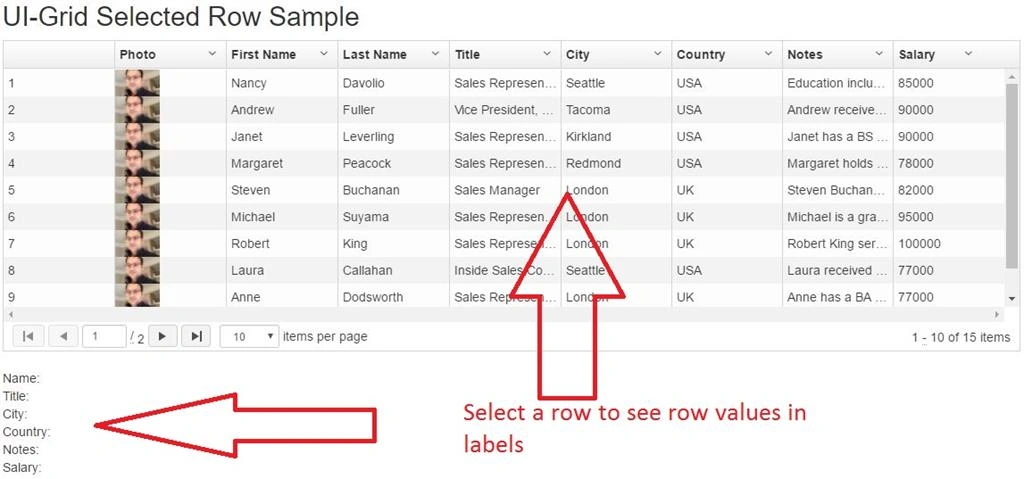
Angular-UI-Grid has selection row changed feature which gives you all column value from selected row.
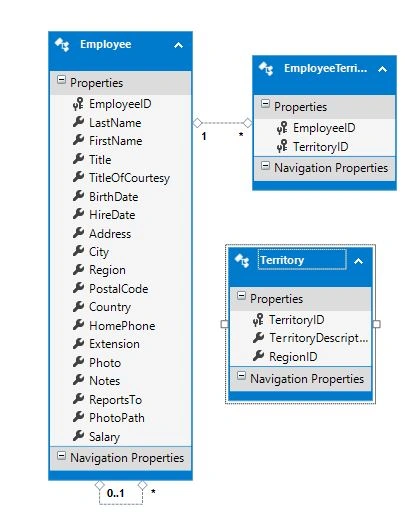
Again in this sample I am using NORTHWND sample database and Employee table data.
Entity Model
Web API
Here, my Web API class code is given below.
- using ng_ui_grid_sample.Models;
- using System.Collections.Generic;
- using System.Data.Entity;
- using System.Data.Entity.Infrastructure;
- using System.Linq;
- using System.Net;
- using System.Threading.Tasks;
- using System.Web.Http;
- using System.Web.Http.Description;
- namespace ng_ui_grid_sample.Controllers
- {
- [RoutePrefix("api/employeeapi")]
- public class EmployeesAPIController : ApiController
- {
- private NORTHWNDEntities3 db = new NORTHWNDEntities3();
- // GET: api/Employees
- [Route("get")]
- public IQueryable<Employee> GetEmployees()
- {
- return db.Employees;
- }
- // GET: api/Employees/5
- [Route("detail")]
- [ResponseType(typeof(Employee))]
- public async Task<IHttpActionResult> GetEmployees(int id)
- {
- Employee employees = await db.Employees.FindAsync(id);
- if (employees == null)
- {
- return NotFound();
- }
- return Ok(employees);
- }
- // PUT: api/Employees/5
- [ResponseType(typeof(void))]
- public async Task<IHttpActionResult> PutEmployees(int id, Employee employees)
- {
- if (!ModelState.IsValid)
- {
- return BadRequest(ModelState);
- }
- if (id != employees.EmployeeID)
- {
- return BadRequest();
- }
- db.Entry(employees).State = EntityState.Modified;
- try
- {
- await db.SaveChangesAsync();
- }
- catch (DbUpdateConcurrencyException)
- {
- if (!EmployeesExists(id))
- {
- return NotFound();
- }
- else
- {
- throw;
- }
- }
- return StatusCode(HttpStatusCode.NoContent);
- }
- // POST: api/Employees
- [ResponseType(typeof(Employee))]
- public async Task<IHttpActionResult> PostEmployees(Employee employees)
- {
- if (!ModelState.IsValid)
- {
- return BadRequest(ModelState);
- }
- db.Employees.Add(employees);
- await db.SaveChangesAsync();
- return CreatedAtRoute("DefaultApi", new { id = employees.EmployeeID }, employees);
- }
- // DELETE: api/Employees/5
- [ResponseType(typeof(Employee))]
- public async Task<IHttpActionResult> DeleteEmployees(int id)
- {
- Employee employees = await db.Employees.FindAsync(id);
- if (employees == null)
- {
- return NotFound();
- }
- db.Employees.Remove(employees);
- await db.SaveChangesAsync();
- return Ok(employees);
- }
- protected override void Dispose(bool disposing)
- {
- if (disposing)
- {
- db.Dispose();
- }
- base.Dispose(disposing);
- }
- private bool EmployeesExists(int id)
- {
- return db.Employees.Count(e => e.EmployeeID == id) > 0;
- }
- [Route("getterritoriesbyid")]
- public IEnumerable<EmployeeTerritory> GetEmployeeTerritoriesByEmployee(int id)
- {
- return (from et in db.EmployeeTerritories.AsEnumerable()
- join t in db.Territories.AsEnumerable() on et.TerritoryID equals t.TerritoryID
- where et.EmployeeID == id
- orderby et.TerritoryID
- select new EmployeeTerritory
- {
- EmployeeID = et.EmployeeID,
- TerritoryID = et.TerritoryID,
- TerritoryDescription = t.TerritoryDescription
- });
- }
- }
- }
- //Module
- var employeeapp = angular.module('employeeapp', ['ui.grid', 'ui.grid.pagination',
- 'ui.grid.selection', 'ui.grid.exporter',
- 'ui.grid.grouping', 'ui.grid.expandable']);
Service
- //Service
- employeeapp.service("employeeservice", function ($http, $timeout) {
- //Function to call get employee web api call
- this.GetEmployee = function () {
- var req = $http.get('api/employeeapi/get');
- return req;
- }
- //function to get territories based on employeeid
- this.GetTerritories = function (employeeId) {
- var req = $http.get('api/employeeapi/getterritoriesbyid?id=' + employeeId);
- return req;
- }
- });
Controller
- //Controller
- employeeapp.controller("empcontroller", function ($scope, employeeservice, $filter, $window, $interval, uiGridGroupingConstants, $timeout) {
- GetEmployee();
- function GetEmployee() {
- employeeservice.GetEmployee().then(function (result) {
- $scope.Employees = result.data;
- console.log($scope.Employees);
- }, function (error) {
- $window.alert('Oops! Something went wrong while fetching employee data.');
- })
- }
- //Columns
- $scope.columnDefs = [
- { name: '', field: 'EmployeeID', enableColumnMenu: false },
- { name: 'photo', enableSorting: false, field: 'PhotoPath', cellTemplate: "<img width=\"50px\" ng-src=\"{{grid.getCellValue(row, col)}}\" lazy-src>", enableCellEdit: false, enableFiltering: false, enableGrouping:false },
- { name: 'First Name', field: 'FirstName', headerCellClass: 'tablesorter-header-inner', enableCellEdit: true, enableFiltering: true, enableGrouping:false },
- { name: 'Last Name', field: 'LastName', headerCellClass: 'tablesorter-header-inner', enableCellEdit: true, enableFiltering: true, enableGrouping:false },
- { name: 'Title', field: 'Title', headerCellClass: 'tablesorter-header-inner', enableCellEdit: true, enableFiltering: false, enableGrouping:false },
- { name: 'City', field: 'City', headerCellClass: 'tablesorter-header-inner', enableCellEdit: true, enableFiltering: true, enableGrouping:false },
- { name: 'Country', field: 'Country', headerCellClass: 'tablesorter-header-inner', enableCellEdit: true, enableFiltering: true, enableGrouping:false },
- { name: 'Notes', field: 'Notes', headerCellClass: 'tablesorter-header-inner', enableCellEdit: true, enableFiltering: false, enableGrouping:false },
- { name: 'Salary', field: 'Salary', headerCellClass: 'tablesorter-header-inner', enableCellEdit: true, enableFiltering: false, enableGrouping:true }
- ];
- //Used to bind ui-grid
- //$scope.selectedItem = null;
- $scope.gridOptions = {
- //For inline filter
- enableGridMenu: false,
- enableRowSelection: true,
- enableRowHeaderSelection: false,
- paginationPageSizes: [5, 10, 20, 30, 40],
- paginationPageSize: 10,
- enableSorting: true,
- exporterMenuPdf: false,
- enableFiltering: false,
- treeRowHeaderAlwaysVisible: false,
- multiSelect: false,
- onRegisterApi: function (gridApi) {
- $scope.gridApi = gridApi;
- $scope.name = undefined;
- $scope.title = undefined;
- $scope.city = undefined;
- $scope.country = undefined;
- $scope.notes = undefined;
- $scope.salary = undefined;
- gridApi.selection.on.rowSelectionChanged($scope,function(row){
- var msg = 'row selected ' + row.isSelected;
- $scope.name = row.entity.FirstName +' '+ row.entity.LastName;
- $scope.title = row.entity.Title;
- $scope.city = row.entity.City;
- $scope.country = row.entity.Country;
- $scope.notes = row.entity.Notes;
- $scope.salary = row.entity.Salary;
- });
- },
- //end here
- columnDefs: $scope.columnDefs,
- //data for grid
- data: 'Employees'
- };
- });
Global
Now, add a few lines in Global.asax in Application_Start event.
- GlobalConfiguration.Configuration.Formatters.JsonFormatter.SerializerSettings.ReferenceLoopHandling = Newtonsoft.Json.ReferenceLoopHandling.Ignore;
- GlobalConfiguration.Configuration.Formatters.Remove(GlobalConfiguration.Configuration.Formatters.XmlFormatter);
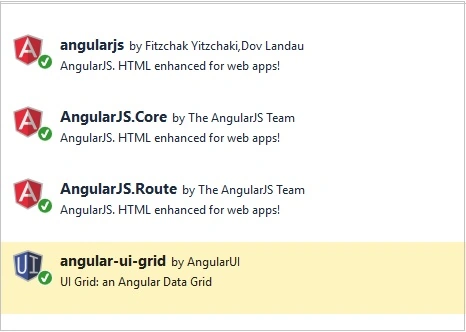
Now, add the mandatory packages given below, using NuGet Package Manager.

Bundling
Bundle the required styles and scripts.
Add the bundles given below in BundleConfig.cs
- bundles.Add(new StyleBundle("~/Content/css").Include(
- "~/Content/bootstrap.css",
- "~/Content/site.css",
- "~/Content/ui-grid.css"));
- bundles.Add(new ScriptBundle("~/bundles/uigrid").Include(
- "~/Scripts/ui-grid.min.js"));
- bundles.Add(new ScriptBundle("~/bundles/angular").Include(
- "~/Scripts/angular.min.js",
- "~/Angular/Controller/employeecontroller.js",
- "~/Angular/Controller/employeegroupingcontroller.js",
- "~/Angular/Controller/empcontroller.js"));
Render all the scripts and styles in _Loyout.cshtml
- @Scripts.Render("~/bundles/jquery")
- @Scripts.Render("~/bundles/bootstrap")
- @Scripts.Render("~/bundles/angular")
- @Scripts.Render("~/bundles/uigrid")
- @RenderSection("scripts", required: false)
View
- @{
- ViewBag.Title = "Index";
- Layout = "~/Views/Shared/_Layout.cshtml";
- }
- <h2>UI-Grid Selected Row Sample</h2>
- <div ng-app="employeeapp" ng-controller="empcontroller">
- <div ui-grid="gridOptions"
- class="grid"
- ui-grid-pagination
- ui-grid-selection
- ui-grid-auto-resize
- ng-cloak>
- </div>
- <div><br /></div>
- <div>
- Name: <b><label>{{name}}</label></b>
- </div>
- <div>
- Title: <b><label>{{title}}</label></b>
- </div>
- <div>
- City: <b><label>{{city}}</label></b>
- </div>
- <div>
- Country: <b><label>{{country}}</label></b>
- </div>
- <div>
- Notes: <b><label>{{notes}}</label></b>
- </div>
- <div>
- Salary: <b><label>{{salary}}</label></b>
- </div>
- </div>
Output

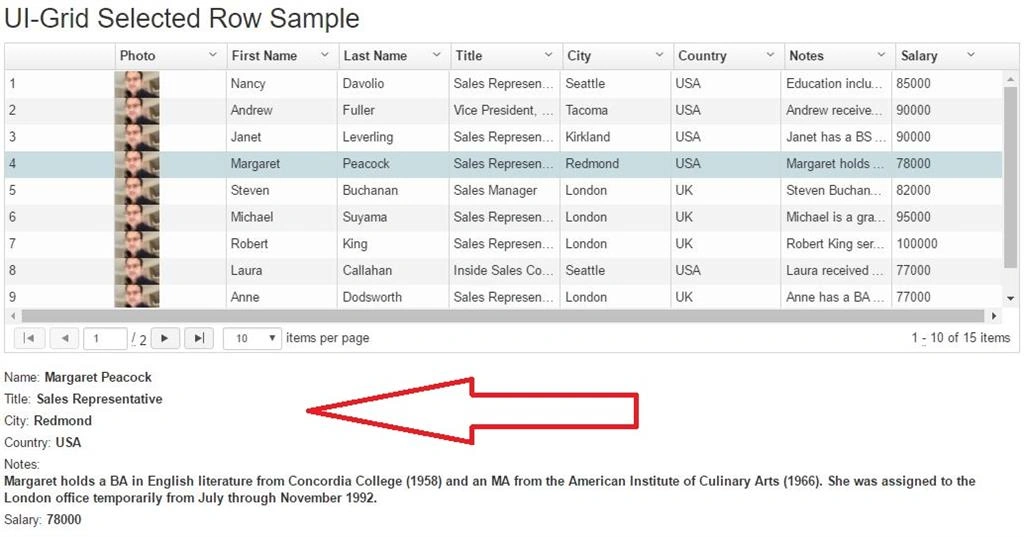
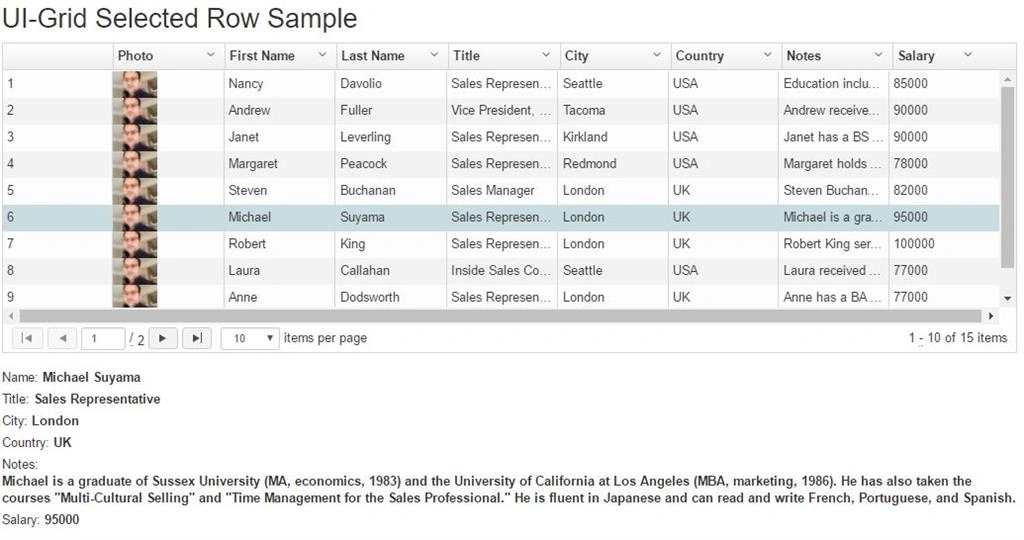
Now click on any row.

As you can see in screenshot 4, all values from selected row is displaying in labels. You can select any row.

Conclusion
In this article, we have seen how to how to get the selected row column values in angular ui-grid with Web API with an Entity Framework in MVC. If you have any question or comments, drop me a line in the comments section.

MUHAMMAD BILALPosted Sep 18, 2017, 6:04 AM
How photo is ZoomIn or Hover on mouseover in UI-Grid ???
Manav PandyaPosted Jun 13, 2017, 1:37 AM
Nice share sir .............