Introduction
This article is part of the XML Tutorial series. In my first tutorial I am creating a XML file using C#. It’s like we take some input from the user and generate a XML file according to that.

Background
We all know that the EXtensible Markup Language (XML) is a standard method to encode structured information. It is a standardize so it can be used in other platforms.
In C#, we will use the XDocument and XElement classes to create it. So you must include the System.Xml.Linq namespace to your project.
Before Starting, get some basic terms:
- Root Element
- Child Element
- Parent Element
- Attribute (but, we will avoid it for now)
I will use the following listing in my reference:
- <?xml version="1.0" encoding="utf-8" ?>
- <Students>
- <Student>
- <Name>Abhishek</Name>
- <Location State=”Jharkhand”>>Dhanbad</Location>
- </Student>
- <Student>
- <Name>Aman</Name>
- <Location State=”Bihar”>samastipur</Location>
- </Student>
- <Student>
- <Name>Vicky</Name>
- <Location State=”Bihar”>>Munger</Location>
- </Student>
- <Student>
- <Name>Ravi</Name>
- <Location State=”Bihar”>>Rafiganj</Location>
- </Student>
- </Students>
is the top most element or you can say is the grandparent of all elements. Every element resides inside its block. In my listing, <Students> is the root element.
Child Element is something that is inside some element. It’s a Relative term. Some element can be parent to some element, at the same time it can be a child for some element.
In the above listing, <Student> is a child element of a <Students> element. But, it is the parent element for <Name> and <Location>.
The same as for a child element, the parent element is also the relative term.
The <Student> element is the parent of the <Name> and <Location> elements.
Now, we come to the last term, Attribute.
It’s a special way to put extra data in a tag. Since, it doesn’t help much we have this feature to do it. Programmers usually avoid it to make their code simple.
As said in books, the use of attributes make your XML code accessibility faster and the CPU feels relaxed by doing this.
Like we put one State attribute in the Location element, <Location State=”Bihar”> … </Location>.
In another way we can put this as:
<Location>
<State>Bihar</State>
</Location>
Both does the same thing, but in a different way. I prefer the simplest one, without any attributes.
The following is the C# Code to put your data in a XML file:
- using System;
- using System.Collections.Generic;
- using System.Linq;
- using System.Text;
- using System.Xml.Linq;
- namespace XMLdemo1
- {
- class Program
- {
-
- class Student
- {
- public Student(string name, string location)
- {
-
- this.Name = name;
- this.Location = location;
- }
- public string Name { get; set; }
- public string Location { get; set; }
- }
- public static void Main(string[] args)
- {
-
- List<Student> student = CreateStudent();
-
- var studentXml = new XDocument();
-
- var rootElement = new XElement("Students");
- studentXml.Add(rootElement);
-
- foreach (Student temp in student)
- {
-
- var studntElem = new XElement("Student");
-
- var nameElement = new XElement("Name", temp.Name);
- studntElem.Add(nameElement);
-
- var locationElement = new XElement("Location", temp.Location);
- studntElem.Add(locationElement);
-
- rootElement.Add(studntElem);
- }
-
- Console.WriteLine(studentXml.ToString());
- studentXml.Save("myData.xml");
- Console.ReadKey();
- }
- private static List<Student> CreateStudent()
- {
- List<Student> stud = new List<Student>()
- {
- new Student("Abhishek","Dhanbad"),
- new Student("Aman","Samastipur"),
- new Student("Vicky","Munger"),
- new Student("Chandan","Bhagalpur"),
- new Student("Ravi","Dhanbad")
- };
-
- return stud;
- }
- }
- }
First we have a Model class named Student with some property. It actually holds that value which we want the child element field in our XML file.
For now, we consider Name and location.
Moving to the main() method, we first try to populate the List using a method which returns a List<Student>, CreateStudent().
In that method, we created a List of the same generic way named stud and added the value using the constructor of the Student class.
And last, we return that generic type.
Now, we come to the real XML thing.
So, the first step is to create an XDocument object. We had done it by studentXml.
Then, we created a root element object, rootElement (object of XElement) and ed an argument in the constructor as a Root Elements string.
After every creation we need to add a child element to its parent (or upper hierarchy). So, here we need to add a root element to studntXml, a XDocument’s object.
Next we had a foreach() loop to add all child elements in <Student>.
In every tag we used the same XElement with two arguments. The first is a "Name" of the tag and the next is its corresponding value.
After doing this, add the element to its upper hierarchy element (or parent element).
At last, we used the WriteLine() method to display the whole format of the XML file. Thereafter, saved it to a physical XML file using the Save() method.
Output of Console
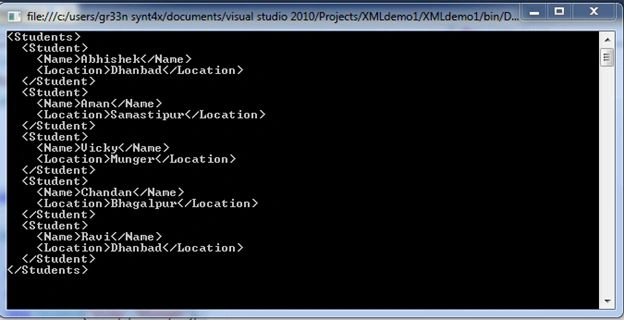
And, the physical XML file is:
 Conclusion
Next we will try to read from a XML file using XmlReader. And, try to use LINQ to XML.
For now, that is enough to start. For nay confusion try to check the enclosed solution file.


Join the conversation! Your thoughts help the community grow.