

Introduction
Workflows helps SharePoint users to collaborate on documents, list items and to manage tasks by implementing business processes on documents and list items.
Creating and assigning tasks to Manager is a very common scenario in workflows. All the user related information is stored in User profile service application (UPA). Although this sounds very straightforward, getting the user profile properties of the logged in user is very tricky in SPD 2013 workflow.
SPD 2010 supported out of box activity to access user profile fields. However, User Profile service option is not present in SharePoint 2013 Designer workflows.
Objective
This article will detail the necessary steps to retrieve user profile properties in a SPD workflow as well as highlight a few common issues you may encounter during development.
Activate site feature - Workflows can use app permissions
- Navigate to Site Settings and click Manage site features under Site Actions.
- Activate feature Workflows can use app permissions.

Granting the App Permissions
Firstly, we will ensure that workflow has sufficient permissions to access the User Profile Service.
- Navigate to Site Settings and click Site app permissions under Users and Permissions.
- Make note of the App ID for your Workflow – portion of the Workflow App Identifier between | and @.
Example
i:0i.t|ms.sp.ext|fc7f8bbb-ac8f-4129-9459-dbdc6f56e2cc@2cf426a0-55c4-461e-81d7-b124b0746498
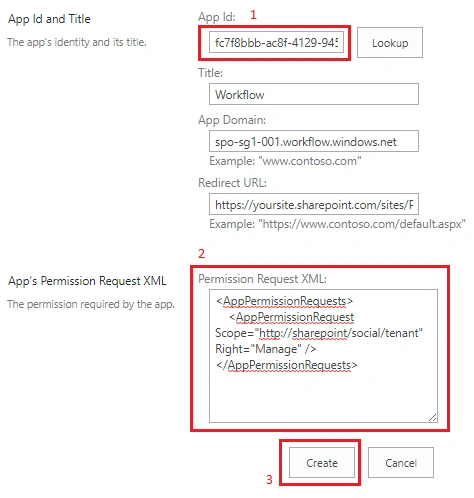
- With the tenant admin account, navigate to <site-url> /_layouts/15/appinv.aspx
- At the appinv.aspx page, fill in the Application ID and click the search button next to the ID box
- Copy below xml to Permission Request XML box,
<AppPermissionRequests> <AppPermissionRequest Scope="http://sharepoint/social/tenant" Right="Manage" /> </AppPermissionRequests> - Click Create
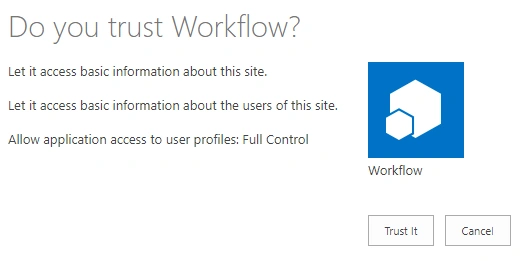
- Click Trust It, when prompted.
Create SharePoint Designer Workflow to Get User Profile Properties Data
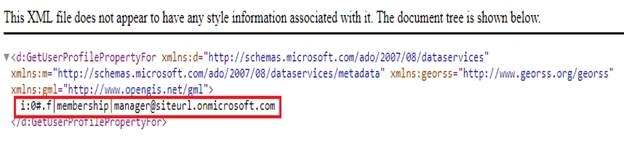
For example, we will concentrate on getting the Manager of a logged-in user.










Umang SoniPosted Sep 7, 2019, 3:29 AM
Can I do same for sharepoint online or any changes are required.
Umang SoniPosted Sep 6, 2019, 11:07 PM
Very much Helpful!!! Thanks for sharing!!
Mukram MdPosted May 16, 2018, 1:01 AM
Hello! I have used this and getting response as Unauthorized.. What exactly should be there here "http://sharepoint/social/tenant". Could you please help
Pankaj ErrollaPosted Apr 11, 2018, 2:00 AM
Hi Nanddeep, thanks you for Sharing this, but iam facing an issue here that my response status is returning as "Forbidden". IS ResponseContetnt is the new variable as type "Dictionary" you created to catch the response ??
Prasham SabadraPosted Jul 18, 2017, 9:44 PM
Thanks Nanddeep for sharing!!!