

This is the next article in the series of Http Header in JSP articles. In my previous article Http Request Headers Display in a JSP page I have already described http request headers and in this article, I am going to describe how to get header data from one JSP page to another JSP page. To understand this concept we are going to develop a JSP web project with the following steps.
Step 1: Select New Project
In this step first we select the New Project option from File menu.

Step 2: Create New Web Application
In this step we select web application option from java web and click on the
next button.
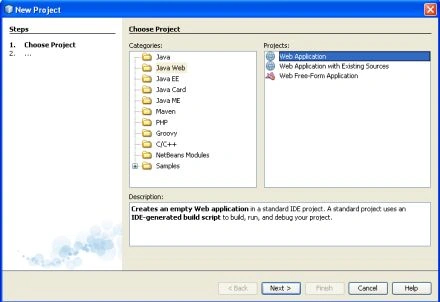
Step 3: Name and Location
In this step we provide a specific name and location to the this aplication,
and click on the next button.
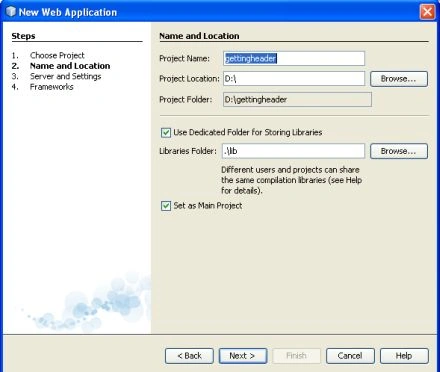
Step 4: Select Server and setting
In this step we select a specific server and then click on the next button.
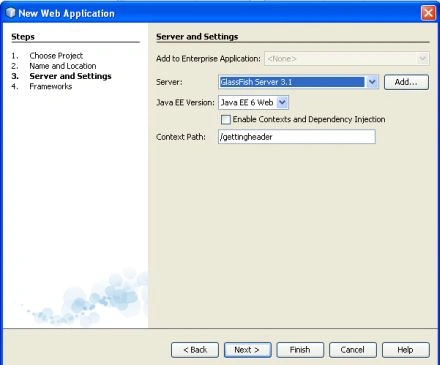
Step 5: Select Framework
In this step there is no need to select any framework for this application.
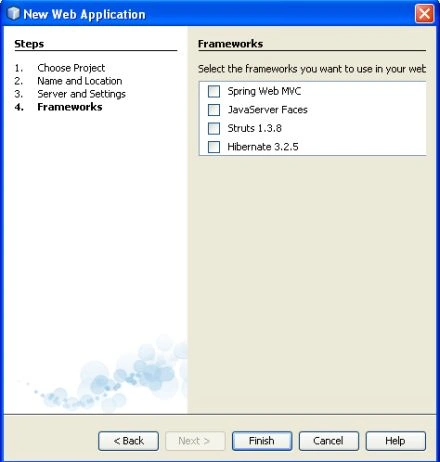
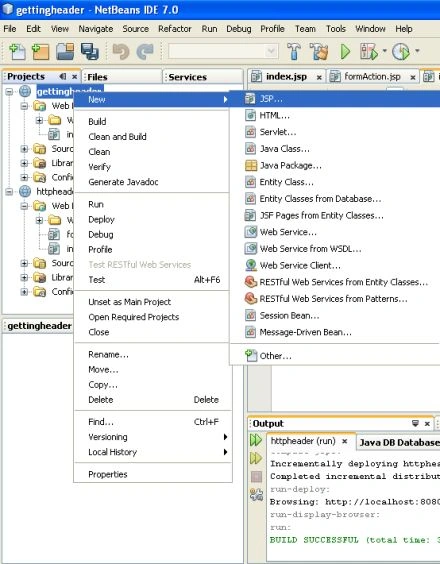
Step 6: Create a JSP File
In this step we create the two jsp files index.jsp and formAction.jsp.
Index.jsp
<HTML>
<HEAD>
<TITLE>Getting
Header Data </TITLE>
</HEAD>
<BODY bgcolor="cyan">
<H1>Getting Header Data From One Page</H1>
<FORM ACTION="formAction.jsp" METHOD="POST">
<INPUT TYPE="submit" VALUE="">
</FORM>
</BODY>
</HTML>
formAction.jsp
<HTML>
<HEAD>
<TITLE>Reading
Header Information </TITLE>
</HEAD>
<BODY bgcolor="green">
<H1>Reading
Header Information From another page</H1>
Here are the request headers and their data:
<BR>
<% java.util.Enumeration names =
request.getHeaderNames();
while(names.hasMoreElements()){
String
name = (String) names.nextElement();
out.println(name + ":<BR>" + request.getHeader(name)
+ "<BR><BR>");
}
%>
</BODY>
</HTML>
Step 7: Compiling and Running the Application
Now we compile and then run it on the server and find the following output:
Output:
Index.jsp

formAction.jsp

Join the conversation! Your thoughts help the community grow.