

Introduction
In this article I describe how to create Windows Store Apps using JavaScript for getting information of your location. I assume you can create a simple Windows Store App using JavaScript for more help visit My first Windows Store Apps .
This app shows your location, latitude, longitude and accuracy in meters and location status. The first time you run the sample, you'll get a prompt that asks if the app can use your location. Choose the Allow option. Click the Get Location button to get the current location. If the location data doesn't display, then make sure you've enabled access to the location by opening the package.appxmanifest in Solution Explorer and checking the Location in the Capabilities tab. If an administrator has disabled location services, your app won't be able to access the user's location. In the Control Panel, open Change Location Settings and confirm that Turn on the Windows Location platform is checked.
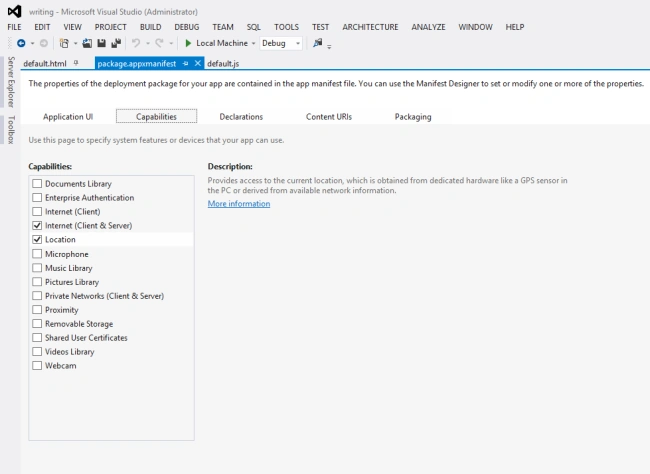
Write the following code in default.aspx:
<!DOCTYPE html>
<html>
<head>
<title>Locations Apps</title>
<link rel="stylesheet" href="/winjs/css/ui-dark.css" />
<script type="text/javascript">
var loc = null;
function getloc() {
if (loc == null) {
loc = new Windows.Devices.Geolocation.Geolocator();
}
if (loc != null) {
loc.getGeopositionAsync().then(getPositionHandler, errorHandler);
}
}
function getPositionHandler(pos) {
document.getElementById('latitude').innerHTML = pos.coordinate.latitude;
document.getElementById('longitude').innerHTML = pos.coordinate.longitude;
document.getElementById('accuracy').innerHTML = pos.coordinate.accuracy;
document.getElementById('geolocatorStatus').innerHTML =
getStatusString(loc.locationStatus);
}
function errorHandler(e) {
document.getElementById('errormsg').innerHTML = e.message;
document.getElementById('geolocatorStatus').innerHTML =
getStatusString(loc.locationStatus);
}
function getStatusString(locStatus) {
switch (locStatus) {
case Windows.Devices.Geolocation.PositionStatus.ready:
return "Location is available.";
break;
case Windows.Devices.Geolocation.PositionStatus.initializing:
return "A GPS device is still initializing.";
break;
case Windows.Devices.Geolocation.PositionStatus.noData:
return "Data is currently unavailable.";
break;
case Windows.Devices.Geolocation.PositionStatus.disabled:
return "Your location is turned off. " +

Join the conversation! Your thoughts help the community grow.