

In this article, you will learn how to begin work with SignalR and how to exchange messages among multiples users.
What SignalR is: SignalR is an ASP.Net server library for adding real-time functionality to a web application. This includes client libraries for JavaScript and other clients.
Getting Started
The get started with SignalR:
- Start Visual Studio
- Create a new website
- Provide the name and location of website
- Click "Next"
Now add a new SignalR Hub class and give a name of class and click "Add".
Note: You will probably get this error message when you add the class:
"This template attempted to load component assembly 'NuGet.VisualStudio.Interop, Version=*, Culture=neutral, PublicKeyToken=*"
Follow this blog to remove this problem:
http://www.c-sharpcorner.com/Blogs/11651/%E2%80%98this-template-attempted-to-load-component-assembly-nuget-v.aspx
Or you can also add SignalR to a project by opening the "Tools" | "Library Package Manager" | "Package Manager Console" and running the command: "install-package Microsoft.AspNet.SignalR". Now again add the SignalR class.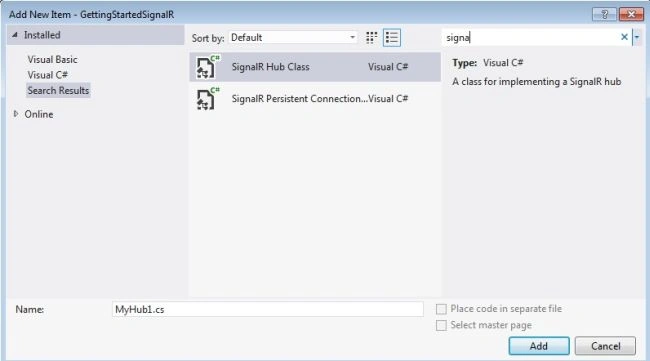
Image 1.
As you can see, many SignalR assemblies have been added in the Bin folder, so you are good to go.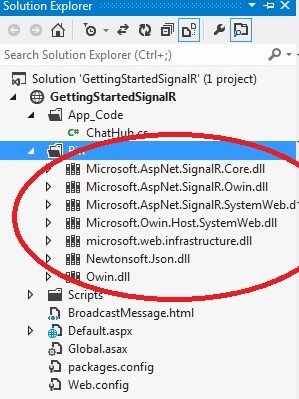
Image 2.
Now it is time to work on HubClass.
First of all add this namespace:
- using Microsoft.AspNet.SignalR;
- public class ChatHub : Hub
- {
- public void Send(string name, string message)
- {
- Clients.All.broadcastMessage(name,message);
- }
- }
Now add these namespaces in the global.asax file:
- <%@ Import Namespace="System.Web.Routing" %>
- <%@ Import Namespace="Microsoft.AspNet.SignalR" %>
Add this code in the "application_start" event:
- RouteTable.Routes.MapHubs();
shankar sharmaPosted Nov 17, 2017, 3:03 AM
Hello sir can you explain how to implement this using database ?