

In my last article "Getting started with ADO.NET Entity Framework in .NET 3.5", we have done select and add operations, now let us extend with update and delete operations.
Now I have added there textboxes fro employee ID, name and title as follows. (you can find it with attached project)
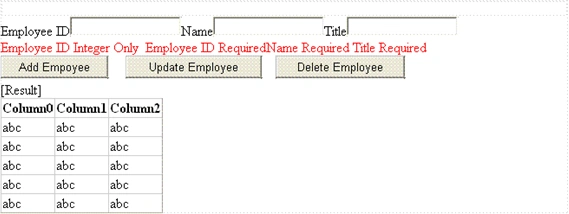
Update:
There is no change in Data layer
In the business layer add the UpdateEmployee method
public string UpdateEmployee(Payroll.Entities.Employee e1)
{
PayrollDAO payrollDAO = new PayrollDAO();
try
{
Employee e2 = null;
e2 = (from emp in payrollDAO.Employee
where emp.EmployeeID == e1.EmployeeID
select emp).First();
e2.Name = e1.Name;
e2.Title = e1.Title;
payrollDAO.SaveChanges();
}
catch
{
return "ERROR";
}
return "SUCCESS";
}
In the Presentation layer, add the following code in update button click
protected void Button2_Click(object sender, EventArgs e)
{
EmployeeService es = new EmployeeService();
DateTime dt = new DateTime(2008, 12, 12);
Payroll.Entities.Employee e1 = Payroll.Entities.Employee.CreateEmployee(Convert.ToInt32(empID.Text), empName.Text, empTitle.Text, dt, "M", "M", dt);
Vithal WadjePosted Sep 27, 2014, 11:44 AM
super
MA BariPosted Feb 27, 2011, 4:31 AM
I am new but I think Its a better way for developer.
Krishna ReddyPosted Apr 12, 2010, 7:00 AM
good
baktash ahmedPosted May 8, 2009, 7:36 AM
I am trying to create a new test project i dont get the ADO.NET Enttity Frame option in VS 2008 though i have .NET 3.5 with Service Pack 1.
ihtesham qaziPosted May 3, 2009, 6:09 AM
I can not compile this project for few errors.
David NelsonPosted Jan 8, 2009, 5:13 PM
I am new to C# and am trying to follow the Example but am not sure what to do to add a Static Main. I could use a little help. "Payroll.exe does not contain a Static Main suitable for an entry point"