

Google announced Kotlin as an official language for Android Application development in Google I/O 2017.Kotlin is a statically-typed language, developed by JetBrains and Open source Contributors in the 2011, that runs on JVM(Java Virtual Machine) and is compiled to JavaScript source code. It is very suitable for server-side application development with full compatibility of Java frameworks. You can use multiple frameworks like - Spring, Vert.x, Ktor etc. for web application development.
Features- It is compatible to greater than or equal version of JDK 6
- As Kotlin uses inline functions and lambda operations it requires much less time to execute.
- Kotlin allows using all Java frameworks.
- Kotlin supports incremental compilation so it required less compilation time than Java.
- Kotlin is very easy to learn. It does not make too many restrictions in programming.
- It is null-safe..
- It can be learned easily.
- Code review is easy in Kotlin.
- Automatic conversion java to Kotlin.
- Kotlin has dropped new keyword of java.
- Kotlin has dropped static keyword of java.
- It uses Safe call operator (.?).
- Characters are not number in Kotlin
- Octal literals are not supported.
- Extension functions, you can add methods to classes without changing their source code.
- Kotlin has data keyword to create model classes.
- It uses a colon (:) operator instead of extends keyword of Java.
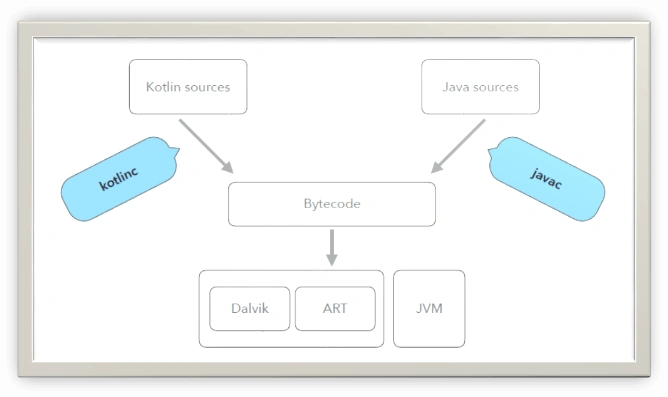
Kotlin source code converts to bytecode after compilation which can run on JVM or JavaScript source code.
You can use IntelliJ, Android Studio, and Eclipse for Kotlin programming.
- If you wish to use Eclipse then go through the link – Getting started with kotlin.
- Or you can visit my article Getting started with Android and Kotlin to use kotlin for Android Application development.
Here are the steps to setup kotlin with Intellij IDE.
- Make sure your system have 7 or latter version.
- Download and install Intellij IDE.
- Now click on IntelliJ IDE desktop icon to launch it.
- Create new project as,
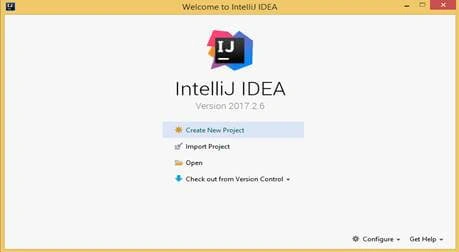
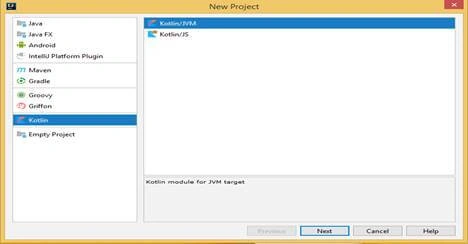
- Select Project Category then click on next.
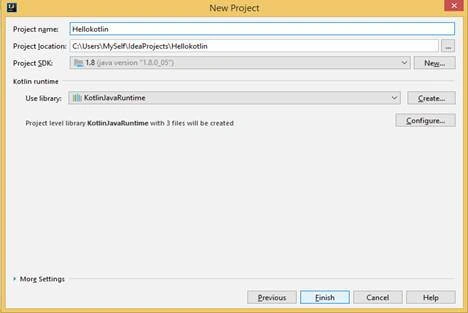
- Give the project name,location and SDK path. Then click on finish.
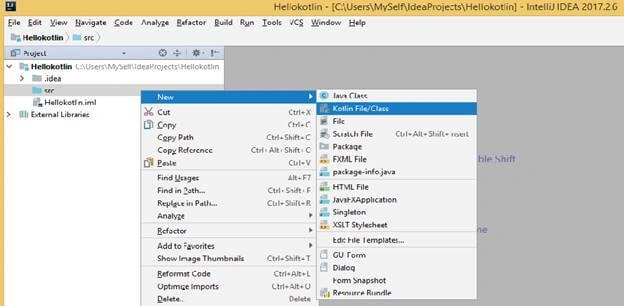
- Now create kotlin file on src folder using IDE
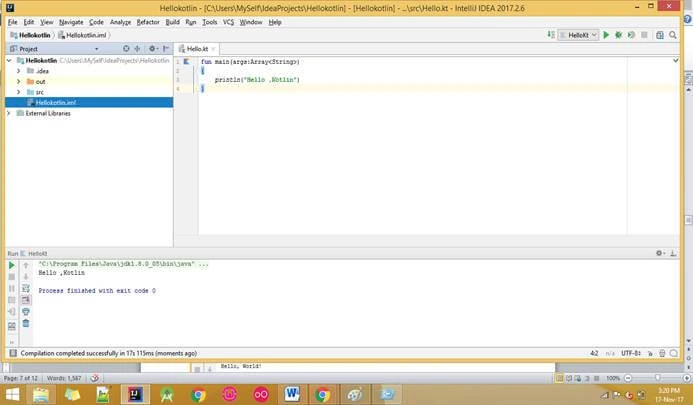
- Now add your hello world program as below and run by right clicking and choosing run menu or play button from standard tool bar,
Kotlin has following tokens which are interpreted as hard keywords – that can’t use as identifiers.
| Int | Float | Double | Short | Long |
| As | break | Continue | Class | do |
| Else | For | Fun | If | in |
| !in | interface | Is | !is | null |
| Object | package | Return | Super | this |
| Throw | True | Try | Typealias | Val |
| Var | when | While | as? | False |
| Byte | Boolean |
And soft keywords – that can use as identifiers.
Ramzanali MominPosted Nov 26, 2018, 3:29 AM
Good explained.Thanks.
Willson-Yu LinPosted Dec 13, 2017, 12:17 AM
Nice explained.Thanks.