Introduction
In this article, we will see how to get list items in spfx using
pnp js. We will see all types of complex field queries like how to get lookup, people, and more. So let's see the step-by-step implementation.
Implementation
For the testing purpose, we will use
SP Editor Extension which is a very cool extension to test PnP js queries. After adding an extension to chrome you can see the
SharePoint tab in developer tools and we will run a query in
PnPjs Console.
- Create a SharePoint list with a different types of columns.
- Open a develoepr tool (F12) > Go to the SharePoint tab > Open PnPjs Console
- import { sp } from "@pnp/sp/presets/all";
-
- (async () => {
-
- const listName = "Employees";
-
-
- const listItems = await sp.web.lists.getByTitle(listName).items.get();
- console.table(listItems);
-
- })().catch(console.log)
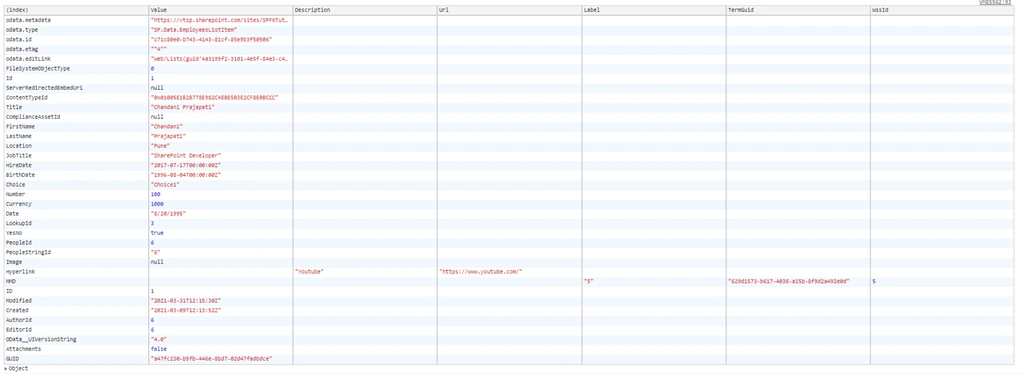
Output
Get list item by ID
- import { sp } from "@pnp/sp/presets/all";
-
- (async () => {
-
- const listName = "Employees";
-
-
- const item = await sp.web.lists.getByTitle(listName).items.getById(1).get();
- console.table(item);
-
- })().catch(console.log)
Output
Get list item by select parameter
- import { sp } from "@pnp/sp/presets/all";
-
- (async () => {
-
- const listName = "Employees";
-
-
- const itemBySelect = await sp.web.lists.getByTitle(listName).items.getById(1).select("Title,ID,Choice,Number,Currency,Date,YesNo,Hyperlink").get();
- console.table(itemBySelect);
-
- })().catch(console.log)
Output
Get list items using expand parameter (it will be used in People, Lookup and managed metadata and etc.)
- import { sp } from "@pnp/sp/presets/all";
-
- (async () => {
-
- const listName = "Employees";
-
-
- const lookupVal = await sp.web.lists.getByTitle(listName).items.select("Lookup/Title,Lookup/Id").expand("Lookup").get();
- console.log("Lookup =>", lookupVal);
-
-
- const userVal = await sp.web.lists.getByTitle(listName).items.select("People/Title,People/Department").expand("People").get();
- console.log("userVal =>", userVal);
-
- })().catch(console.log)
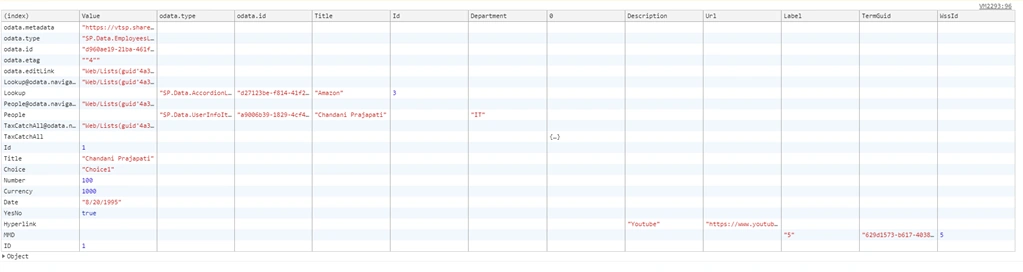
Output
Get all field values from list items in one query
- import { sp } from "@pnp/sp/presets/all";
-
- (async () => {
-
- const listName = "Employees";
-
-
- const allListItems = await sp.web.lists.getByTitle(listName)
- .items.getById(1)
- .select("Title,ID,Choice,Number,Currency,Date,YesNo,Hyperlink,Lookup/Title,Lookup/Id,People/Title,People/Department,MMD,TaxCatchAll/Term")
- .expand("Lookup,People,TaxCatchAll").get();
- console.table(allListItems);
-
-
- })().catch(console.log)
Output
Summary
In this article, we have seen how to use pnp js to get list items with different types of fields.
Hope this helps!
Sharing is caring!





Join the conversation! Your thoughts help the community grow.