

This article is in continuation of my articles related to Cognitive Services. I came across some complicated articles on Cognitive Services, but as I've been working on this Service for the last six months, I thought of writing simple, step by step articles on the same.
If you have landed directly on this article, I also recommend you read the following.
- Getting started with Microsoft Cognitive Services – Face API
- Getting started with Microsoft Cognitive Services – Emotion API
- Getting started with Microsoft Cognitive Services – LUIS API
- Getting Started With Microsoft Azure Cognitive Services - Recommendations API
- Getting Started With Microsoft Azure Cognitive Services - Speaker Recognition API
- Getting Started With Microsoft Azure Cognitive Services - Text Analytics API
- Getting Started With Microsoft Azure Cognitive Services - Computer Vision API
- Getting Started With Microsoft Azure Cognitive Services – Web Language Model API
- Getting Started With Microsoft Azure Cognitive Services - Bing Autosuggest API
As defined, Cognitive Services provides the best suite for having interactive, automated models of the Application. It helps to build powerful intelligence into the Applications to enable natural and contextual interactions.
The Web Language Model API, as described by Microsoft, uses the power of language models trained on the Web-scale data. Also, it automates a variety of standard, natural language processing tasks named as state-of-the-art language modeling APIs.
Word combination probability
Calculates the joint probability that a specific word sequence will appear together.
Word sequence probability
Calculates the conditional probability that a particular word will follow a given sequence of words.
Predictive text
Gets a list of words (completions) most likely to follow a given sequence of the words.
Word breaking
Inserts spaces into a string of words that lack spaces, such as a hashtag or a part of a URL.
We will learn more about Web Language Model API in the later articles. To start with, let's create Cognitive account to use Web Language Model API, using Azure portal.
Here, let's assume that you have Azure portal account. If not, create your free Azure account.
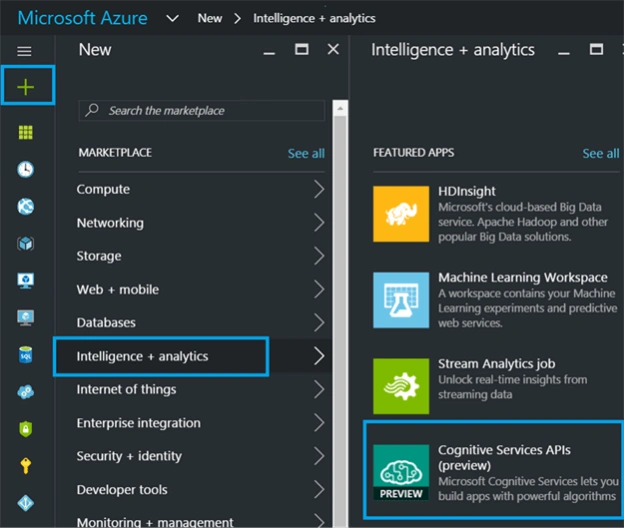
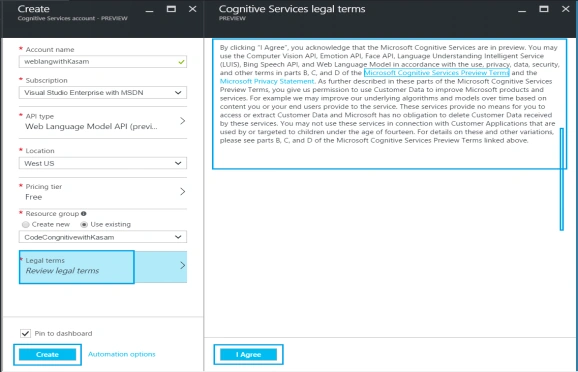
Once done with account creation, Click '+’ => Category, Intelligence + analytics => Services, Cognitive Services APIs.
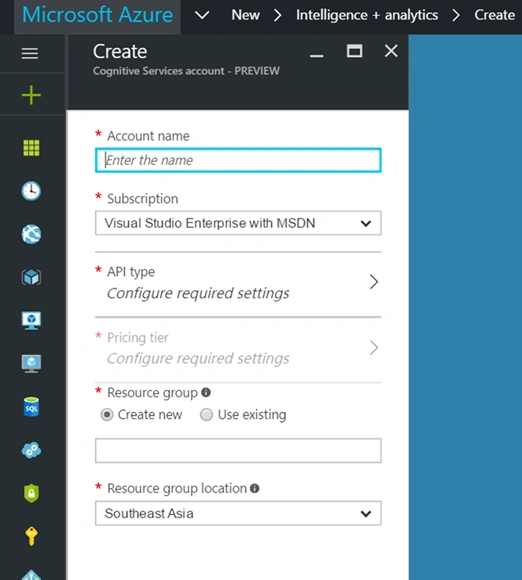
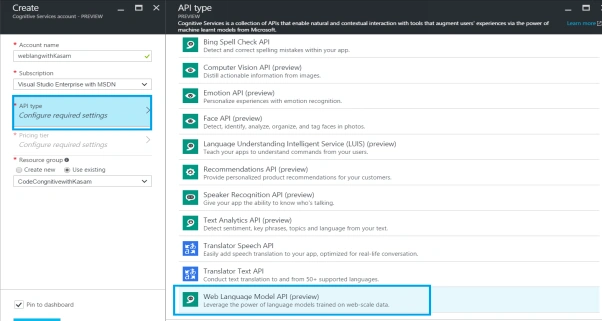
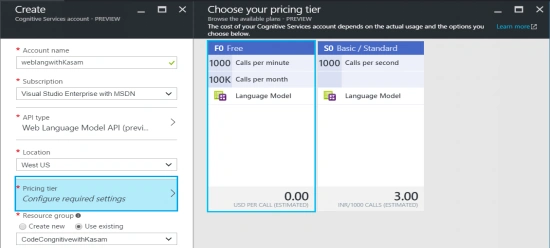
Fill in the details, mentioned below.
Join the conversation! Your thoughts help the community grow.