Introduction
In this article, I am going to explain what .Net Core is, .Net Core features and benefits, .Net Core Versions, why we use .Net Core, and how to set Visual Studio for developing .Net Core 2.1 Console applications. The latest version of .Net Core is .Net Core 3.1 and it was released December 3, 2019.
What is .Net Core?
.Net Core is a new version of the .Net framework, developed by Microsoft. It is an open-source framework for developing Windows, web applications, services, and mobile applications and it can be run on Windows, Mac, or Linux. .Net Core applications can run on both .NET CORE and traditional .NET Framework (.NET framework 4. x). It is completely rewritten from scratch and it was initially launched as .Net 5 but then it was renamed to .NET CORE 1.0.
In simple words, .Net Core is a cross-platform, high-performance, unified, fast, lightweight, open-source framework for building modern, mobile, web, and windows applications and services.
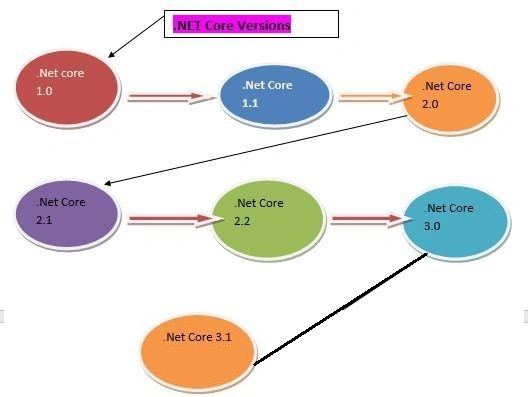
.NET Core Versions
What’s New in .NET Core 3.1?
.NET Core 3.1 version was released on December 3, 2019. The most important feature is that .NET core 3.1 is a long-term supported (LTS) release and it will be supported for 3 years. Visual Studio 2019 updated version 16.4 is required for developing .Net Core 3.1 console applications.
Features
- It supports a partial class for Razor components
- It passes parameters to top-level components
- It supports new component tag helper
- It prevents default actions for events in the Blazor application
- It stops event propagation in the Blazor application
- It gives detailed errors during the Blazor application development
- It supports shared queues in HttpSysServer
- It has to break changes for SameSite cookies
History of .NET Core Versions
The below table shows the details of .Net Core Versions.
| Version |
Release Date |
Development/Editor Tool |
Support |
| .Net Core 1.0 |
Jun-27-2016 |
Visual Studio 2015 updated version 3 |
1.0 |
| .Net Core 1.1 |
Nov-18-2016 |
Visual Studio 2015,2017 |
1.0,1.1 |
| .Net Core 2.0 |
Aug-14-2017 |
Visual Studio 2017 Version 15.3 |
1.0,1.1,2.0 |
| .Net Core 2.1 Long Term Support |
May-30-2018 |
Visual Studio 2017 Version 15.7 |
1.0,1.1,2.0,2.1 |
| .Net Core 2.2 |
Dec-04-2018 |
Visual Studio 2017 Version15.9 |
1.0,1.1,2.0,2.1,2.2 |
| .Net Core 3.0 |
Sep-23-2019 |
Visual Studio 2019 Version 16.3 |
1.0,1.1,2.0,2.1,2.2,3.0 |
| .Net Core 3.1 (3 yr Long-term support) |
Dec-03-2019 |
Visual Studio 2019 Version 16.4 |
1.0,1.1,2.0,2.1,2.2,3.0, 3.1 |
Note. Asp.Net Core and .Net Core Both are different, just like Asp.Net and .Net Framework.
Why Use .Net Core?
- Cross-platform: It can run on Windows, Linux and Mac.
- Unified: It offers a single unified component like the .NET Standard library for all platforms with the same code, same languages, and same tools.
- Better performance: .Net core does not depend on system.web.dll for communication between browser-server. In .Net core everything is packages that we need for our application. Packages reduce the request pipeline and improve the application performance.
- Lightweight: It is a lightweight framework. It allows developers to deploy libraries and components that are needed in a set of packages.
- Dependency Injection: Dependency Injection is built in .Net Core.
- Hosting: The .Net Core application can be hosted on multiple Web servers such as IIS, Apache, Docker, etc. It is not dependent on IIS.
- Open Source: It is a fully open-source framework. That means, it is free of cost and its source code is available.
- Testability: Unit testing is very easy in .Net core applications.
- Side-by-side App Versioning: .Net Core runs on .NET Core, which supports simultaneously running multiple versions of applications.
Setting up machine for .Net Core 2.1 development
We need to install 2 Software’s, for developing the .Net core 2.1 application.
- An Editor/ Integrated Development Environment (IDE)
- .NET Core 2.1 SDK (Software Development Kit)
Step 1. Download and Install an editor for .NET Core 2.1 Development.
I am using Visual Studio 2017 updated version 15.3.9 as the editor for .NET Core 2.1 application development. You can use any editor of your choice.
- Visual Studio
- Visual Studio Code
- Sublime
- Vim
- Atom
- Etc.
Download and install Visual Studio
- I am using Visual Studio 2017, so I need to install Visual Studio 2017 Community Edition because this is free.
- You can download Visual Studio 2017 from this Link
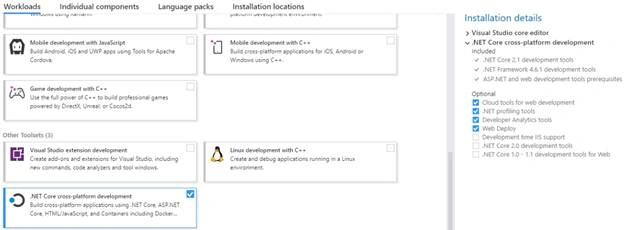
- To develop .NET Core 2.1 applications in Visual Studio 2017, please select .NET Core cross-platform development workload when installing.
Step 2. Download and install .NET Core 2.1 SDK
You can download .NET Core 2.1 SDK from this link
- Depending on the operating system you have, download and install the SDK.
- The SDK includes everything you need to build and run .NET core applications.
- The .NET Core Runtime is already included in the SDK. So, there is no need to install the .NET Core Runtime
- The .NET Core Runtime includes just the resources required to run existing .NET Core applications.
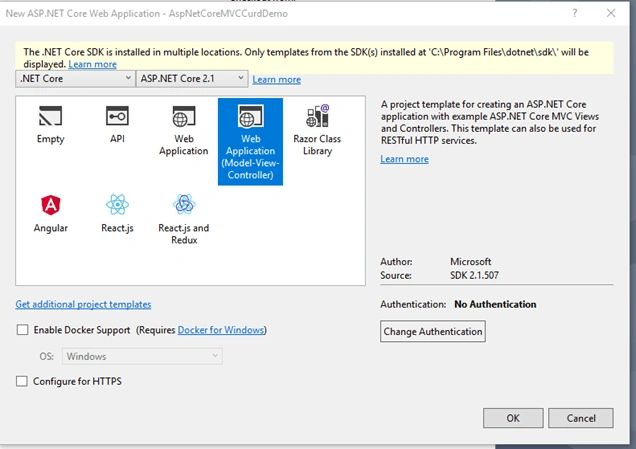
After installing .NET Core SDK 2.1, for checking I am creating a new .NET Core 2.1 Console Application. Notice, in the .NET Core Dropdown list ASP.NET Core 2.1 is coming. So our software installation is completed successfully.
Conclusion
In this article, we explained the basics of .NET Core 3.1 and how to set up a machine for developing the .NET Core 2.1 Console applications.


Mangesh GPosted Jan 4, 2020, 9:47 AM
Update the title if u can a this will clealrly misguide people coming on portal
Dipak BarnwalPosted Dec 25, 2019, 6:39 AM
Nice article
Vidyadharran GPosted Dec 18, 2019, 1:19 AM
Explained clearly thanks bro
Sourav Kumar DasPosted Dec 17, 2019, 10:49 PM
Nice and useful article Sir.
Ashutosh GuptaPosted Dec 17, 2019, 12:53 PM
Not sure, you meant .Net Core 2.1 development or 3.1 here.. your main heading says 3.1 but internal matter talk about net core 2.1 development which is quite old.
Ravishankar NPosted Dec 17, 2019, 10:47 AM
Clearly explained. Thank you