

Introduction
Node.js was created by Ryan Dahl starting in 2009. It is one of the fastest-growing platforms for building scalable web applications. This article explains how to begin using Node in a console, its background history. You can download the Node.js framework onto your system.
What is Node.js?
Node.js is a server-side JavaScript. Node.js is a platform built on Chrome's JavaScript runtime for easily building fast and scalable web applications. Node.js uses an event-driven, non-blocking I/O model that makes it lightweight, efficient and perfect for data-intensive real-time applications that run across the distributed devices. Node.js is event-driven, but most servers are thread-based.
Why Node.js?
Node.js is specially designed for building fast, efficient, scalable network applications and uses an event-driven, non-blocking I/O model to maximize efficiency. The callback function is what Node calls a listener function and it is called by the server whenever a new request comes in.
How it works?
The following describes how Node.js works:
- You use your web browser to make a request for "about.html" on a Node.js web server.
- The Node server accepts your request and calls a function to retrieve that file from disk.
- While the Node server is waiting for the file to be retrieved, it services the next web request.
- When the file is retrieved, there is a callback function inserted into the Node server's queue.
- The Node server executes that function, that in this case would render the HTML page and send it back to your browser.
Platforms for Node.js
- Runs on OSX, Linux, Windows.
- Clickable installer for Windows and MacOSX.
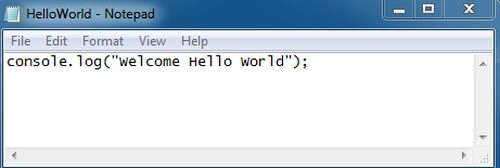
Open the editor, for example, Notepad and write the simple Hello World and save the file with a ".js" extension. You can run this by putting it in a file called "HelloWorld.js" and running it with the node "HelloWorld.js".
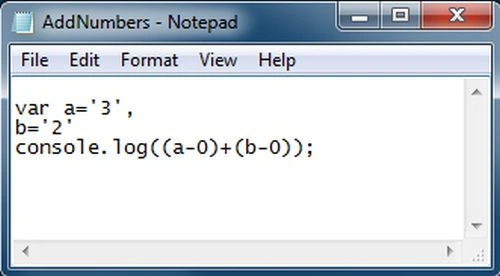
The console.log() functions are synchronous when the destination is a terminal and prints to values with new line log functions that can take multiple arguments, such as like in a printf().
console.log("value :%d",value)
Step 1
Step 2
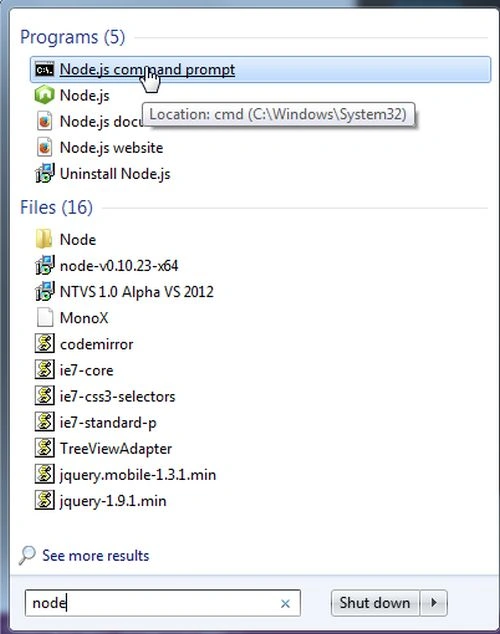
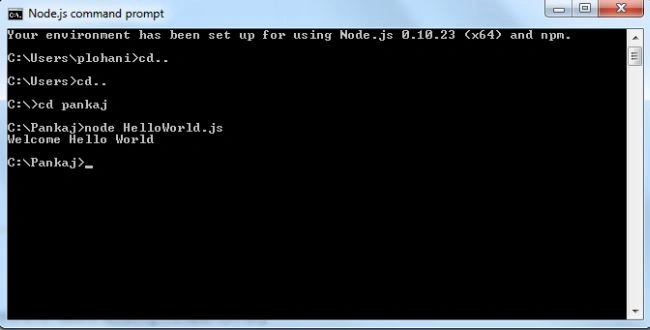
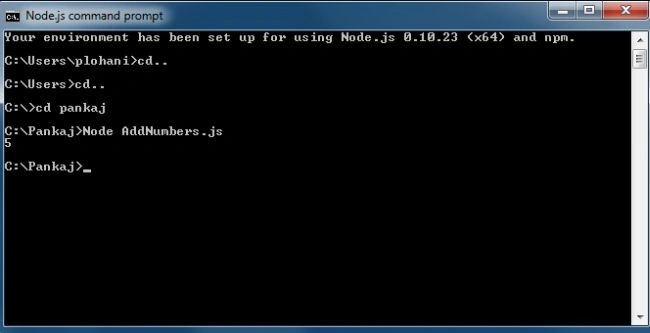
Now open the Node.js Command prompt and execute the simple hello world as in the following figure.
Join the conversation! Your thoughts help the community grow.