In this article, we will continue from the previous article and see a few examples around the UI side. Let us suppose the following snippet, wherein I have simply created one windows form and attached a textbox to it.
  1. using System;
  2. using System.Reactive.Linq;
  3. using System.Windows.Forms;
  4. namespace ReactiveExtensions
  5. {
  6. internal class Program
  7. {
  8. private static void Main(string[] args)
  9. {
  10. // ObservableGetValue();
  11. var textbox = new TextBox();
  12. var form = new Form
  13. {
  14. Controls = {textbox}
  15. };
  16. Application.Run(form);
  17. }
  18. private static void ObservableGetValue()
  19. {
  20. IObservable<string> obj = Observable.Generate(
  21. 0, //Sets the initial value like for loop
  22. _ => true, //Don't stop till i say so, infinite loop
  23. i => i + 1, //Increment the counter by 1 everytime
  24. i => new string('#', i), //Append #
  25. i => TimeSelector(i)); //delegated this to private method which just calculates time
  26. //Subscribe here
  27. using (obj.Subscribe(Console.WriteLine))
  28. {
  29. Console.WriteLine("Press any key to exit!!!");
  30. Console.ReadLine();
  31. }
  32. }
  33. //Returns TimeSelector
  34. private static TimeSpan TimeSelector(int i)
  35. {
  36. return TimeSpan.FromSeconds(i);
  37. }
  38. }
  39. }
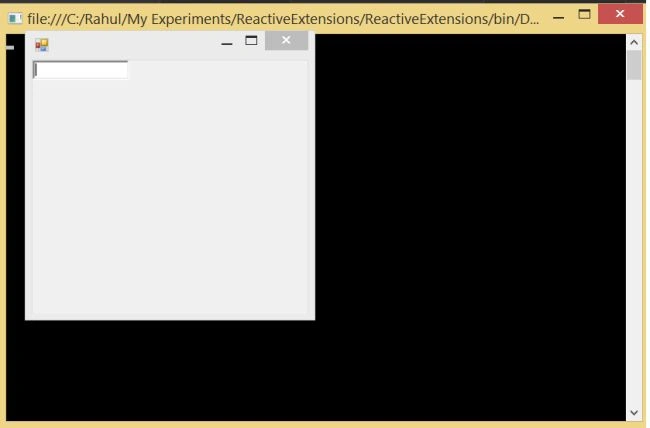
Now, with the above change in place, it will simply give me one window form with one text-box in it.
text box
Now, I would like to listen to text changed event. So, what I would do? I will simply go ahead and attach the text changed handler as in the following code snippet.
textchanged
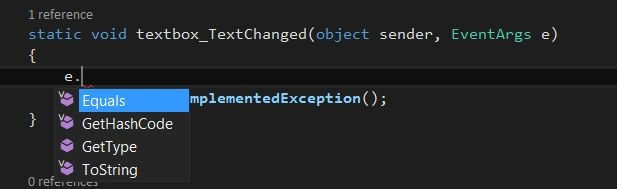
Therefore, it has created the following sample event code.
  1. using System;
  2. using System.Reactive.Linq;
  3. using System.Windows.Forms;
  4. namespace ReactiveExtensions
  5. {
  6. internal class Program
  7. {
  8. private static void Main(string[] args)
  9. {
  10. // ObservableGetValue();
  11. var textbox = new TextBox();
  12. var form = new Form
  13. {
  14. Controls = {textbox}
  15. };
  16. //Trying to fetch the value from textbox
  17. textbox.TextChanged += textbox_TextChanged;
  18. Application.Run(form);
  19. }
  20. static void textbox_TextChanged(object sender, EventArgs e)
  21. {
  22. throw new NotImplementedException();
  23. }
  24. private static void ObservableGetValue()
  25. {
  26. IObservable<string> obj = Observable.Generate(
  27. 0, //Sets the initial value like for loop
  28. _ => true, //Don't stop till i say so, infinite loop
  29. i => i + 1, //Increment the counter by 1 everytime
  30. i => new string('#', i), //Append #
  31. i => TimeSelector(i)); //delegated this to private method which just calculates time
  32. //Subscribe here
  33. using (obj.Subscribe(Console.WriteLine))
  34. {
  35. Console.WriteLine("Press any key to exit!!!");
  36. Console.ReadLine();
  37. }
  38. }
  39. //Returns TimeSelector
  40. private static TimeSpan TimeSelector(int i)
  41. {
  42. return TimeSpan.FromSeconds(i);
  43. }
  44. }
  45. }
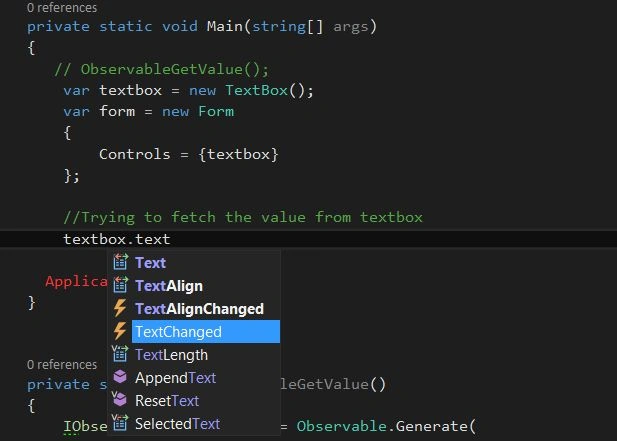
But, if you look at the following screenshot, textchanged is not available.
code
Hence, this won't be helpful to me. Rather than that, I would prefer to have a reactive extension and subscribe the same as shown below.
  1. private static void Main(string[] args)
  2. {
  3. // ObservableGetValue();
  4. var textbox = new TextBox();
  5. var form = new Form
  6. {
  7. Controls = {textbox}
  8. };
  9. //Using Rx, to get the textchanged
  10. var textChanged = Observable.FromEventPattern<EventArgs>(textbox, "TextChanged");
  11. //then, I will subscribe the same
  12. Application.Run(form);
  13. }
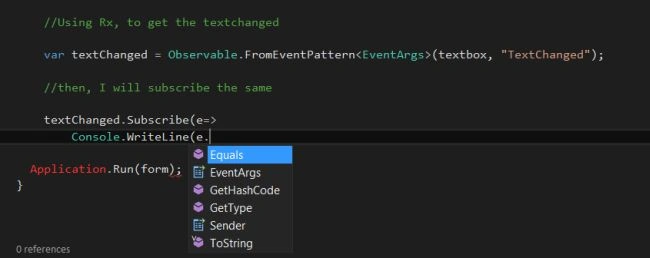
Now, if you see the following screenshot, it gave me EventArgs.
EventArgs
really
Here, in order to get changed text, I need to make use of LINQ on the top of Rx. Hence, below is the finished code for the same. I have done a little bit of refactoring as well, just to keep the code more readable and clean.
  1. using System;
  2. using System.Reactive.Linq;
  3. using System.Windows.Forms;
  4. namespace ReactiveExtensions
  5. {
  6. internal class Program
  7. {
  8. private static void Main(string[] args)
  9. {
  10. // ObservableGetValue();
  11. GetTextBoxValue();
  12. }
  13. private static void GetTextBoxValue()
  14. {
  15. var textbox = new TextBox();
  16. var form = new Form
  17. {
  18. Controls = {textbox}
  19. };
  20. //Using Rx, to get the textchanged
  21. var textChanged = Observable.FromEventPattern<EventArgs>(textbox, "TextChanged");
  22. //then, I will subscribe the same using LINQ Projection
  23. var query = from e in textChanged
  24. select ((TextBox) e.Sender).Text;
  25. //Hence, if the application quits, i want to unsubscribe
  26. using (query.Subscribe(Console.WriteLine))
  27. {
  28. Application.Run(form);
  29. }
  30. }
  31. private static void ObservableGetValue()
  32. {
  33. IObservable<string> obj = Observable.Generate(
  34. 0, //Sets the initial value like for loop
  35. _ => true, //Don't stop till i say so, infinite loop
  36. i => i + 1, //Increment the counter by 1 everytime
  37. i => new string('#', i), //Append #
  38. i => TimeSelector(i)); //delegated this to private method which just calculates time
  39. //Subscribe here
  40. using (obj.Subscribe(Console.WriteLine))
  41. {
  42. Console.WriteLine("Press any key to exit!!!");
  43. Console.ReadLine();
  44. }
  45. }
  46. //Returns TimeSelector
  47. private static TimeSpan TimeSelector(int i)
  48. {
  49. return TimeSpan.FromSeconds(i);
  50. }
  51. }
  52. }
Hence, with the above change in place, when I run the app, it will give us the following output.
run the app
You can also download the source code from here.
With this, I would like to wrap this session here. Thanks for joining me.