

In this article, I'll explain about Global Exception Filter and discuss the ways to handle an exception globally in the whole project, without using try catch. I will also be explaining how to use log4net to create a log file on your local machine.
In ASP.NET MVC applications, Exception Handling is taken care of generally in two ways: at a simple level, and by using try catch block in the code. ASP.NET MVC comes with some in-built features, like as Exception Filter. The HandleErro the default in Exception Filter. Sadly, the HandleError filter doesn't give a complete response to the exception handling the issue globally. That makes us depend on the Application_Error Event, at present.
Some related links which may help to learn basic and advanced concepts related to this.
Some related links which may help to learn basic and advanced concepts related to this.
- Exception handling in asp.net application
- MVC in details
- Web Api explanation
- Error Logging
- Web Api testing
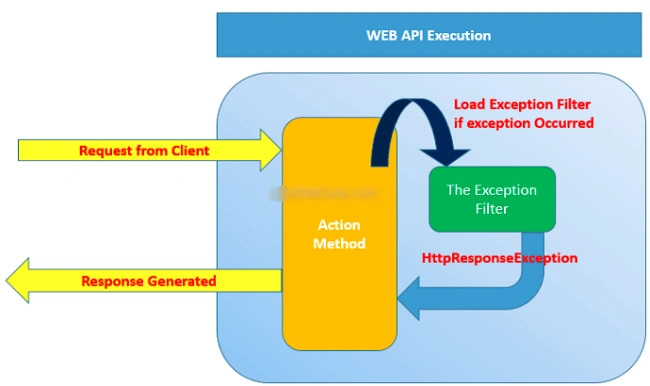
Today, we will learn these topics.
- How to use Exception filter?
- How to configure Log4Net in webapi 2?
- How to create Global Exception filter?
- How to avoid to use try catch in application?
- How to create log file with log details in drive.
- Advantage of Exception filter.
To learn these topics, you should follow steps which are given below.
Step 1 - Create a web based application in MVC or Web API.
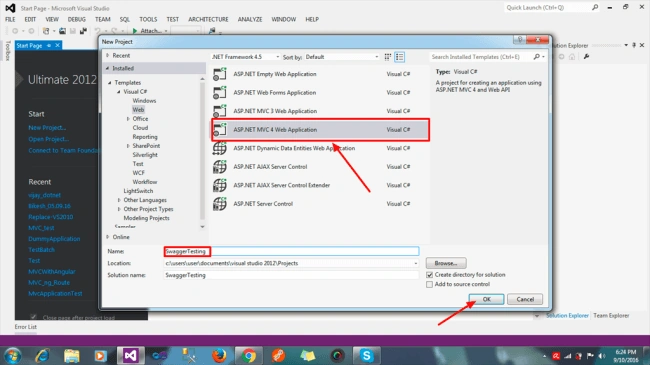
As per your choice, you can name your project. I have named it "swaggerTsting". Click on "OK". Thereafter, the next window will open. Select "MVC" OR "WebAPI" or both and click on OK.
After that, you can see your project in Solution Explorer.
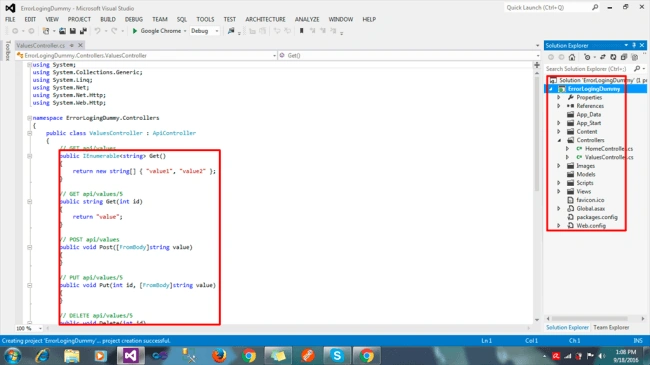
Here, you can see some API Controllers already created with demo output. You can create any number of Controllers and Actions. If I run this application, it will run correctly.
Now, I am going to integrate Exception Filter with log4net. So, follow some steps....
Step 2 - First, add log4net in your Solution, using NuGet Package or PM console. I am going to add log4net by PM console.
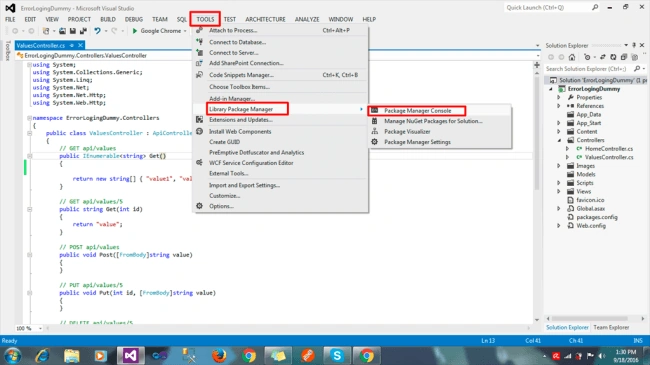
Thereafter, click on "Package Manager Console ". You will see a new window on the bottom of editor, as shown below.
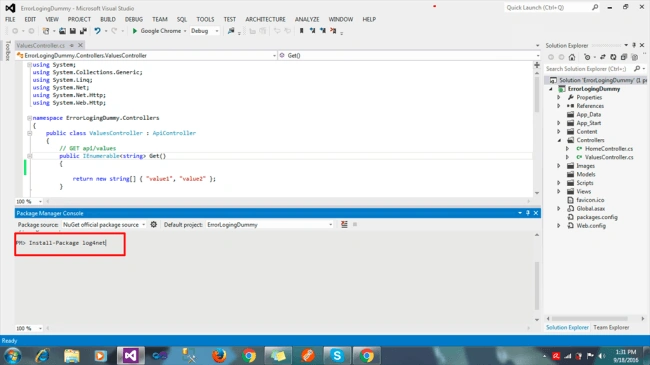
Just type "Install-package log4net" or copy paste .
PM> Install-Package log4net
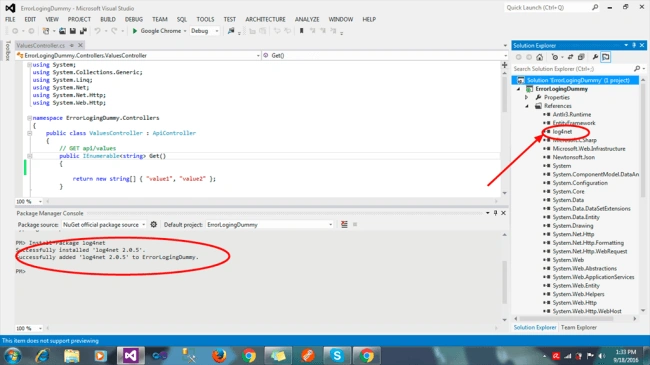
In this image, you can see that log4net is added and showing message in bottom pane.
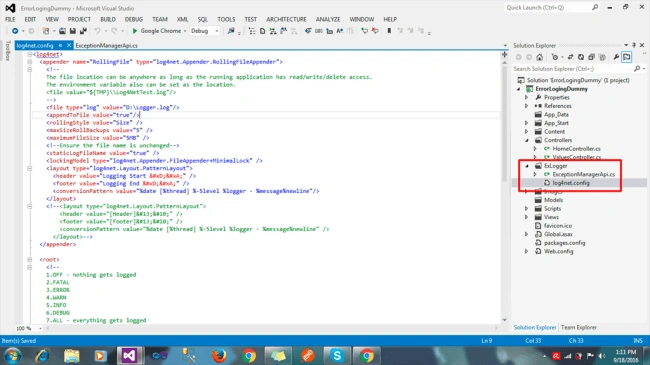
Step 3 - After that, create a folder named "ExLogger" in your application. It's not mandatory but the best way to create a folder is to put all files related to exception and, create two files inside "ExLogger" folder.
- log4net.config
- ExceptionManagerApi.cs
You can see it in the following image.
Step 4 - Write custom code inside log4net.config file to set the log path, log format, and log type etc.
Log4net - Copy this code and paste in your log4net.config file.
- <log4net>
- <appender name="RollingFile" type="log4net.Appender.RollingFileAppender">
- <!--
- The file location can be anywhere as long as the running application has read/write/delete access.
- The environment variable also can be set as the location.
- <file value="${TMP}\\Log4NetTest.log"/>
- -->
- <file type="log" value="D:\Logger.log"/>
- <appendToFile value="true"/>
- <rollingStyle value="Size" />
- <maxSizeRollBackups value="5" />
- <maximumFileSize value="5MB" />
- <!--Ensure the file name is unchanged-->
- <staticLogFileName value="true" />
- <lockingModel type="log4net.Appender.FileAppender+MinimalLock" />
- <layout type="log4net.Layout.PatternLayout">
- <header value="Logging Start
- " />
- <footer value="Logging End
- " />
- <conversionPattern value="%date [%thread] %-5level %logger - %message%newline"/>
- </layout>
- <!--<layout type="log4net.Layout.PatternLayout">
- <header value="[Header]
- " />
- <footer value="[Footer]
- " />
- <conversionPattern value="%date [%thread] %-5level %logger - %message%newline" />
- </layout>-->
- </appender>
- <root>
- <!--
- 1.OFF - nothing gets logged
- 2.FATAL
- 3.ERROR
- 4.WARN
- 5.INFO
- 6.DEBUG
- 7.ALL - everything gets logged
- -->
- <level value="ALL"/>
- <appender-ref ref="RollingFile"/>
- </root>
- </log4net>
In this code, you can change log format and destination path to save log details.
Step 5 - Now, go to configure Exception Filter logic in "ExceptionManagerApi.cs". Copy and paste this code in your "ExceptionManagerApi.cs" file.
- using System;
- using System.Collections.Generic;
- using System.Linq;
- using System.Text;
- using System.Threading.Tasks;
- using System.Web.Mvc;
- using log4net;
- using System.IO;
- using System.Reflection;
- using System.Web.Http.ExceptionHandling;
- namespace CrxApi.ExLogger
- {
- public class ExceptionManagerApi : ExceptionLogger
- {
- ILog _logger = null;
- public ExceptionManagerApi()
- {
- // Gets directory path of the calling application
- // RelativeSearchPath is null if the executing assembly i.e. calling assembly is a
- // stand alone exe file (Console, WinForm, etc).
- // RelativeSearchPath is not null if the calling assembly is a web hosted application i.e. a web site
- var log4NetConfigDirectory = AppDomain.CurrentDomain.RelativeSearchPath ?? AppDomain.CurrentDomain.BaseDirectory;
- //var log4NetConfigFilePath = Path.Combine(log4NetConfigDirectory, "log4net.config");
- var log4NetConfigFilePath = "c:\\users\\user\\documents\\visual studio 2012\\Projects\\ErrorLogingDummy\\ErrorLogingDummy\\ExLogger\\log4net.config";
- log4net.Config.XmlConfigurator.ConfigureAndWatch(new FileInfo(log4NetConfigFilePath));
- }
- public override void Log(ExceptionLoggerContext context)
- {
- _logger = log4net.LogManager.GetLogger(MethodBase.GetCurrentMethod().DeclaringType);
- _logger.Error(context.Exception.ToString() + Environment.NewLine);
- //_logger.Error(Environment.NewLine +" Excetion Time: " + System.DateTime.Now + Environment.NewLine
- // + " Exception Message: " + context.Exception.Message.ToString() + Environment.NewLine
- // + " Exception File Path: " + context.ExceptionContext.ControllerContext.Controller.ToString() + "/" + context.ExceptionContext.ControllerContext.RouteData.Values["action"] + Environment.NewLine);
- }
- public void Log(string ex)
- {
- _logger = log4net.LogManager.GetLogger(MethodBase.GetCurrentMethod().DeclaringType);
- _logger.Error(ex);
- //_logger.Error(Environment.NewLine +" Excetion Time: " + System.DateTime.Now + Environment.NewLine
- // + " Exception Message: " + context.Exception.Message.ToString() + Environment.NewLine
- // + " Exception File Path: " + context.ExceptionContext.ControllerContext.Controller.ToString() + "/" + context.ExceptionContext.ControllerContext.RouteData.Values["action"] + Environment.NewLine);
- }
- }
- }
In this, I have configured my system path to set log4net setting. You should change the path according your application.
- var log4NetConfigFilePath = "c:\\users\\user\\documents\\visual studio 2012\\Projects\\ErrorLogingDummy\\ErrorLogingDummy\\ExLogger\\log4net.config";
Step 6 - Now, we need to configure "ExceptionManagerApi" class inside "WebApiConfig.cs" in app_start folder; to make global we have to configure inside "WebApiConfig.cs". Use this code inside "WebApiConfig.cs" and save.
- //Register Exception Handler
- config.Services.Add(typeof(IExceptionLogger), new ExceptionManagerApi());
Step 7 - If your application is now running well, for testing purposes, throw any default exception and check.
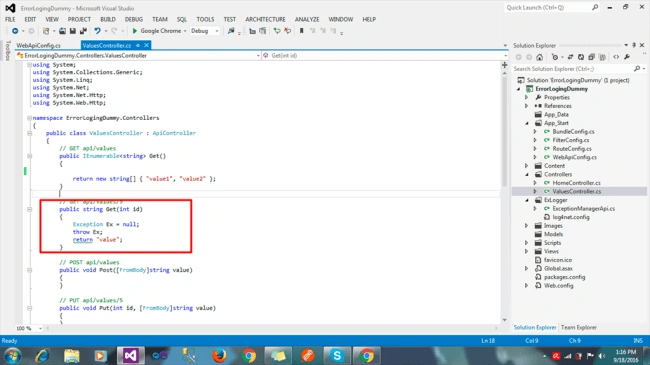
According to this image, I am throwing exception forcibly. After that, consume this API using Postman or any other client. This action will throw an exception and create and new log file in your system.
Step 8 - Run your application and use if any exception occurs anywhere ,any layer (BAL,DAL,....) exception wiil be managed by exception filter and create a new log file in your system by log4net.
No need to use other extra configuration to manage exception in your application.
No need to use other extra configuration to manage exception in your application.
Advantage of Exception Filter and Log4net,
- No need to use any complicated configuration.
- It will be manage global exception in your application.
- No need to use try catch block .
- You can check log details from log file which is created by log4net
- We can find exact error on production server if exception will occur.
- Easy to impliment in web api2.
- No need to manage exception on each layer, because it's for whole solution.
- Easy maintenance of application.
Garima JoshiPosted Jul 1, 2020, 2:00 AM
Nice article Bikesh, I have a question though does this implementation handles all the exception which is not handled by us...As, web API does not handle errors on Application_Error() event on global.asax.cs
Chittaranjan SwainPosted Oct 30, 2019, 8:56 AM
Nice article....
Rasmi RayPosted Jun 17, 2019, 6:58 AM
Hi Bikesh. Thanks for the article. Its really a good one. But how to manage exception on each layer, I can see its working for only one webapi project. How can I implement for more than one webapi and also for webui.
erez morPosted Feb 22, 2017, 6:19 AM
Hi Bikesh. thanks for a great article! i like the idea of using it instead of countless try-catch blocks. my question is: right now i use the catch block to return InternalServerError (or any other response instead of the success one) to the client. how can i accomplish this with your solution?