
This program will generate a html page with animated gif. You just need at least 2 gifs and use the program to set the time to display each image. Click on the "generate html" button and it will generate the code for you. Try out and see ..
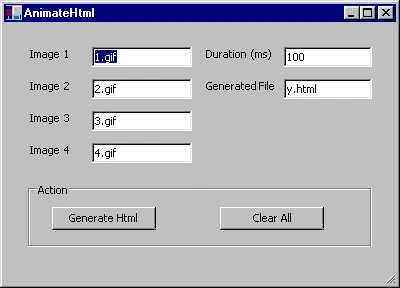
Source Code:
/*
Author : Say Gin Teh
Date : 24/5/2001
Copyright
Free to distribute this program only for educational purpose
This basic program can be used to generate html code using javascript for animating the images.
The duration of image cycle is in milliseconds. A html file will be generated as specified
Feel free to use this program to generate the codes. Cut and paste the "Generated codes" to any html file as required...adding my name somewhere in your html code will be much appreciated but this is entirely your choice
NOTE: The generated html file will overwrite the previous html file
*/
{
using System;
using System.Drawing;
using System.ComponentModel;
using System.WinForms;
using System.IO;
/// <summary>
/// Summary description for AnimateHtml
/// </summary>
public class AnimateHtml : System.WinForms.Form
{
/// <summary>
/// Required by the Win Forms designer
/// </summary>
private System.ComponentModel.Container components;
private System.WinForms.StatusBar statusBar1;
private System.WinForms.Button button2;
private System.WinForms.Button button1;
private System.WinForms.GroupBox groupBox1;
private System.WinForms.TextBox textBox6;
private System.WinForms.Label label6;
private System.WinForms.Label label5;
private System.WinForms.TextBox textBox5;
private System.WinForms.Label label4;
private System.WinForms.Label label3;
private System.WinForms.Label label2;
private System.WinForms.Label label1;
private System.WinForms.Button button3;
private System.WinForms.TextBox textBox4;
private System.WinForms.TextBox textBox3;
private System.WinForms.TextBox textBox2;
private System.WinForms.TextBox textBox1;
private string img1 = "";
private string img2 = "";
private string img3 = "";
private string img4 = "";
private string duration = "";
private string fileName = "";
private StreamWriter writer = null;
private int totalImages = 4;
private String [] imageNames = {"","","",""}; public AnimateHtml()
{
// Required for Win Form Designer support
InitializeComponent();
// TODO: Add any constructor code after InitializeComponent call
}
/// <summary>
/// Clean up any resources being used
/// </summary>
public override void Dispose()
{
base.Dispose();
components.Dispose();
}
/// <summary>
/// The main entry point for the application.
/// </summary>
public static void Main(string[] args)
{
Application.Run(new AnimateHtml());
}
/// <summary>
/// Required method for Designer support - do not modify
/// the contents of this method with an editor
/// </summary>
private void InitializeComponent()
{
this.components = new System.ComponentModel.Container();
this.groupBox1 = new System.WinForms.GroupBox();
this.textBox4 = new System.WinForms.TextBox();
this.textBox1 = new System.WinForms.TextBox();
this.textBox6 = new System.WinForms.TextBox();
this.textBox5 = new System.WinForms.TextBox();
this.statusBar1 = new System.WinForms.StatusBar();
this.button1 = new System.WinForms.Button();
this.button2 = new System.WinForms.Button();
this.label6 = new System.WinForms.Label();
this.button3 = new System.WinForms.Button();
this.label4 = new System.WinForms.Label();
this.label5 = new System.WinForms.Label();
this.label1 = new System.WinForms.Label();
this.textBox2 = new System.WinForms.TextBox();
this.textBox3 = new System.WinForms.TextBox();
this.label2 = new System.WinForms.Label();
this.label3 = new System.WinForms.Label();
//@design this.TrayHeight = 0;
//@design this.TrayLargeIcon = false;
//@design this.TrayAutoArrange = true;
groupBox1.Location = new System.Drawing.Point(24, 160);
groupBox1.TabIndex = 16;
groupBox1.TabStop = false;
groupBox1.Text = "Action";
groupBox1.Size = new System.Drawing.Size(344, 64);
textBox4.Location = new System.Drawing.Point(88, 120);
textBox4.Text = "4.gif";
textBox4.TabIndex = 3;
textBox4.Size = new System.Drawing.Size(100, 20);
textBox1.Location = new System.Drawing.Point(88, 24);
textBox1.Text = "1.gif";
textBox1.TabIndex = 0;
textBox1.Size = new System.Drawing.Size(100, 20);
textBox6.Location = new System.Drawing.Point(280, 56);
textBox6.Text = "y.html";
textBox6.TabIndex = 15;
textBox6.Size = new System.Drawing.Size(88, 20);
textBox5.Location = new System.Drawing.Point(280, 24);
textBox5.Text = "100";
textBox5.TabIndex = 12;
textBox5.Size = new System.Drawing.Size(88, 20);
statusBar1.BackColor = System.Drawing.SystemColors.Control;
statusBar1.Location = new System.Drawing.Point(0, 245);
statusBar1.Size = new System.Drawing.Size(392, 16);
statusBar1.TabIndex = 17;
statusBar1.Text = "";
button1.Location = new System.Drawing.Point(24, 24);
button1.Size = new System.Drawing.Size(104, 23);
button1.TabIndex = 4;
button1.Text = "Generate Html";
button1.Click += new System.EventHandler(button1_Click);
button2.Location = new System.Drawing.Point(192, 24);
button2.Size = new System.Drawing.Size(104, 23);
button2.TabIndex = 5;
button2.Text = "Clear All";
button2.Click += new System.EventHandler(button2_Click);
label6.Location = new System.Drawing.Point(200, 56);
label6.Text = "Generated File";
label6.Size = new System.Drawing.Size(80, 23);
label6.TabIndex = 14;
button3.Location = new System.Drawing.Point(32, 232);
button3.Size = new System.Drawing.Size(0, 0);
button3.TabIndex = 6;
button3.Text = "button3";
label4.Location = new System.Drawing.Point(24, 120);
label4.Text = "Image 4";
label4.Size = new System.Drawing.Size(48, 23);
label4.TabIndex = 11;
label4.Visible = true;
label5.Location = new System.Drawing.Point(200, 24);
label5.Text = "Duration (ms)";
label5.Size = new System.Drawing.Size(80, 23);
label5.TabIndex = 13;
label1.Location = new System.Drawing.Point(24, 24);
label1.Text = "Image 1";
label1.Size = new System.Drawing.Size(48, 23);
label1.TabIndex = 8;
textBox2.Location = new System.Drawing.Point(88, 56);
textBox2.Text = "2.gif";
textBox2.TabIndex = 1;
textBox2.Size = new System.Drawing.Size(100, 20);
textBox3.Location = new System.Drawing.Point(88, 88);
textBox3.Text = "3.gif";
textBox3.TabIndex = 2;
textBox3.Size = new System.Drawing.Size(100, 20);
label2.Location = new System.Drawing.Point(24, 56);
label2.Text = "Image 2";
label2.Size = new System.Drawing.Size(48, 23);
label2.TabIndex = 9;
label2.Visible = true;
label3.Location = new System.Drawing.Point(24, 88);
label3.Text = "Image 3";
label3.Size = new System.Drawing.Size(48, 23);
label3.TabIndex = 10;
label3.Visible = true;
this.Text = "AnimateHtml";
this.AutoScaleBaseSize = new System.Drawing.Size(5, 13);
this.ClientSize = new System.Drawing.Size(392, 261);
groupBox1.Controls.Add(button2);
groupBox1.Controls.Add(button1);
this.Controls.Add(statusBar1);
this.Controls.Add(groupBox1);
this.Controls.Add(textBox6);
this.Controls.Add(label6);
this.Controls.Add(label5);
this.Controls.Add(textBox5);
this.Controls.Add(label4);
this.Controls.Add(label3);
this.Controls.Add(label2);
this.Controls.Add(label1);
this.Controls.Add(button3);
this.Controls.Add(textBox4);
this.Controls.Add(textBox3);
this.Controls.Add(textBox2);
this.Controls.Add(textBox1);
}
// Clear all
Join the conversation! Your thoughts help the community grow.