

Working with Path in Silverlight
A graphics path is a set of connected lines, curves, and other simple graphics objects. This article demonstrates how to use Path control in Silverlight using XAML and C#.
Introduction
A graphics path is a set of connected lines, curves, and other simple graphics objects, including rectangles, ellipses, and text. A path works as a single graphics object, so an effect applied to the graphics path will be applied to all the components of the path. For example, if a graphics path contains a line, a rectangle, and an ellipse and we draw the path using a red stroke, all three components (line, rectangle, and ellipse) of the graphics path will be drawn with the red stroke.
The Path object represents a path shape and draws a path. The Path object draws both closed and open paths. A closed path is a shape that has the same start and endpoints and an open path is a shape that has different start and endpoints.
The Fill property fills the interior of an ellipse. The Stroke property sets the color and StrokeThickness represents the width of the outer line of an ellipse.
The Data property of the Path object defines a shape or a collection of shapes in form of Geometry.
The Path element represents a Silverlight Path control in XAML
- <Path/>
The code snippet in Listing 1 creates a Path and draws an arc by settings its Data property.
- <Path Stroke="Black" StrokeThickness="4"
- Data="M 80,200 A 100,50 45 1 0 100,50" />
Listing 1
The output looks like Figure 1.
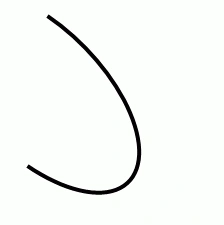
Figure 1
The Path Syntaxes
Let us take a look at the Data attribute of the Path code used in the previous section.
- <Path Stroke="Black" StrokeThickness="4"
- Data="M 80,200 A 100,50 45 1 0 100,50" />
As you may see from the above code snippet, the Data attribute has the letter M followed by two comma-separated numbers, letter A is followed by two comma-separated numbers, and letter O is also followed by two comma-separated numbers.
- The letter M represents a move action and moves to the given point from the current point. For example, M 80,200 command moves from the current point to the point (80, 200).
- The letter L draws a line from the current point to the specified point. For example, the L 100,200 command draws a line from the current point to the point (100, 200).
- The letter H draws a horizontal line from the current point to the specified point towards the x-axis.
- The letter V draws a vertical line from the current point to the specified point towards the y-axis.
- The letter C draws a cubic Bezier curve from the current point to the third point and two points in between are used as the control points.
- The letter S draws a smooth cubic Bezier curve from the current point to the second point and the first point is used as the control point.
- The letter Q draws a quadratic Bezier curve from the first point to the second point and the first point is used as the control point.
- The letter T draws a smooth quadratic Bezier curve from the first point to the second point and the first point is used as the control point.
- The letter A draws an elliptical arc. It takes five parameters - Size, IsLargeArc, Rotation Angle, Sweep Direction, and Endpoint.
- The letter Z closes the current path by drawing a line from the current point to the starting point.
Using Geometries within a Path
The LineGeometry class represents the geometry of a line. The StartPoint and EndPoint properties of the LineGeometry class define the start and endpoints of a line. The following code snippet creates the geometry of a line.
- <LineGeometry StartPoint="20,50" EndPoint="200,50" />
The RectangleGeometry class represents the geometry of a rectangle. The Rect property of the RectangleGeometry defines the starting points, width, and height of a rectangle. The following code snippet creates the geometry of a rectangle.
- <RectangleGeometry Rect="80,167 150 30"/>
The EllipseGeometry class represents the geometry of an ellipse. The Center property of the EllipseGeometry defines the center of an ellipse. The RadiusX and RadiusY define the width and height of an ellipse. The following code snippet creates the geometry of an ellipse.
- <EllipseGeometry Center="80,150" RadiusX="50" RadiusY="50" />
The GeometryGroup creates a composite geometry that is a combination of multiple Geometry objects.
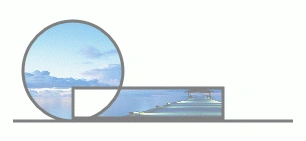
The code listed in Listing 2 creates a GeometryGroup with three geometry shapes - a line, an ellipse, and a rectangle and sets the Data property of a path.
- <Path Stroke="Black" StrokeThickness="3" Fill="Blue" >
- <Path.Data>
- <GeometryGroup >
- <LineGeometry StartPoint="20,200" EndPoint="300,200" />
- <EllipseGeometry Center="80,150" RadiusX="50" RadiusY="50" />
- <RectangleGeometry Rect="80,167 150 30"/>
- </GeometryGroup>
- </Path.Data>
- </Path>
Listing 2
The output of Listing 2 looks like Figure 2.
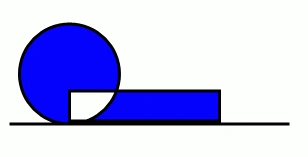
Figure 2. A composite shape
The FillRule property of the GeometryGroup class specifies how the intersecting areas of geometry objects in a GeometryGroup are combined. It has two values – EvenOdd and NonZero. The default value of the FillRule is EvenOdd. In this case, the intersecting area of two shapes is not filled. In the case of NonZero, the interesting area of two shapes is filled. By setting the FillRule to NonZero generates Figure 3.
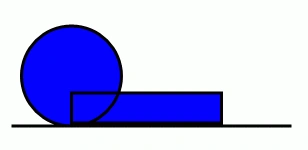
Figure 3. A composite shape with NonZero FillRule
Ankur DeshpandePosted Oct 10, 2012, 11:25 AM
hello sir, i need to draw a dynamic line between to images of servers. How can i go about it..??? n how to use your above code in asp web application.. please guide.
Mahesh ChandPosted May 30, 2012, 10:21 AM
@Prashant, yes. All elements in WPF and Silverlight have width and height properties. You should be able to use the Height and the Width properties at runtime.
Mahesh ChandPosted May 30, 2012, 10:19 AM
I would not have time to write the sample code Gangadhar. But I think the way I will implement is, create a custom control and load that with an image that looks like call out below. Then put a TextBox or TextBlock on top of that and expose the Author Image and TextBox text properties as public properties. Cheers!
Gangadhar MahindrakarPosted May 21, 2012, 8:27 AM
Hi Mahesh, i want create the Callout, like shown in the post comment. 1.here it should take a arrow Left or Right dynamically as per position. can u give sample for this. Thanks
pavan kumareditedPosted Jan 12, 2012, 6:29 AMEdited Jan 12, 2012, 6:29 AM
Hi Mahesh, Thanks for this article. how to bind the Data="m 0,0 l -16,16 l 16,1 l 1,-16" dynamically please help me.. thanks in advance...
PrashanthPosted Dec 13, 2011, 10:02 PM
Great article.. Really clear and explains everything to know.. Is there a way to resize a Path element dynamically in C#? I have a xaml file into which I have imported an Adobe Illustrator file. This gave me a ton of Path elements that I need to make use of in another xaml and set it as a background for another UIElement. I need to reset the height and width of this path element to be slightly more than the UIElement so that the Path element acts as a border to that element. I have been trying to set the height, Minheight, Maxheight to the new value, even used setValue(dependency property, value) function, but it just won't work!! It resizes the path element to the grid size of its parent element! Is there any way to do this?? Thanks!!
Richard WaddellPosted Nov 22, 2010, 9:14 PM
Just what I needed all in one place with no distracting fluff. Perfect.
Mahesh ChandPosted Dec 20, 2009, 9:39 PM
you found this article useful. Cheers!
Raghuraman KanchiPosted Dec 18, 2009, 3:02 PM
Hi Mahesh, You are doing an excellent Job of writing all tutorial styled articles. Thank you for this write up Regards Raghuraman