

Here I am explaining GridView CRUD Operations using N-Tier Architecture.
First here I am explaining databases, table parameters, and Stored Procedures to Create, Read, Update and Delete Operations.
  1. Use [GridData]
  2. CREATE TABLE [dbo].[OperatingSystem](
  3. [OSId] [int] IDENTITY(1,1) NOT NULL,
  4. [OSName] [varchar](100) NULL,
  5. [CreateDate] [datetime] NULL,
  6. [Status] [smallint] NULL,
  7. CONSTRAINT [PK_OperatingSystem] PRIMARY KEY CLUSTERED
  8. (
  9. [OSId] ASC
  10. )WITH (PAD_INDEX = OFF, STATISTICS_NORECOMPUTE = OFF, IGNORE_DUP_KEY = OFF, ALLOW_ROW_LOCKS = ON, ALLOW_PAGE_LOCKS = ON) ON [PRIMARY]
  11. ) ON [PRIMARY]
  12. GO
  13. SET ANSI_PADDING OFF
  14. GO
  15. ALTER TABLE [dbo].[OperatingSystem] ADD DEFAULT (getdate()) FOR [CreateDate]
  16. GO
  17. ALTER TABLE [dbo].[OperatingSystem] ADD DEFAULT ('1') FOR [Status]
  18. GO
  19. Stored Procedures are,
  20. //Create Procedure
  21. Create Procedure [dbo].[InsertSystemName]
  22. (
  23. @OSName varchar(50)
  24. )
  25. AS
  26. BEGIN
  27. insert into OperatingSystem(OSName) values(@OSName)
  28. END
  29. //Get Data Procedure
  30. ALTER Procedure [dbo].[GetSystemsData]
  31. As
  32. Begin
  33. select * from OperatingSystem where Status='1'
  34. End
  35. //Update Procedure
  36. ALTER Procedure [dbo].[UpdateSystems]
  37. (
  38. @Id int,
  39. @Name varchar(100),
  40. @Status int
  41. )
  42. As
  43. BEGIN
  44. update OperatingSystem set OSName=@Name,Status=@Status where OSId=@Id
  45. END
  46. //Delete Procedure
  47. ALTER Procedure [dbo].[DeleteSystemsData]
  48. (
  49. @Id int
  50. )
  51. As
  52. Begin
  53. update OperatingSystem set Status='0' where OSId=@Id
  54. End
Getting to the Databaselayer, create a classs named "SqlHelper.CS" and write the following code.
Note: Here dbconnection is a connection string for SQL Server.
    1. public static string CONNECTION_STRING = ConfigurationManager.ConnectionStrings["dbconnection"].ConnectionString;
    2. public static DataSet ExecuteParamerizedSelectCommand(string CommandName, CommandType cmdType, SqlParameter[] param) {
    3. DataSet ds = new DataSet();
    4. using(SqlConnection con = new SqlConnection(CONNECTION_STRING)) {
    5. using(SqlCommand cmd = con.CreateCommand()) {
    6. cmd.CommandType = cmdType;
    7. cmd.CommandText = CommandName;
    8. cmd.Parameters.AddRange(param);
    9. try {
    10. if (con.State != ConnectionState.Open) {
    11. con.Open();
    12. }
    13. using(SqlDataAdapter da = new SqlDataAdapter(cmd)) {
    14. da.Fill(ds);
    15. }
    16. } catch {
    17. throw;
    18. }
    19. }
    20. }
    21. return ds;
    22. }
    23. // This function will be used to execute CUD(CRUD) operation of parameterized commands
    24. public static bool ExecuteNonQuery(string CommandName, CommandType cmdType, SqlParameter[] pars) {
    25. int result = 0;
    26. using(SqlConnection con = new SqlConnection(CONNECTION_STRING)) {
    27. using(SqlCommand cmd = con.CreateCommand()) {
    28. cmd.CommandType = cmdType;
    29. cmd.CommandText = CommandName;
    30. cmd.Parameters.AddRange(pars);
    31. try {
    32. if (con.State != ConnectionState.Open) {
    33. con.Open();
    34. }
    35. result = cmd.ExecuteNonQuery();
    36. } catch {
    37. throw;
    38. }
    39. }
    40. }
    41. return (result > 0);
    42. }
    43. //Getting To EntityLayer, add a class and named as GridData.CS and write following code:
    44. public class OperatingSystemEntity {
    45. public int OSId {
    46. get;
    47. set;
    48. }
    49. public string OSName {
    50. get;
    51. set;
    52. }
    53. public DateTime CreateDate {
    54. get;
    55. set;
    56. }
    57. public int Status {
    58. get;
    59. set;
    60. }
    61. }
    62. //Getting to DAL, Add a class and named as GridData.cs and write the following code:
    63. public class GridData {
    64. public bool CreateSystem(OperatingSystemEntity SEntity) {
    65. SqlParameter[] parameters = new SqlParameter[] {
    66. new SqlParameter("@OSName", SEntity.OSName),
    67. };
    68. return SqlHelper.ExecuteNonQuery("InsertSystemName", CommandType.StoredProcedure, parameters);
    69. }
    70. public List < OperatingSystemEntity > GetSystemsData(OperatingSystemEntity SEntity) {
    71. List < OperatingSystemEntity > ListEntry = null;
    72. SqlParameter[] parameters = new SqlParameter[] {
    73. };
    74. using(DataSet ds = SqlHelper.ExecuteParamerizedSelectCommand("GetSystemsData", CommandType.StoredProcedure, parameters)) {
    75. if (ds.Tables.Count > 0) {
    76. ListEntry = new List < OperatingSystemEntity > ();
    77. foreach(DataRow row2 in ds.Tables[0].Rows) {
    78. OperatingSystemEntity entry = new OperatingSystemEntity();
    79. entry.OSId = Convert.ToInt32(row2["OSId"].ToString());
    80. entry.OSName = row2["OSName"].ToString();
    81. entry.CreateDate = Convert.ToDateTime(row2["CreateDate"].ToString());
    82. entry.Status = Convert.ToInt32(row2["Status"].ToString());
    83. ListEntry.Add(entry);
    84. }
    85. }
    86. }
    87. return ListEntry;
    88. }
    89. public bool UpdateSystems(OperatingSystemEntity SEntity) {
    90. SqlParameter[] parameters = new SqlParameter[] {
    91. new SqlParameter("@Id", SEntity.OSId),
    92. new SqlParameter("@Name", SEntity.OSName),
    93. new SqlParameter("@Status", SEntity.Status),
    94. };
    95. return SqlHelper.ExecuteNonQuery("UpdateSystems", CommandType.StoredProcedure, parameters);
    96. }
    97. public bool DeleteSystem(OperatingSystemEntity SEntity) {
    98. SqlParameter[] parameters = new SqlParameter[] {
    99. new SqlParameter("@Id", SEntity.OSId),
    100. };
    101. return SqlHelper.ExecuteNonQuery("DeleteSystemsData", CommandType.StoredProcedure, parameters);
    102. }
    103. }
    104. }
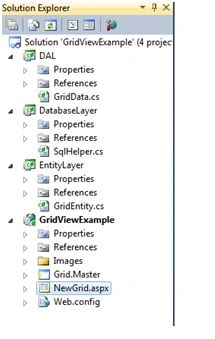
    Then the Solution Explorer will be such as follows:
    Getting to GridViewExample Web Application, add a new form named NewGrid.aspx and add the following code:
      1. <asp:Content ID="Content1" ContentPlaceHolderID="head" runat="server">
      2. <script language="javascript" type="text/javascript">
      3. function validate() {
      4. if (document.getElementById("<%=txtname.ClientID %>").value == "") {
      5. alert("Please Enter Name");
      6. document.getElementById("<%=txtname.ClientID %>").focus();
      7. return false;
      8. }
      9. }
      10. </script>
      11. </asp:Content>
      12. <asp:Content ID="Content2" ContentPlaceHolderID="Body" runat="server">
      13. <div>
      14. <h2 style="width: 80%">
      15. <u>Create System</u></h2>
      16. <table>
      17. <tr>
      18. <td colspan="2">
      19. <asp:Label runat="server" ID="lblmsgerror" Font-Bold="true"></asp:Label>
      20. </td>
      21. </tr>
      22. <tr>
      23. <td>
      24. <asp:Label ID="lblname" runat="server" Text="SystemName"></asp:Label>
      25. </td>
      26. <td>
      27. <asp:TextBox ID="txtname" runat="server"></asp:TextBox>
      28. </td>
      29. </tr>
      30. <tr>
      31. <td>
      32. </td>
      33. <td>
      34. <asp:Button ID="btnsave" runat="server" Text="Save" OnClick="btnsave_Click" />
      35. </td>
      36. </tr>
      37. </table>
      38. </div>
      39. <h2 style="width: 80%">
      40. <u>Total Availble Systems</u></h2>
      41. <p>
      42. <asp:Label runat="server" ID="lblmsg" ForeColor="Red" Font-Bold="true"></asp:Label>
      43. </p>
      44. <div>
      45. <asp:GridView ID="gvSystem" runat="server" AutoGenerateColumns="false" OnRowUpdating="gvSystem_RowUpdating" OnRowEditing="gvSystem_RowEditing" OnRowDeleting="gvSystem_RowDeleting" DataKeyNames="OSId" OnRowCancelingEdit="gvSystem_RowCancelingEdit">
      46. <Columns>
      47. <asp:TemplateField>
      48. <EditItemTemplate>
      49. <asp:ImageButton ID="imgbtnUpdate" CommandName="Update" runat="server" ImageUrl="~/Images/Update.jpg" ToolTip="Update" Height="20px" Width="20px" />
      50. <asp:ImageButton ID="imgbtnCancel" runat="server" CommandName="Cancel" ImageUrl="~/Images/Cancel.jpg" ToolTip="Cancel" Height="20px" Width="20px" />
      51. </EditItemTemplate>
      52. <ItemTemplate>
      53. <asp:ImageButton ID="imgbtnEdit" CommandName="Edit" runat="server" ImageUrl="~/Images/Edit.jpg" ToolTip="Edit" Height="20px" Width="20px" />
      54. <asp:ImageButton ID="imgbtnDelete" CommandName="Delete" OnClientClick="return confirm('Are you sure you want to delete selected record?')" Text="Edit" runat="server" ImageUrl="~/images/Delete.jpg" ToolTip="Delete" Height="20px" Width="20px" />
      55. </ItemTemplate>
      56. </asp:TemplateField>
      57. <asp:TemplateField HeaderText="System Name">
      58. <EditItemTemplate>
      59. <asp:TextBox ID="txtname" runat="server" Text='<%# Eval("OSName")%>'></asp:TextBox>
      60. </EditItemTemplate>
      61. <ItemTemplate>
      62. <asp:Label ID="lblname" runat="server" Text='<%# Eval("OSName")%>'></asp:Label>
      63. </ItemTemplate>
      64. </asp:TemplateField>
      65. <asp:TemplateField HeaderText="Date Of Created">
      66. <ItemTemplate>
      67. <asp:Label ID="lbldate" runat="server" Text='<%# Eval("CreateDate")%>'></asp:Label>
      68. </ItemTemplate>
      69. </asp:TemplateField>
      70. <asp:TemplateField HeaderText="Status">
      71. <EditItemTemplate>
      72. <asp:TextBox ID="txtstatus" runat="server" Text='<%# Eval("Status")%>'></asp:TextBox>
      73. </EditItemTemplate>
      74. <ItemTemplate>
      75. <asp:Label ID="lblstatus" runat="server" Text='<%# Eval("Status")%>'></asp:Label>
      76. </ItemTemplate>
      77. </asp:TemplateField>
      78. </Columns>
      79. </asp:GridView>
      80. </div>
      81. </asp:Content>
      In NewGrid.aspx.cs file, write the following code:
        1. OperatingSystemEntity SEntity = new OperatingSystemEntity();
        2. GridData GData = new GridData();
        3. protected void Page_Load(object sender, EventArgs e) {
        4. btnsave.Attributes.Add("onclick", "return validate()");
        5. if (!IsPostBack) {
        6. BindData();
        7. }
        8. }
        9. protected void btnsave_Click(object sender, EventArgs e) {
        10. SEntity.OSName = txtname.Text;
        11. if (GData.CreateSystem(SEntity) == true) {
        12. lblmsgerror.ForeColor = Color.Green;
        13. lblmsgerror.Text = "System Name Saved Successfully";
        14. BindData();
        15. txtname.Text = "";
        16. } else {
        17. lblmsgerror.ForeColor = Color.Red;
        18. lblmsgerror.Text = "System Name Already Exists ";
        19. }
        20. }
        21. private void BindData() {
        22. List < OperatingSystemEntity > SList = GData.GetSystemsData(SEntity);
        23. if (SList.Count != 0) {
        24. gvSystem.DataSource = SList;
        25. gvSystem.DataBind();
        26. } else {
        27. lblmsg.Text = "No Data found..";
        28. }
        29. }
        30. private static String GetTextFromRowBox(GridViewRow row, String field) {
        31. return ((TextBox) row.FindControl(field)).Text;
        32. }
        33. protected void gvSystem_RowUpdating(object sender, GridViewUpdateEventArgs e) {
        34. int id = Convert.ToInt32(gvSystem.DataKeys[e.RowIndex].Values["OSId"].ToString());
        35. GridViewRow row = gvSystem.Rows[e.RowIndex];
        36. SEntity.OSName = GetTextFromRowBox(row, "txtname");
        37. SEntity.Status = Convert.ToInt32(GetTextFromRowBox(row, "txtstatus").ToString());
        38. SEntity.OSId = id;
        39. if (GData.UpdateSystems(SEntity) == true) {
        40. gvSystem.EditIndex = -1;
        41. BindData();
        42. lblmsg.Text = "Records Updated sucessfully";
        43. } else {
        44. lblmsg.Text = "Updation Failed";
        45. }
        46. }
        47. protected void gvSystem_RowEditing(object sender, GridViewEditEventArgs e) {
        48. gvSystem.EditIndex = e.NewEditIndex;
        49. BindData();
        50. }
        51. protected void gvSystem_RowCancelingEdit(object sender, GridViewCancelEditEventArgs e) {
        52. gvSystem.EditIndex = -1;
        53. BindData();
        54. }
        55. protected void gvSystem_RowDeleting(object sender, GridViewDeleteEventArgs e) {
        56. int ID = Convert.ToInt32(gvSystem.DataKeys[e.RowIndex].Values["OSId"].ToString());
        57. deleterecords(ID);
        58. }
        59. private void deleterecords(int ID) {
        60. SEntity.OSId = ID;
        61. if (GData.DeleteSystem(SEntity) == true) {
        62. lblmsg.Text = "Records deleted sucessfully...";
        63. BindData();
        64. lblmsg.Text = "";
        65. } else {
        66. lblmsg.ForeColor = Color.Red;
        67. lblmsg.Text = "Records deleted failed...";
        68. BindData();
        69. lblmsg.Text = "";
        70. }
        71. }
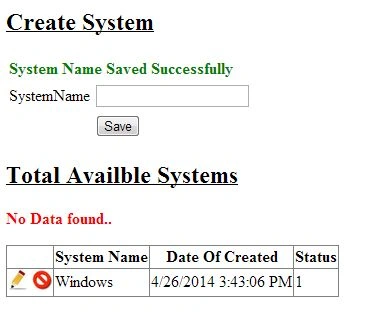
        Like that we have completed the CRUD Operations for the Gridview in the N-Tier architecture. If you have any doubts then please leave a comment. I will explain ASAP. The output will appear as in the following:
        Thanks and happy coding.