

Introduction
Sometimes you create a List/Document Library using Visual Studio and you need to hide ‘Export to Excel’ button from Ribbon. You do not want to do it using SharePoint Designer because you have to do it manually in all the environments. Using this JavaScript approach hide this button from Ribbon.
Implementation
We are going to customize the List View using JavaScript.
- Add a JavaScript file in your solution.
- Modify schema.xml of the List and add the reference of JavaScript file to the <JSLink> tag.
Get Started:
- Create a SharePoint –hosted ‘Apps for SharePoint 2013’ project using Visual Studio 2012/2013.
- Add a List ‘TestList’ to your solution.
- Add a JavaScript file ‘HideExportToExcel.js’ to the Scripts folder.

- Add the following code to the JavaScript file.
- var nIntervId;
- // DOM is ready
- (function () {
- var e = ExecuteOrDelayUntilScriptLoaded(
- CallHide,
- "sp.js");
- })();
- //Call this function on click of 'LIST' until Export to Excel link is hidden
- function CallHide() {
- document.addEventListener('click', function (evt) {
- if (evt.target.textContent == "List") {
- nIntervId = setInterval(HideExportLink, 50);
- }
- });
- }
- //Hide 'Export to Excel' Span if it is rendered in the Ribbon Menu
- function HideExportLink() {
- //Get Span which contains the Export Link
- var exportSpan = document.getElementById('Ribbon.List.Actions-LargeMedium-0-0');
- if (exportSpan != null) {
- // set the display to none
- exportSpan.style.display = 'none';
- //Since link is hidden, Stop CallHide()
- StopCallHide();
- }
- }
- //Clear Interval
- function StopCallHide() {
- clearInterval(nIntervId);
- }
Explanation
- Associate click event on Document elements.
- Check if clicked element’s text is ‘Lists’, then call the function to hide ‘Export to Excel’. ‘Lists’ tab already has an onclick event, so when this tab is clicked, its default as well as our custom added click event will be triggered. We cannot modify its default click behaviour and we cannot say when it will be completed, so we call hide function at some interval till the button is hidden. Once the button is hidden, stop calling the hide function.
- Open schema.xml of ‘TestList’ and go to the AllItems View tag <View BaseViewID="1"……………>. Update the <JSLink>tag to reference this JavaScript.
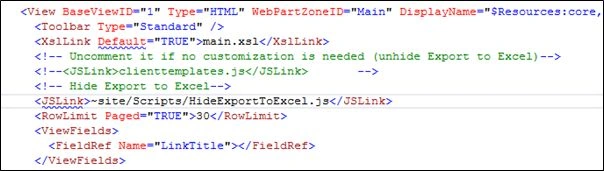
- <!-- Hide Export to Excel-->
- <JSLink>~site/Scripts/HideExportToExcel.js</JSLink>
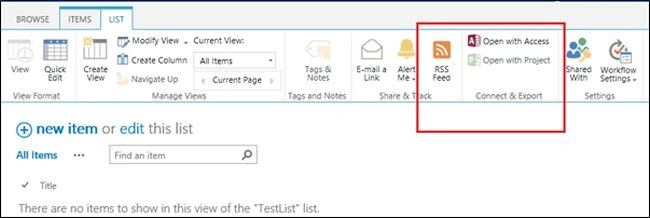
- Build and deploy the solution. Open the ‘TestList’ and click on ‘Lists’ tab. ‘Export to Excel’ button will be hidden.
Additional Note
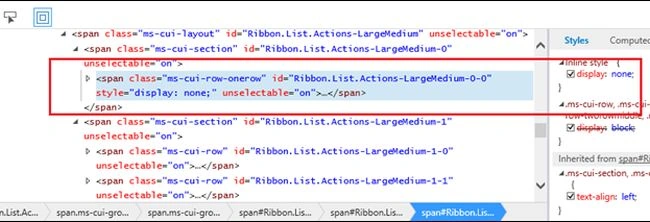
You can use developer tool to get the Id of the span which contains ‘Export to Excel’ button. It is different in Document Library AllItems view.
Conclusion
This method can be used to hide any button or Document element on All items View page. If you have more than one view on the List/Library, you can use the same JavaScript file hide any element. Achieve additional customization in List View using custom JavaScript.
Archana SapkalPosted Feb 16, 2016, 1:12 AM
Any referances for this development will be help full to me..
Archana SapkalPosted Feb 16, 2016, 1:12 AM
Thank you amit for reply..Any references will be helpfull?
Archana SapkalPosted Feb 15, 2016, 7:39 AM
can we add Export To Pdf button on ribbon in sharepoint online using javascript?
Santhakumar MunuswamyPosted Oct 18, 2015, 5:51 AM
Good one
Sibeesh VenuPosted Oct 6, 2015, 9:44 AM
Nice Share
Harshad PansuriyaPosted Oct 6, 2015, 8:39 AM
Nice one
Priyaranjan K SPosted Oct 6, 2015, 5:43 AM
Nice Share ..
Nilesh JadavPosted Oct 6, 2015, 3:37 AM
Nice one sir !
Ankit BansalPosted Oct 6, 2015, 3:14 AM
nice..
Vinodh NarayananPosted Oct 6, 2015, 1:42 AM
Nice share keep going