

Amazon S3(Simple Storage Service) is an object level storage in the AWS. S3 is a highly available, scalable, AWS managed storage service. There is no limit to store objects in the S3 but the object size should not be greater than 5TB. S3 offer four 9’s of availability (99.99%) and eleven 9’s of durability (99.999999999%).
Apart from storing objects, S3 can also be used to host static websites, website with constant content that does not require server side computing.
In this article, we will host a sample static website on S3.
The first step is to create a S3 bucket.
- Go to AWS console, under services-> Select S3
- Create a S3 bucket by providing a unique name (S3 is a global service and two buckets can have the same name)
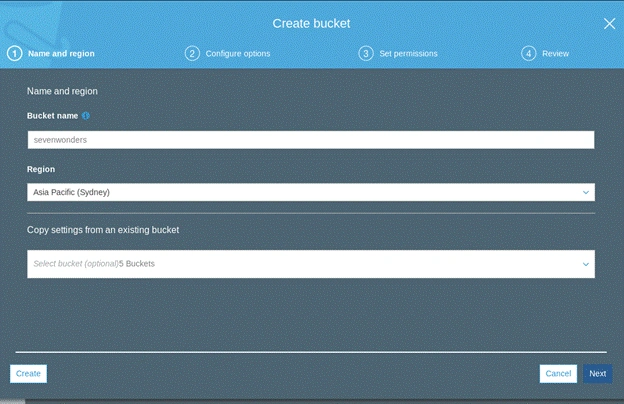
- Untick the ‘Block all Public Access’ option. To host a static website in S3, the bucket should be public, so that the website is available to the world. Ticking on this option, prevents us from making the bucket and object public in the later steps.
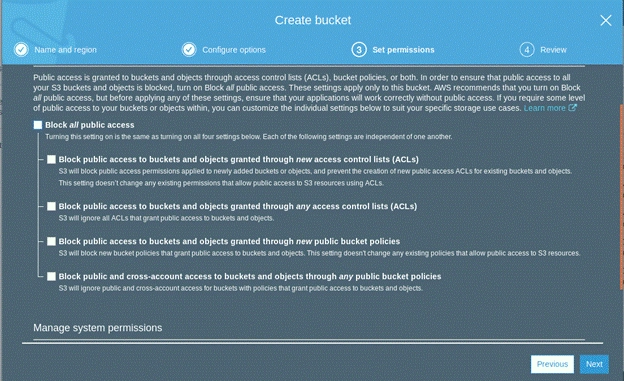
- Create the bucket. Once the bucket is been created, it's time to configure it for static website hosting.
- Go to bucket properties, under properties -> static website hosting
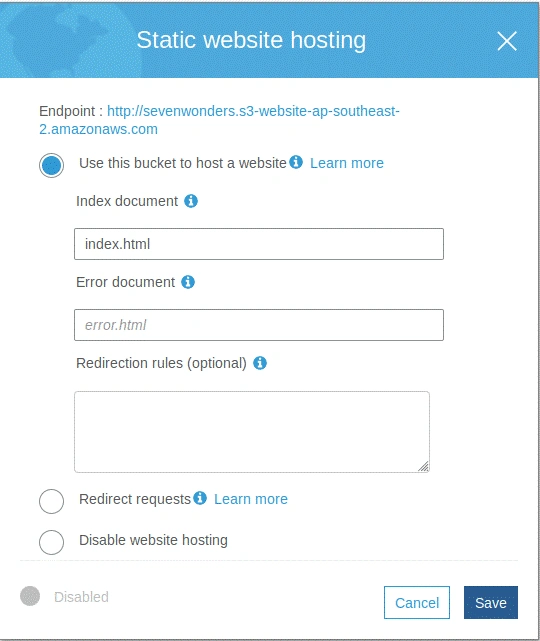
Provide the name of the index document of your website. You can also specify error document if you wish to. Click save.
- The next thing is to make the bucket and object public. While giving permissions it is important that you give only ‘ public read‘ permission. Do not give any ‘public write’ permission.
- Once done, upload your static files to S3.
- Hit the endpoint shown in static website hosting.
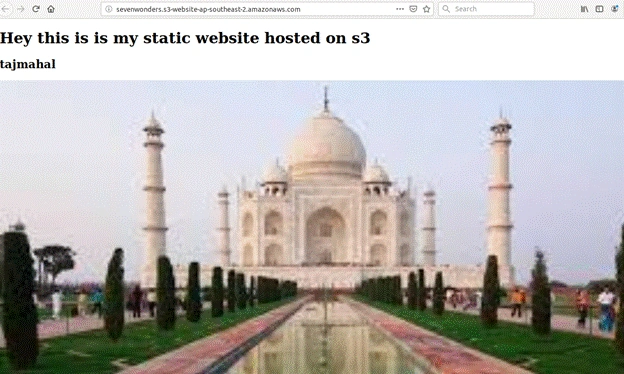
Your static website is up and running. The domain for this website is your bucket name followed by default S3 domain name. If you own a domain, such as example.com, you can also set it to redirect to this page using Route53 and S3. For this, it is important to have your S3 bucket name the same as your domain name. For example, if your domain name is www.example.com then your bucket name should also be www.example.com.
The website is hosted in S3, so it is highly available, durable and maintained by AWS.
Join the conversation! Your thoughts help the community grow.