

Introduction
I encountered the problem in my project of how to set and change a watermark during runtime in a single "text box" on the change event of a dropdown. I found various solutions on the internet but then I developed the following solution. JavaScript code
- $(document).ready(function()
- {
- $("#textBoxId").val("Enter Name");
- ChangeWatermark('textBoxId', 'Enter Name');
- });
- function ChangeWatermark(inputId, watermarkText)
- {
- $("#" + inputId).unbind("focus");
- $("#" + inputId).unbind("blur");
- $("#" + inputId).bind("focus", function()
- {
- if (this.value == watermarkText) this.value = '';
- });
- $("#" + inputId).bind("blur", function()
- {
- if (this.value == '') this.value = watermarkText;
- });
- }
- function ChangeWatermarkBasedOnDropdownChange()
- {
- switch ($("#DdlSelectSearch option[value='" + $("#DdlSelectSearch").val() + "']").text())
- {
- case "Name":
- $("#textBoxId").val("Enter Name");
- ChangeWatermark('textBoxId', 'Enter Name');
- break;
- case "Zip":
- $("#textBoxId").val("Enter Zip");
- ChangeWatermark('textBoxId', 'Enter Zip');
- break;
- case "City":
- $("#textBoxId").val("Enter City");
- ChangeWatermark('textBoxId', 'Enter City');
- break;
- case "MC Id":
- $("#textBoxId").val("Enter MC Id");
- ChangeWatermark('textBoxId', 'Enter MC Id');
- break;
- default:
- }
- }
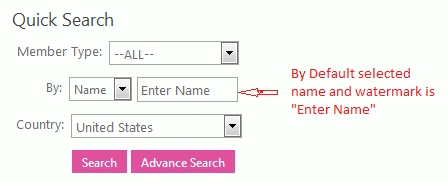

Abhijat SaxenaPosted Dec 23, 2015, 2:49 AM
http://www.w3schools.com/tags/att_input_placeholder.asp
Abhijat SaxenaPosted Dec 23, 2015, 2:49 AM
Hi There, Nice Article, By the way it's called a Placeholder attribute on an input tag