

Here, you will see how to create a TextBox upon each button click using JavaScript and CSS.
I hope this code is very helpful for creating a paper format for an online examination project. Check it out. If you have any concerns then let me know.
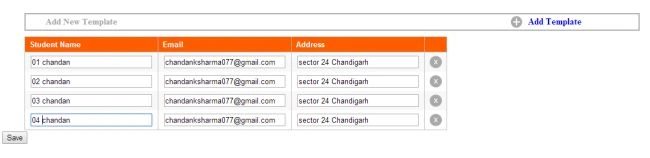
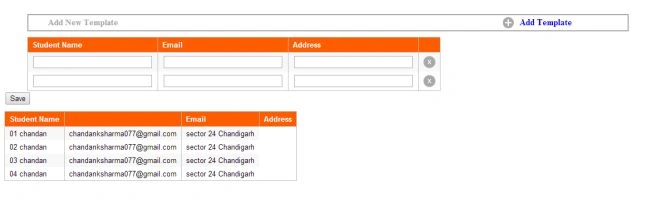
.Aspx Code
- <%@ Page Language="C#" AutoEventWireup="true" CodeFile="Default.aspx.cs" Inherits="_Default" %>
- <!DOCTYPE html PUBLIC "-//W3C//DTD XHTML 1.0 Transitional//EN" "http://www.w3.org/TR/xhtml1/DTD/xhtml1-transitional.dtd">
- <html xmlns="http://www.w3.org/1999/xhtml">
- <head id="Head1" runat="server">
- <title></title>
- <style type="text/css">
- .TemplateTable
- {
- width: 80%;
- margin-left: 3%;
- border: 2px solid #a7a8a7;
- margin-top: 30px;
- padding-left: 35px;
- font-size: 15px;
- font-style: initial;
- font-weight: bold;
- color: #a7a8a7;
- padding-top: 3px;
- padding-bottom: 3px;
- }
- .TemplateTable tr td div
- {
- float: left;
- padding-right: 10px;
- font-size: 16px;
- }
- .TemplateTable tr td div a
- {
- color: Blue;
- }
- .custom-tablePopup
- {
- font-family: Arial, Helvetica, sans-serif;
- font-size: 13px;
- margin: 10px 0 0 0;
- padding: 0;
- border-right: 1px solid #bebebe;
- border-top: 1px solid #bebebe;
- border-bottom: 1px solid #bebebe;
- }
- .custom-tablePopup th
- {
- background: #ff5c00 !important;
- text-align: left;
- border-left: 1px solid #bebebe;
- border-bottom: 1px solid #bebebe;
- padding: 5px 8px;
- color: #fff;
- }
- .custom-tablePopup td
- {
- border-left: 1px solid #bebebe;
- padding: 4px 8px;
- }
- .custom-tablePopup tr:nth-child(even)
- {
- background: #f8f8f8;
- }
- </style>
- <script type="text/javascript">
- var count = "1";
- function addRow(in_tbl_name) {
- var tbody = document.getElementById(in_tbl_name).getElementsByTagName("TBODY")[0];
- // create row
- var row = document.createElement("TR");
- // create table cell 2
- var td1 = document.createElement("TD")
- var strHtml2 = "<input type=\"text\" name=\"SName\" size=\"30\" maxlength=\"30\" />";
- td1.innerHTML = strHtml2.replace(/!count!/g, count);
- // create table cell 3
- var td2 = document.createElement("TD")
- var strHtml3 = "<input type=\"text\" name=\"Email\" size=\"30\" maxlength=\"30\" />";
- td2.innerHTML = strHtml3.replace(/!count!/g, count);
- // create table cell 4
- var td3 = document.createElement("TD")
- var strHtml4 = "<input type=\"text\" name=\"Address\" size=\"30\" maxlength=\"30\" />";
- td3.innerHTML = strHtml4.replace(/!count!/g, count);
- // create table cell 5
- var td4 = document.createElement("TD")
- var strHtml5 = "<img src=\"Images/icon_03.png\" onclick=\"delRow()\" style=\"width: 22px; cursor:pointer;\" />";
- td4.innerHTML = strHtml5.replace(/!count!/g, count);
- // append data to row
- row.appendChild(td1);
- row.appendChild(td2);
- row.appendChild(td3);
- row.appendChild(td4);
- count = parseInt(count) + 1;
- // add to count variable
- // append row to table
- tbody.appendChild(row);
- }
- function delRow() {
- var current = window.event.srcElement;
- //here we will delete the line
- while ((current = current.parentElement) && current.tagName != "TR");
- current.parentElement.removeChild(current);
- }
- </script>
- </head>
- <body>
- <form id="form1" runat="server">
- <div>
- <table cellpadding="0" cellspacing="0" class="TemplateTable">
- <tr>
- <td>
- Add New Template
- </td>
- <td style="float: right; padding-right: 90px;">
- <div>
- <img id="Img1" src="~/Images/icon_04.png" width="20" runat="server" /></div>
- <div>
- <a title="Add more template" style="cursor: pointer;" onclick="addRow('tblPets')">Add
- Template</a>
- </div>
- </td>
- </tr>
- </table>
- </div>
- <div style="margin-left: 3%;">
- <table id="tblPets" cellpadding="0" cellspacing="0" class="custom-tablePopup">
- <tr>
- <th>Student Name</th>
- <th>Email</th>
- <th>Address</th>
- <th></th>
- </tr>
- <tr>
- <td><input type="text" name="SName" size="30" maxlength="30" /></td>
- <td><input type="text" name="Email" size="30" maxlength="30" /></td>
- <td><input type="text" name="Address" size="30" maxlength="30" /></td>
- <td><img src="Images/icon_03.png" onclick="delRow()" style="width: 22px; cursor: pointer;" /></td>
- </tr>
- </table>
- </div>
- <div>
- <asp:Button ID="btnSave" runat="server" Text="Save" OnClick="btnSave_Click" />
- </div>
- <div>
- <asp:Literal ID="lit" runat="server"></asp:Literal>
- </div>
- </form>
- </body>
- </html>
Shujauddin KhanPosted Apr 28, 2020, 12:39 PM
Thanks mate,Great Article. Also give some idea for dynamic checkboxes and dropdown.
rahul bhatPosted Sep 29, 2016, 9:32 AM
Thanks Bro Works like a Charm... i even added some ADO in it for database insertion.. Thanks for the Code Bro... Keep up the good work...
Rama KrishnaPosted Dec 15, 2014, 7:36 AM
thanks
Jitendra GangwarPosted Dec 10, 2014, 5:45 AM
Use this - onclick="deleteRow(this.parentNode.parentNode.rowIndex)" function deleteRow(i) { document.getElementById('tblPets').deleteRow(i) }
Rama KrishnaPosted Nov 30, 2014, 12:51 AM
In Firefox delRow() is not working
Amila Ruvinda DharmaratnePosted Oct 22, 2014, 12:23 PM
Excellent Code , Highly Appreciate if u could include list box Fill With Jquery
saif jameelPosted Oct 2, 2014, 8:47 AM
Sir I Have Two Tables Like this But One Is not Working Properly pls Help me