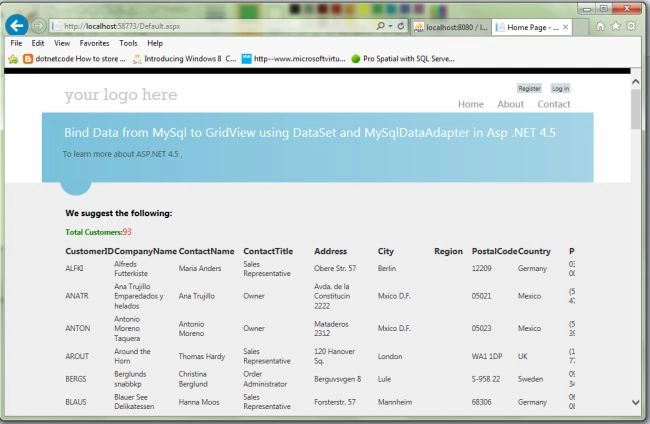
Introduction

This article shows how to bind data from a MySQL database to a GridView in ASP.Net 4.5.

Use

See the following screen; select "MySQL Wamp Server database" > "customers data".
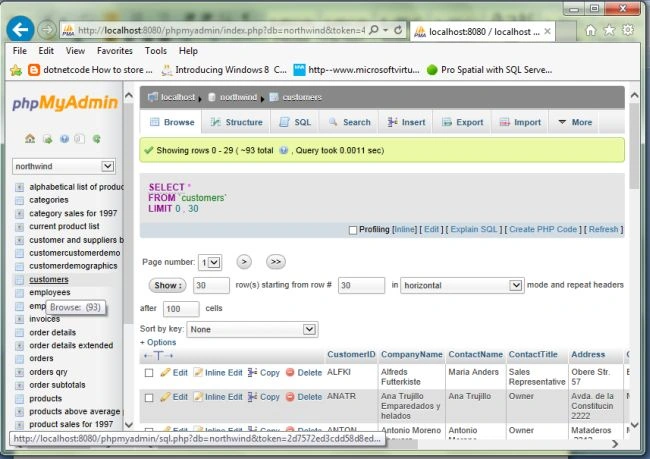
MySQL Wamp Server database

Create a new project using "File" -> "New" -> "Project..." then select web "ASP .Net Web Forms Application". Name it "GridViewBindMySql".
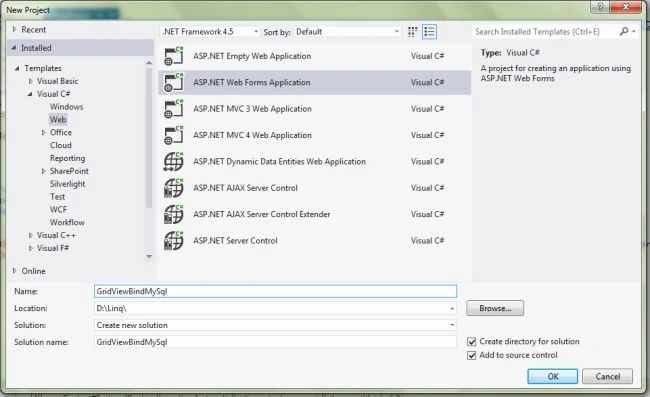
Create a new project

Now in the Design page “Default.aspx” design the web page as in the following screen:
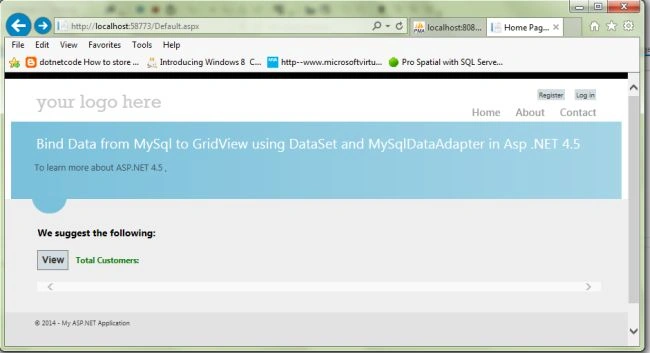
Design page

In the code behind file (Default.aspx.cs) write the code as:

Default.aspx.cs

  1. <%@ Page Title="Home Page" Language="C#" MasterPageFile="~/Site.Master" AutoEventWireup="true" CodeBehind="Default.aspx.cs" Inherits="GridViewBindMySql._Default" %>
  2. <asp:Content runat="server" ID="FeaturedContent" ContentPlaceHolderID="FeaturedContent">
  3. <section class="featured">
  4. <div class="content-wrapper">
  5. <hgroup class="title">
  6. <h2>Bind Data from MySql to GridView using DataSet and MySqlDataAdapter in Asp .NET 4.5
  7. </h2>
  8. </hgroup>
  9. <p>
  10. To learn more about ASP.NET 4.5 ,
  11. </p>
  12. </div>
  13. </section>
  14. </asp:Content>
  15. <asp:Content runat="server" ID="BodyContent" ContentPlaceHolderID="MainContent">
  16. <h3>We suggest the following:</h3>
  17. <asp:Panel ID="Panel1" runat="server" Width="100%" ScrollBars="Horizontal">
  18. <p>
  19. <asp:Button ID="btnBind" runat="server" Text="View" OnClick="btnBind_Click" /> <asp:Label ID="Label1" runat="server" Font-Bold="true" ForeColor="Green" Text="Total Customers:"> </asp:Label><asp:Label ID="lbltotalcount" runat="server" ForeColor="Red" Font-Size="Larger"></asp:Label> </p>
  20. <asp:GridView ID="grvCustomers" runat="server"></asp:GridView>
  21. </asp:Panel>
  22. </asp:Content>

In the Web.config file create the connection string as:

Web.config

  1. <connectionStrings>
  2. <add name="ConnectionString" connectionString="Server=localhost;userid=root;password=;Database=northwind" providerName="MySql.Data.MySqlClient"/>
  3. </connectionStrings>

Default.aspx.cs

  1. using System;
  2. using System.Collections.Generic;
  3. using System.Linq;
  4. using System.Web;
  5. using System.Web.UI;
  6. using System.Web.UI.WebControls;
  7. //Using namespaces
  8. using MySql.Data.MySqlClient;
  9. using System.Configuration;
  10. using System.Text;
  11. using System.Net;
  12. using System.Net.Mail;
  13. using System.Data;
  14. namespace GridViewBindMySql
  15. {
  16. public partial class _Default : Page
  17. {
  18. #region MySqlConnection Connection
  19. MySqlConnection conn = new MySqlConnection(ConfigurationManager.ConnectionStrings["ConnectionString"].ConnectionString);
  20. protected void Page_Load(object sender, EventArgs e)
  21. {
  22. try
  23. {
  24. if (!Page.IsPostBack)
  25. {
  26. }
  27. }
  28. catch (Exception ex)
  29. {
  30. ShowMessage(ex.Message);
  31. }
  32. }
  33. #endregion
  34. #region show message
  35. /// <summary>
  36. /// This function is used for show message.
  37. /// </summary>
  38. /// <param name="msg"></param>
  39. void ShowMessage(string msg)
  40. {
  41. ClientScript.RegisterStartupScript(Page.GetType(), "validation", "<script language='javascript'>alert('" + msg + "');</script>");
  42. }
  43. #endregion
  44. #region Bind Data
  45. /// <summary>
  46. /// This display the data fetched from the table using MySQLCommand,DataSet and MySqlDataAdapter
  47. /// </summary>
  48. /// <param name="sender"></param>
  49. /// <param name="e"></param>
  50. protected void btnBind_Click(object sender, EventArgs e)
  51. {
  52. try
  53. {
  54. conn.Open();
  55. MySqlCommand cmd = new MySqlCommand("Select * from customers", conn);
  56. MySqlDataAdapter adp = new MySqlDataAdapter(cmd);
  57. DataSet ds = new DataSet();
  58. adp.Fill(ds);
  59. grvCustomers.DataSource = ds;
  60. grvCustomers.DataBind();
  61. lbltotalcount.Text = grvCustomers.Rows.Count.ToString();
  62. }
  63. catch (MySqlException ex)
  64. {
  65. ShowMessage(ex.Message);
  66. }
  67. finally
  68. {
  69. conn.Close();
  70. }
  71. btnBind.Visible = false;
  72. }
  73. #endregion
  74. }
  75. }

See the following screen for the Default.aspx:

Default

Use the following for “btnBind_Click "; bind the GridView with the data.

Bind GridView with data

Now bind data from MySql to the GridView using a DataSet and MySqlDataAdapter in Asp .NET 4.5. I hope this article is useful. If you have any other questions then please provide your comments below.