

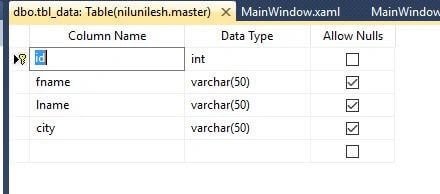
We will use SQL Server 2008 for making our database and table and create our design for DataGrid in XAML format. After that bind that DataGrid in xaml.cs file.
Initial chamber
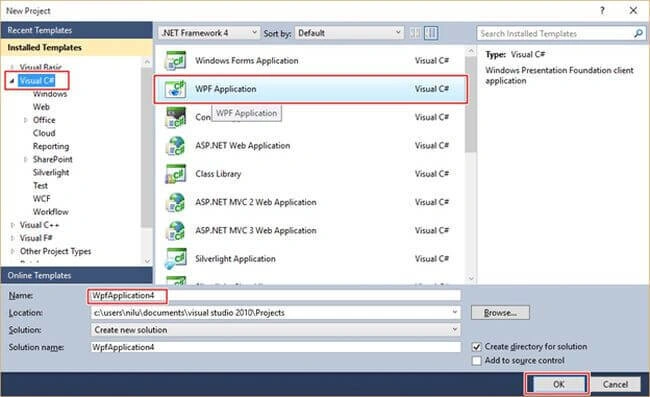
Step 1: Open Visual Studio 2010, Go to File, then New and click Projects. Under Visual C#, select WPF Application.
Design chamber
In the Solution Explorer there is a Main Window.xaml file. You will see something like the following mage.
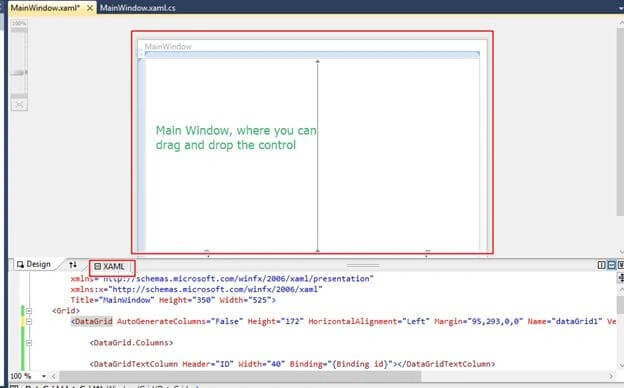
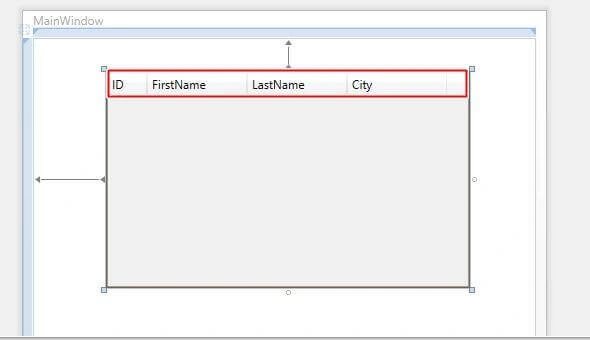
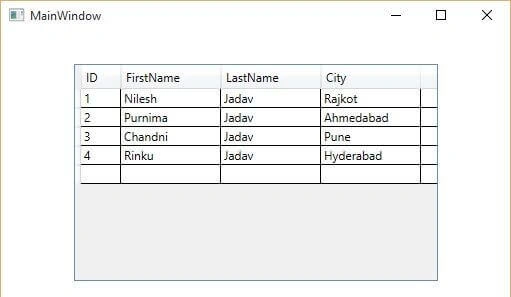
Here you have to drag and drop the DataGrid from the toolbox. Initially there will be no columns in the DataGrid. For that you have to write the following code to make columns.
You have to write the following code where XAML is written and all code should be in between <grid> </grid>.
Step 1: Open Visual Studio 2010, Go to File, then New and click Projects. Under Visual C#, select WPF Application.
Design chamber
In the Solution Explorer there is a Main Window.xaml file. You will see something like the following mage.
Here you have to drag and drop the DataGrid from the toolbox. Initially there will be no columns in the DataGrid. For that you have to write the following code to make columns.
You have to write the following code where XAML is written and all code should be in between <grid> </grid>.
- <Window x:Class="WpfApplication3.MainWindow"
- xmlns="http://schemas.microsoft.com/winfx/2006/xaml/presentation"
- xmlns:x="http://schemas.microsoft.com/winfx/2006/xaml"
- Title="MainWindow" Height="350" Width="525">
- <Grid>
- <DataGrid AutoGenerateColumns="False" Height="217" HorizontalAlignment="Left" Margin="73,33,0,0" Name="dataGrid1" VerticalAlignment="Top" Width="364">
- <DataGrid.Columns>
- <DataGridTextColumn Header="ID" Width="40" Binding="{Binding id}"></DataGridTextColumn>
- <DataGridTextColumn Header="FirstName" Width="100" Binding="{Binding fname}"></DataGridTextColumn>
- <DataGridTextColumn Header="LastName" Width="100" Binding="{Binding lname}"></DataGridTextColumn>
- <DataGridTextColumn Header="City" Width="100" Binding="{Binding city}"></DataGridTextColumn>
- </DataGrid.Columns>
- </DataGrid>
- </Grid>
- </Window>
Jhonty DodechaPosted Dec 23, 2020, 5:27 PM
How to add the same data binding from the backend code (in .cs file)
Arul RPosted Oct 28, 2015, 5:34 AM
Good one !!!
Santhakumar MunuswamyPosted Sep 8, 2015, 3:21 PM
Good One. Thanks for sharing
Pankaj Kumar ChoudharyPosted Sep 8, 2015, 8:51 AM
Another wonderful article Sir...
RakeshPosted Sep 7, 2015, 3:06 AM
Good one
Rajeesh MenothPosted Sep 7, 2015, 2:37 AM
Good Buddy..
Karthikeyan KPosted Sep 7, 2015, 2:11 AM
Good one sir...Thanks for sharing